AI search & filters
Describe the quote. We'll find it.
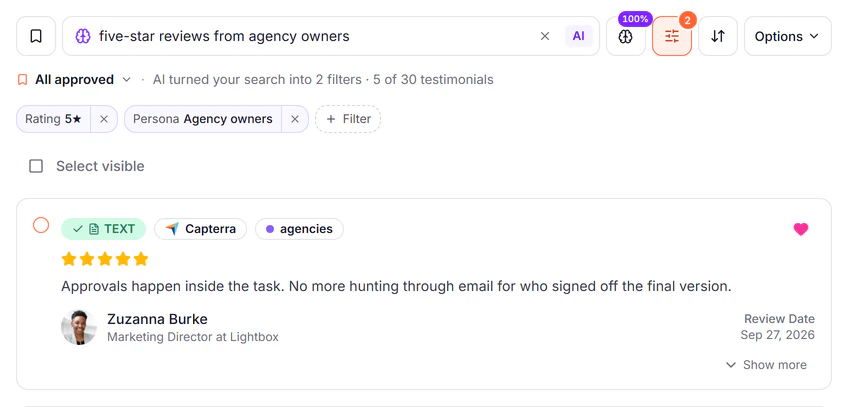
Type what you need, like “five-star reviews from agency owners”. AI search turns it into filters you can see and change, using only the tags, themes and sources already in your library.
Keyword search, filters and saved views on every plan, Free included. AI search on Premium and Business.
five-star reviews from agency owners in the last 30 days
AI turned your search into 3 filters · 2 of 30 testimonials
 Zuzanna BurkeMarketing Director at Lightbox
 Capterra
Approvals happen inside the task. No more hunting through email for who signed off the final version.
 Amelie LaurentAgency owner at Studio Laurent
 Google
Every client gets their own space and their own view. They think we built it for them.
Driftlane is our made-up demo project. Its reviewers' faces are stock photos.
It can't make up a filter.
AI search sees your sources, forms, walls and tags, and the themes, use cases and personas Proof AI found. It picks only from those. Words it can't match stay a plain keyword search, so you always see what it did.
You type
agency owners on G2 who switched tools from a spreadsheet
Keyword searchspreadsheet
Not in your library, droppedPersona: CFOs
Your library
Personas
Agency ownersEngineering leadsSmall teams
Sources
G2CapterraGoogleProduct HuntLinkedInX (Twitter)
Use cases
Switching toolsClient workTeam onboardingReportingShipping faster
Themes
Client workEngineeringOnboardingPricingSupportMigration
- Yours, not invented
- The only values it can pick are your project's own. Anything else is dropped before the search runs.
- Every filter is a chip
- What it made shows in violet under the toolbar. Change a chip, take one off, add your own.
- Free of credits
- A search costs no AI credits on Premium and Business: up to 20 a minute each, sentences up to 300 characters.
When you know what you want, click it.
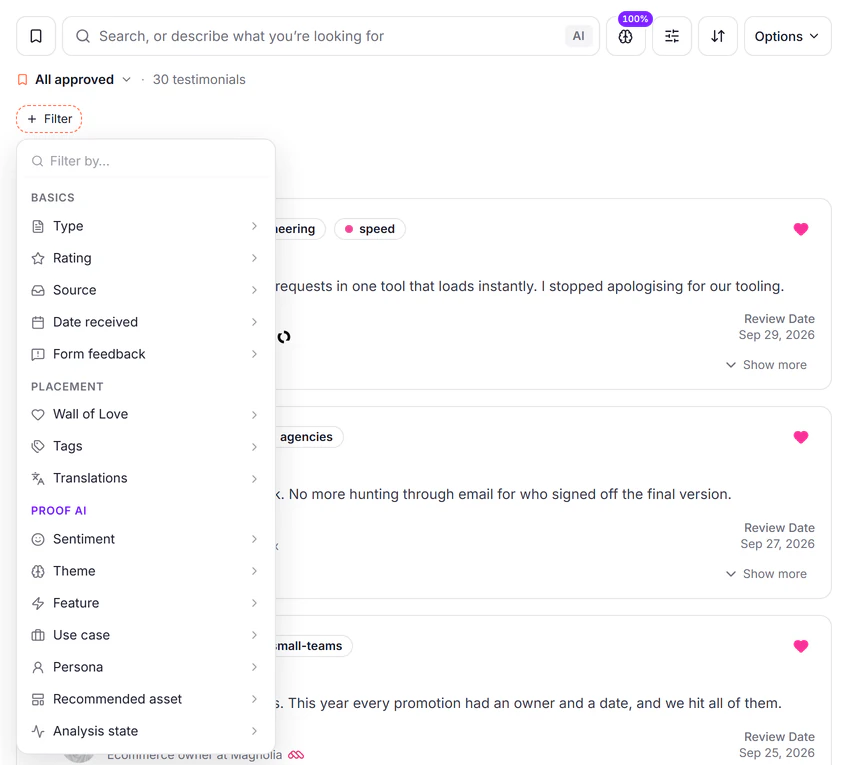
Pick several values in a filter and get any of them; add filters to narrow the list. Every option says how many testimonials it would find before you click.
Basics
Type · Rating · Source · Date received · Form feedback
Placement
Wall of Love · Tags · Translations
Proof AIPremium and Business
Sentiment · Theme · Feature · Use case · Persona · Recommended asset · Analysis state
Keyword
Looks through the words, the author's name, email and handle as you type. On every plan.
Every new testimonial arrives already read.
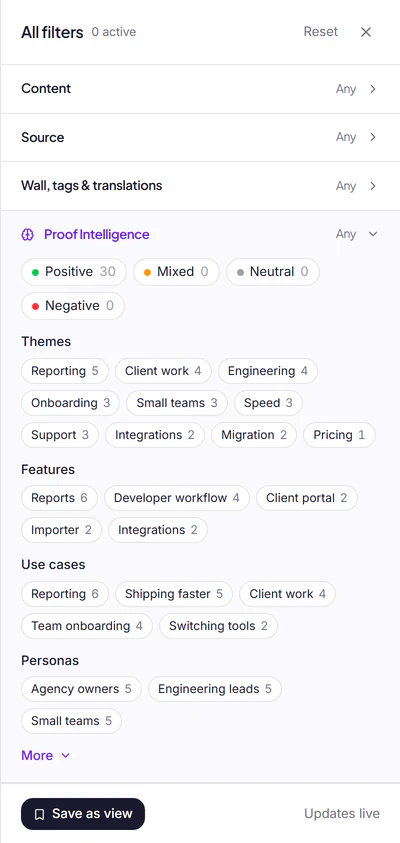
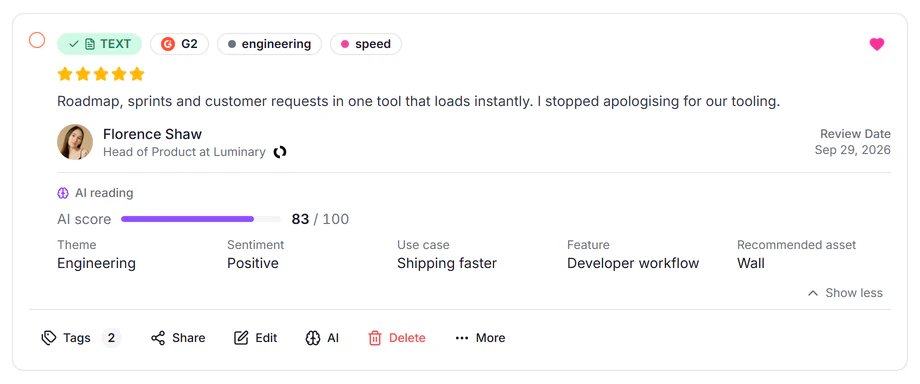
Proof AI notes each one's sentiment, main theme, feature, use case and persona, the asset it would work best as, and how strong it is as proof. That's what the Proof AI filters and the AI score sort use.
- Sentiment
- Positive, Mixed, Neutral, Negative.
- Best as
- Case study, Image, Video, Widget, Wall, Quote.
- Automatic
- New testimonials are read as they arrive (you can turn it off). 1 AI credit each; 50 credits a month per project on Premium, 150 on Business.
Find the quote before the meeting starts.
Start free — no cardA good search is worth keeping.
Save it, send it, or act on everything it found.
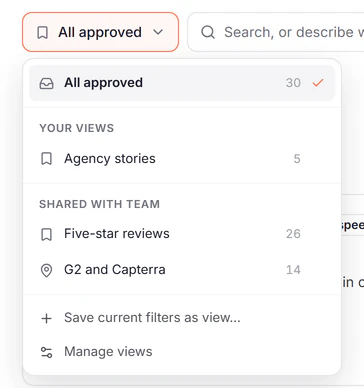
Save it as a view
Your filters and sort under a name, for you or the whole team. Up to 50 of your own and 50 shared per project.
Send the link
Paste it to a teammate and they open the same list. Bookmark it for yourself.
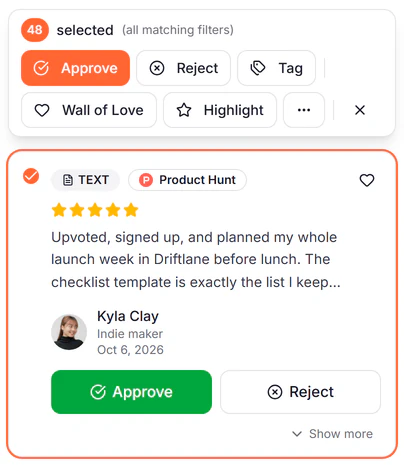
Act on every match
Approve, tag, add to a wall or translate them in one go. Bulk actions
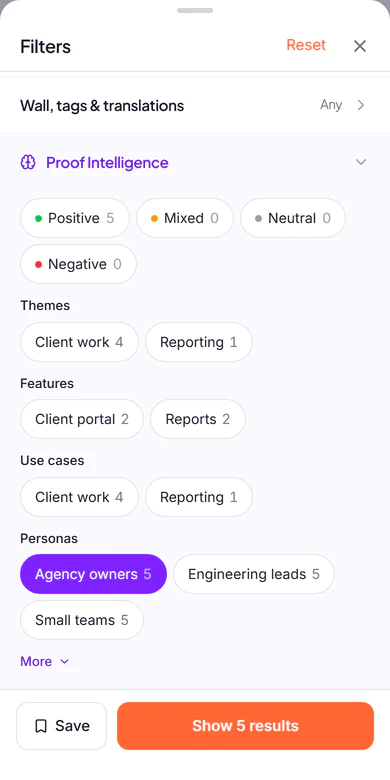
On a phone, too
Filters open from the bottom of the screen and wait until you tap the button that says how many results you'll get.
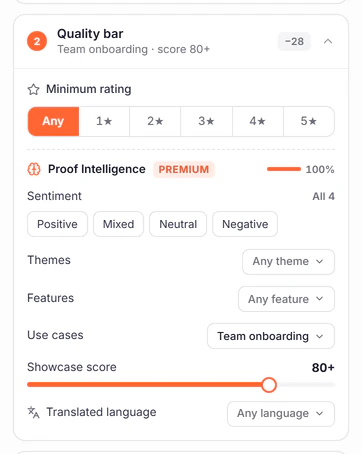
The filters you search with decide what gets published.
A widget or Wall of Love that fills itself reads the same sentiment, themes, features and use cases, plus a minimum showcase score. New proof that fits shows up on its own.
Pricing page
ThemesPricingSentimentPositive
Praise for the price, never a lukewarm word beside the buy button.
Onboarding page
Use casesTeam onboardingShowcase score80+
Only the strongest stories about getting a team started.
Agency landing page
ThemesClient work
Agencies hear from agencies, and new ones join on their own.
Proof AI rules are on Premium and Business. Rating, source, type and tag rules are on every plan. Widget builder
Search on every plan. AI on Premium and Business.
| Feature | Free$0 | Pro$29/mo | Premium$49/mo | Business$79/mo |
|---|---|---|---|---|
| Keyword search | ||||
| Filters for type, rating, source, date, wall, tag and language, with counts | ||||
| Saved views, personal or shared, and filters in the link | ||||
| AI search: describe it, get the filters | – | – | ||
| Proof AI filters: sentiment, theme, feature, use case, persona | – | – | ||
| Sort by AI score | – | – | ||
| Widgets and walls that fill themselves from Proof AI | – | – | ||
| AI credits included, per project | – | – | 50 a month | 150 a month |
Monthly prices, per active project. Free holds 10 text and 2 video testimonials. See every plan
Questions
Want the details? Filter and search your inbox
Does AI search use my AI credits?
No. It's included on Premium and Business, up to 20 searches a minute per person. Credits pay for Proof AI's reading of each testimonial, 1 credit each.
Can AI search make things up?
No. It can only pick values your project already has: your sources, forms, walls, tags, and the themes, features, use cases and personas Proof AI found. Anything else is dropped before the search runs, words no filter can express become a keyword search, and you see every filter it made as a chip you can change or remove.
What can I ask for?
Ratings, dates ("last month", or a range), text or video, where testimonials came from down to a form, business or product, walls, tags, translations, sentiment, themes, features, use cases, personas and the asset Proof AI recommends.
Is search on the Free plan?
Keyword search, every filter that isn't Proof AI, and saved views are on every plan. AI search and the Proof AI filters are on Premium and Business.
Where do themes, personas and sentiment come from?
Proof AI reads each new testimonial as it arrives (you can turn that off) and notes its sentiment, main theme, feature, use case and persona, the asset it would work best as, and a score for how strong it is as proof. Each reading costs 1 AI credit; 50 credits a month per project on Premium, 150 on Business.
Can I save a search and share it?
Yes. Save it as a view, for you or for the whole team (up to 50 of your own and 50 shared per project), or send the link: the filters are in the page's address.
Can I act on everything a search finds?
Yes. Select all takes every match, not only the ones on screen, then approve, tag, add to a wall or translate them in one go.
Does it search Archived and Spam?
No: search and filters are on Pending and Approved, where you choose what to publish.
Does the CSV export follow my filters?
No. The inbox's export holds every testimonial in the project. All Imports has an export that follows its own filters.
Can a widget use the same filters?
Yes. A widget or Wall of Love that fills itself can keep testimonials by sentiment, theme, feature, use case or a minimum showcase score, on Premium and Business. Rating, source, tag and type work on every plan.
Stop scrolling. Start asking.
Keyword search, filters and saved views on every plan, Free included. AI search on Premium and Business.