Testimonial software for freelancers
Let your last client win you the next one.
Ask every client at the handoff, save the praise already in your inbox, and put it where the next client decides: your portfolio, your proposal, your link.
Free plan · no credit card
Brand refresh for Cedar & Co.

What clients say
This widget's settingAuto-sync · Tags: has any of brand
Its cardsName, job title, company and avatar, as they came in
Anita Cruz and her clients are made up; the widget is ReTestimonial's own, in colours every plan can publish. In Notion, a widget goes in through its Embed URL; a PDF takes a picture or a link instead. Nothing tracks who opens a proposal. Show testimonials in Notion
Ask at the handoff, while the work is fresh.
The best moment is the email that delivers the final files. Put one line and your form's link in it, and ask every client the same way.
From Anita Cruz
To Lucy Bond
Final files: Pell & Finch Tea packaging
Pell & Finch Tea print files.zip
Hi Lucy, thanks again for working with me on the Pell & Finch Tea packaging. Would you share a few words about how it went? A short video or a few lines, whichever is easier: https://praise.anitacruz.example
Share & embed writes this ask under your form's link: add the client's first name and the project, pick Short or Warm, copy it. Nothing is sent from there, and the name stays in the message, never in the link. Her link is on her own domain, from Pro. Send it with a message
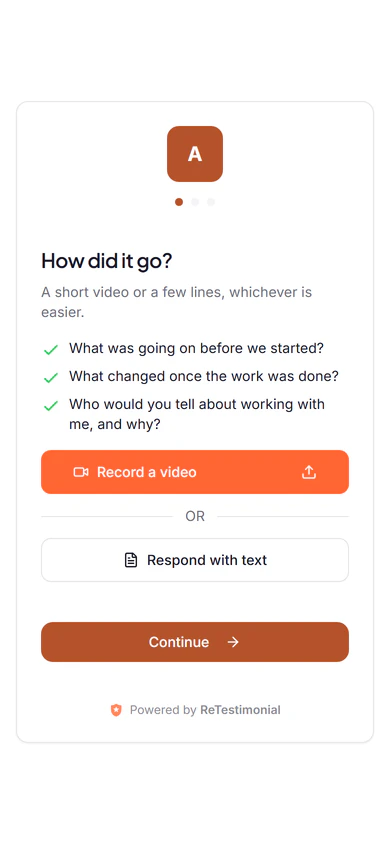
What the client meets
- No account, no app
- Your form opens in their browser, on a phone or a laptop.
- A short video or a few lines
- Recorded in the browser, or written instead. You set each question's longest answer, up to 2 minutes on Free and Pro, 3 on Premium and 5 on Business.
- Prompts that get a story
- The Conversational form's question starts with prompts such as “What problem were you trying to solve?” and “What specific results have you seen?”. Rewrite them in your words, so the answer is a story rather than “great work!”.
- Pictures of the work
- Up to 3 with an answer, on every plan.
- Their permission, kept
- The Conversational form comes with a Consent page (add one to any form), and the sentence each client agreed to is kept with their answer.
Your link and its QR code
Paste the link into the handoff email, a note on the invoice or the project chat. Share & embed also prints a slip with its QR code, or saves one as a picture for your invoice template.
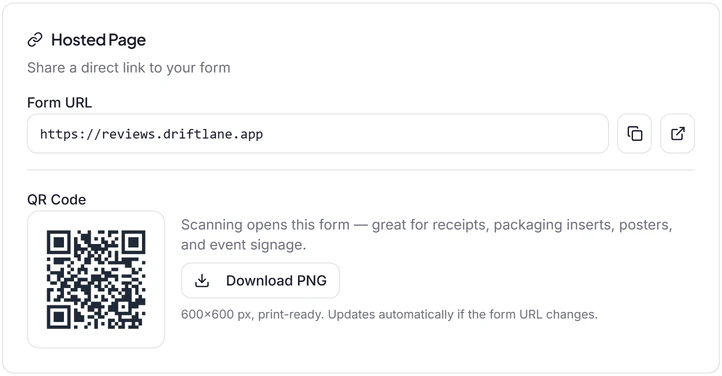
Or let it ask for you Premium+
Load a list of past clients and Smart Invites email the ask, then up to two reminders, 3 and 7 days later, and stop when the client answers. A client is asked once in 90 days.
The kind things they already wrote.
The nicest words about your work are in an email thread, a chat or a message. Bring them in before they're buried, with the client's okay.
A screenshot becomes a testimonial
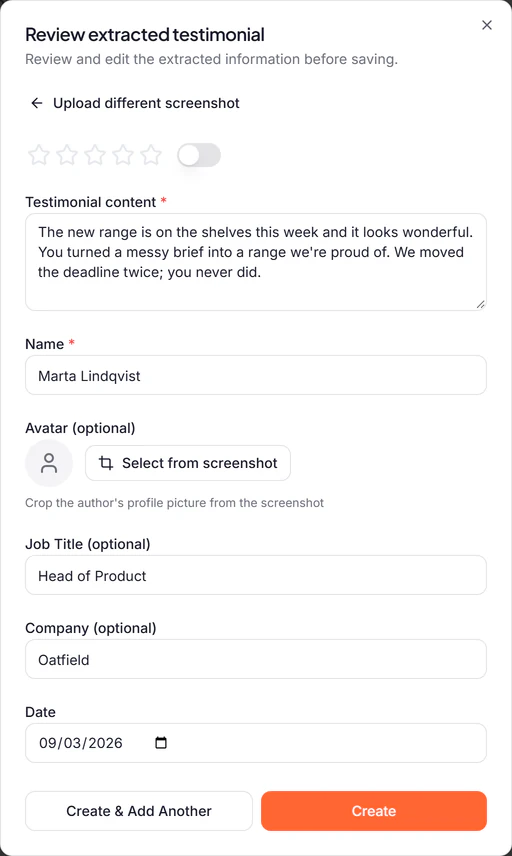
Extract from screenshot reads a picture of a client's email or message: their words, their name, the rating and the date. You check the fields and click Create; it waits in Pending. On every plan, and the picture isn't kept.
Re: Final range files
Marta Lindqvist <marta@oatfield.example>3 Sep 2026
Hi Anita,
The new range is on the shelves this week and it looks wonderful. You turned a messy brief into a range we're proud of. We moved the deadline twice; you never did.
Thank you for all of it,
Marta
Marta Lindqvist · Head of Product, Oatfield
A client's email, and what the reading made of a picture of it: her words as she wrote them, and no stars, because the email gave none. Extract from screenshot
LinkedIn recommendations
A recommendation belongs to the person who wrote it. Ask them first; with their yes, a screenshot of it comes in the same way.
From another testimonial tool
Its CSV export imports in one go, with a preset for the most common tools.
Upwork and Fiverr reviews
They stay on the platform: its terms keep them there. Ask those clients for a testimonial of your own, on Upwork once the contract has ended. What each platform allows
Praise on any page
The browser extension saves a client's words from a page open in Chrome.
On your portfolio, on every page that sells you.
One widget, styled to your site, beside the work it talks about. It fills itself as clients answer.
Kind words from the people I've worked with.
The same clients in a Carousel, the product's own, on her portfolio.
- On your portfolio builder
- Step-by-step guides for Webflow, WordPress, Framer, Squarespace and Wix, or any site that takes a script; Notion takes the widget's Embed URL.
- 8 widget types
- 4 on Free, all of them from Pro: a carousel, a grid, a badge with your rating, a video wall and more.
- Video, played in place
- A client's video answer plays in the widget: up to 2 videos on Free and 10 a project on Pro, with transcripts from Pro.
- Your name, not ours
- Widgets carry a small ReTestimonial line on Free; from Pro, you can take it off.
A praise page for your bio and your email signature
Your Wall of Love is a page of its own for your testimonials, on your own domain from Pro. With its Tags filter on, a link like praise.anitacruz.example/love/clients?tag=brand opens it on one kind of work. Wall of Love filters
In the proposal, the deck, the reply.
Where you write it decides what it can hold. Each of these is on every plan.
In Notion
The widget itself
Paste its Embed URL into an Embed block, as in the proposal above. What you publish later shows up there by itself.
In a PDF, a doc or a deck
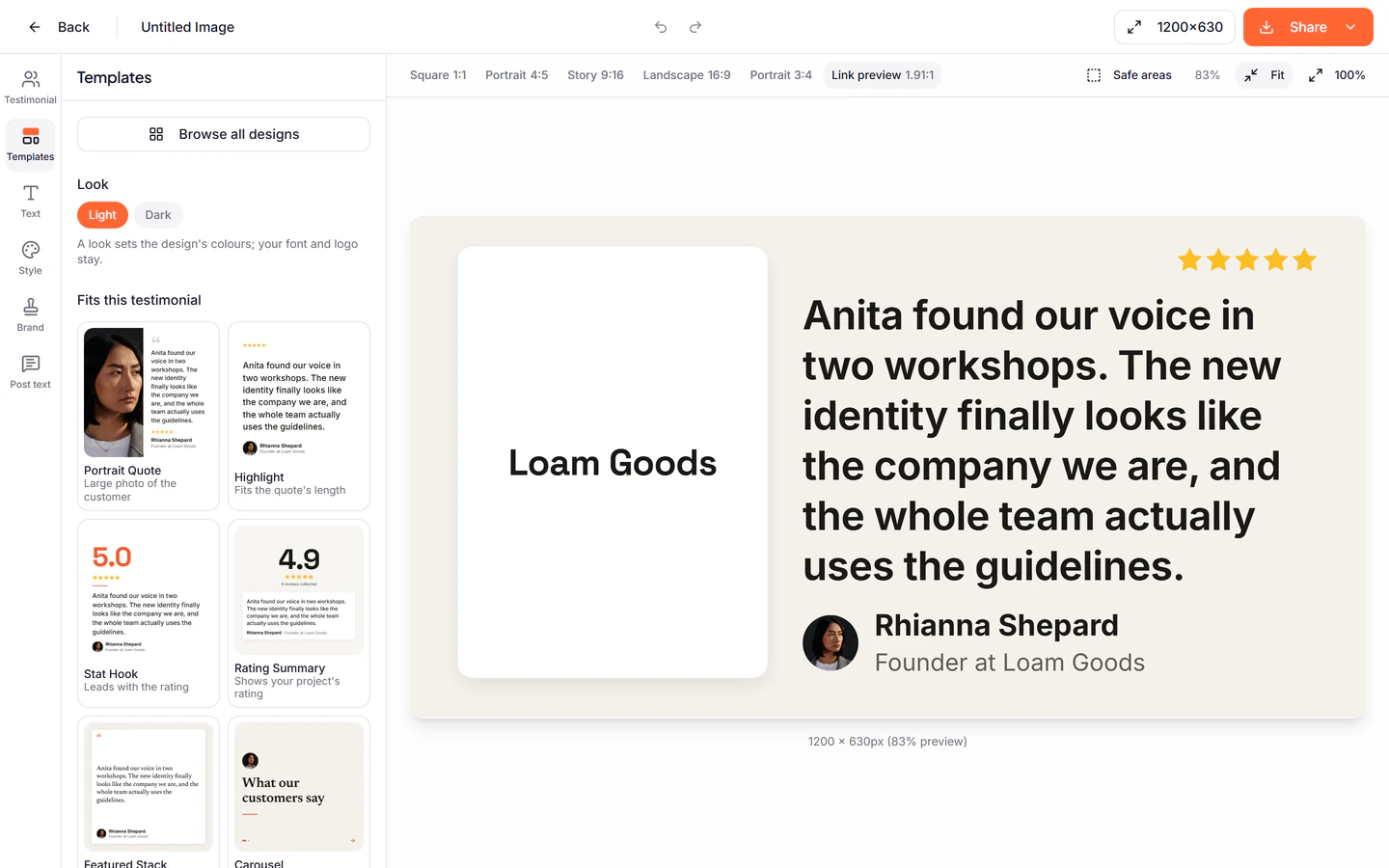
A testimonial picture
The image editor has 22 designs: Link Card for a slide, Carousel saved as a PDF of slides. A small watermark on Free.
In a reply
One story, one link
Every approved testimonial has its own share page. Worried about the timeline? Here's a client on exactly that.
At the end of it
All of them, one link
Your Wall of Love, opened on the kind of work the proposal is about.
- A case study Premium+
- AI drafts one from a strong testimonial, with AI credits, and checks its quotes against the client's words. You edit it, and you send it to the client yourself.
- A clip Pro+
- A client's video becomes a captioned clip, square or upright, from Pro: download it and post it where you like.
Under NDA, they can still vouch for you.
Many clients can't be named. With their okay, show their role and their words in place of their name and their company.
Agree it with the client
How they're described (“Head of Marketing at a fintech”), nothing confidential about the work, and their yes, kept.
- Widgets
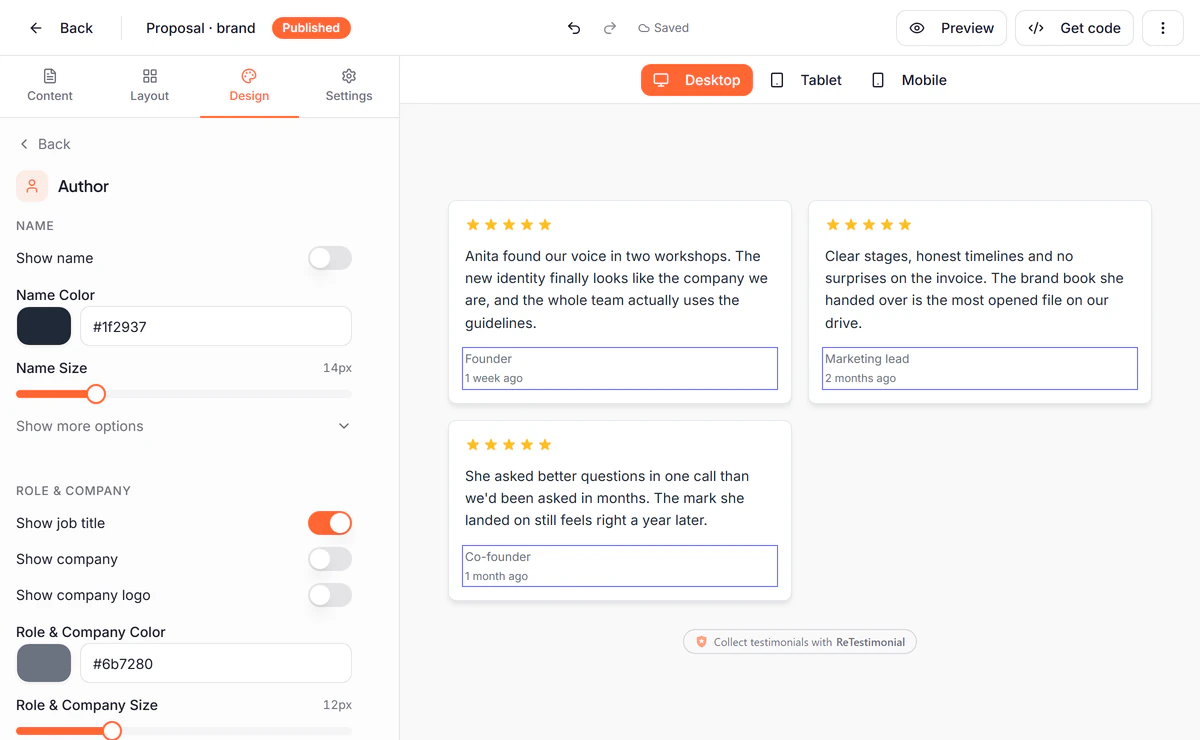
- Design → Author: Show name, Show company and Show company logo off; Design → Avatar: Show avatar off. Each card shows the job title and the words. These hide the rest from the cards only, so for a client who mustn't be named anywhere, edit the testimonial too.
- Your Wall of Love
- Design → Author → Show name off: every client is shown by their job title, or “A client”, with a plain silhouette for a photo and no company, logo or profile link. Show clients without their name
- Share pages
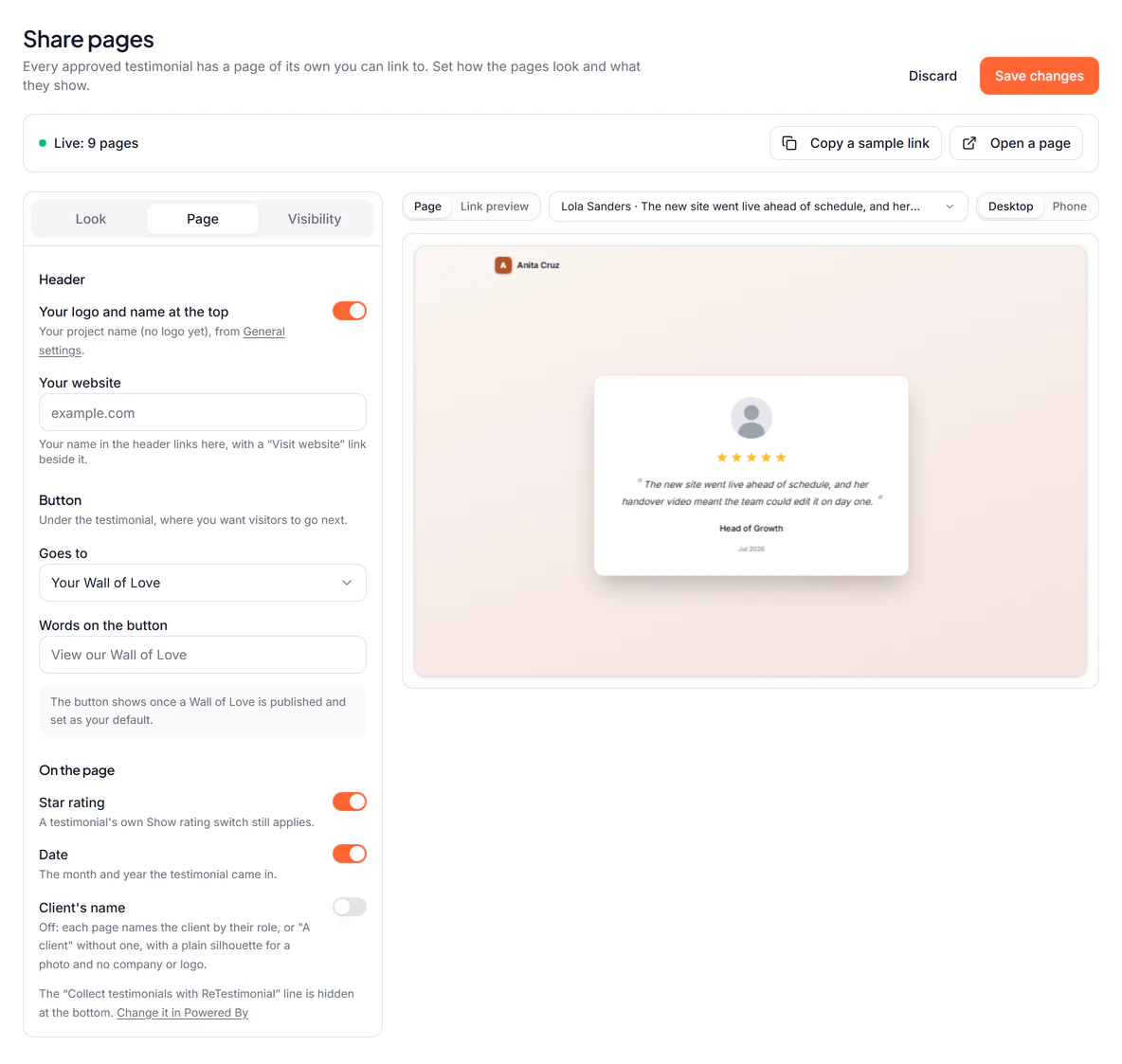
- The Page tab's Client's name, off: the same, on every testimonial's own page. Share pages
- One testimonial
- Edit its name to their role or initials, and clear its company and photo: every widget, wall and share page then shows it that way.
Real clients. Their words. Their okay.
What the platforms you work through and the law allow, from the places that set the rules.
Upwork
Your Upwork feedback stays on Upwork: share it with its own Share button, never by copying it. Asking a client for a testimonial after the contract has ended is allowed, and payments with a client you met there stay on Upwork for 24 months. Upwork Terms of Use
Fiverr
Keep everything on Fiverr: no links or contact details off it, and never ask for a better review or offer anything for one. Fiverr Terms of Service
LinkedIn
A recommendation belongs to the person who wrote it. Ask before you show it anywhere else, and never copy LinkedIn with a scraper. LinkedIn User Agreement, section 8.2
The FTC (US)
Real clients only, in their own words. Say so when a friend, relative or partner vouches for you, disclose a discount given for a testimonial, and never edit one so it means something else. 16 CFR 255 and 465
The UK and the EU
No fake or bought reviews, no hidden incentives. Keep each client's permission and their contact details, and take a testimonial down when they withdraw their consent. DMCC Act 2024, Schedule 20
Clients under NDA
Describe the client's role, not the client, with their okay, and leave out anything confidential about the work. AIGA Standard Form of Agreement
What the product holds to, in its code:
- The sentence each client agreed to on your Consent page is kept with their answer.
- A new form keeps every answer in Pending until you approve it.
- A deleted testimonial leaves your widgets, your wall and its share page.
- The CSV export, on every plan, is your own record.
This isn't legal advice. You decide what you publish.
Priced for one person.
Start on Free, with no card. Every paid plan is priced per project, and one project holds all your clients.
| Feature | Free$0 | Pro$29/mo | Premium$49/mo | Business$79/mo |
|---|---|---|---|---|
| Written testimonials | 10 in all | Unlimited | Unlimited | Unlimited |
| Video testimonials | 2 in all | 10 a project | Unlimited a project | Unlimited a project |
| Longest video answer | 2 min | 2 min | 3 min | 5 min |
| Forms per project | 1 | 3 | 5 | Unlimited |
| Widgets per project | 2 | 10 | 20 | Unlimited |
| Widget types | 4 | All 8 | All 8 | All 8 |
| Testimonials on a live widget | 10 | 50 | Unlimited | Unlimited |
| Walls of Love per project | 1 | 1 | 5 | Unlimited |
| Share pages, testimonial pictures, screenshot reading | ||||
| Clients shown without their name | ||||
| Your own domain for forms and walls | – | |||
| No ReTestimonial line on widgets | – | |||
| Video transcripts | – | |||
| Social clips of a client's video, a month | – | 5 | 25 | Unlimited |
| Smart Invites | – | – | ||
| AI case studies | – | – | ||
| Import from social posts | – | – |
Monthly prices, per active project; a year costs ten months. No setup fee. Every plan: forms with video, the inbox, tags, auto-sync widgets, the Wall of Love, share pages and the CSV export. See every plan
Questions freelancers ask
How do I ask a client for a testimonial without it being awkward?
Make it part of the handoff. Put your form's link in the email that delivers the final files, with one line: a few words or a short video, whichever is easier. Share & embed writes that message for you. Ask every client the same way, not only the ones you expect to be happy.
My client is under an NDA. Can they still give me one?
Often, yes, by role instead of by name: "Head of Marketing" rather than their name and company. A widget can hide the name, company, logo and photo, and a Wall of Love or your share pages can show every client that way, or as "A client". Agree with the client how they're described, and keep their answer.
Can I show my Upwork or Fiverr reviews on my website?
Not by copying them. Upwork's terms don't let you copy content off Upwork without its consent (it offers its own Share button), and Fiverr wants promotion to point back to Fiverr. Ask your clients for a testimonial of their own instead: on Upwork, once the contract has ended.
Can I import my LinkedIn recommendations?
No. A recommendation belongs to the person who wrote it, and LinkedIn's terms forbid copying it without their consent. Ask them first; then a screenshot of it becomes a testimonial with Extract from screenshot, on every plan. Importing LinkedIn posts by their link is on Premium and up.
How do I put testimonials in a proposal?
It depends on where you write it. In Notion, paste the widget's Embed URL and the widget shows in the page. In a PDF, a Google Doc or your proposal tool, use a testimonial picture from the image editor, or a link: a share page for one story, or your Wall of Love for all of them. Nothing tracks who opens your proposal.
Does it work with my portfolio site?
Yes. A widget goes on Webflow, WordPress, Framer, Squarespace and Wix or any site that takes a script, styled to your site, and Notion takes it through its Embed URL. Your Wall of Love is a page of its own, on your own domain from Pro.
Can I write the testimonial for my client to approve?
Please don't. A testimonial has to be the client's own words; edited ones must still say what they meant. Instead, give them prompts: the form's question can show a few, so the answer becomes a story rather than "great work!".
What does the free plan include?
Free holds 10 written and 2 video testimonials, 1 form, 2 widgets in 4 types, a Wall of Love, share pages, testimonial pictures and screenshot reading, with no card. Pro, at $29 a month, takes away the limits on written testimonials, adds your own domain and removes our line from your widgets.
Do my clients need an account?
No. The form opens in their browser, on a phone or a laptop. They write a few lines or record a video, up to 2 minutes on Free and Pro, 3 on Premium and 5 on Business, and add up to 3 pictures if they like.
What if a client wants their testimonial taken down?
Take it down: delete it, and it leaves your widgets, your wall and its share page. In the UK and the EU, consent can be withdrawn at any time. A Consent page on your form keeps the sentence each client agreed to, beside their answer.
Ask your last client today.
Make your form, copy the ask, and send it with the final files. It's free to start.