Keep your Trustpilot rating. Add proof that's yours to show.
Trustpilot lets you show its reviews through Trustpilot's own widgets. Testimonials your customers give you directly, written or on video and with their consent, are yours to put anywhere: beside Add to basket, at checkout, in your emails and your ads.
Collecting and showing testimonials is free on every plan. Smart Invites, which ask after every order, are on Premium and Business.
Testimonials on Tidewell's product page
What our sleepers tell us
Can I put my Trustpilot reviews on my website?
Yes, through Trustpilot's own widgets. It's the question every shop with a Trustpilot profile asks, so here is what Trustpilot's rules say, in Trustpilot's words.
The short version
Use Trustpilot's widget for your Trustpilot reviews. Use ReTestimonial for the testimonials your customers give you. The two sit on the same page without getting in each other's way.
Check your own Trustpilot plan and terms. This isn't legal advice.
On your own website, Trustpilot's reviews go in Trustpilot's own widgets.
“only if you use the designs, widgets (like TrustBoxes), images and functionality that we make available to you in your business account”
Terms of Use and Sale for Businesses, version 9.0, in force from 23 June 2026
Other widgets and apps aren't allowed to show them.
“Don't: Use any unauthorised widgets or applications to display Trustpilot content”
Trustpilot's widgets that show the reviews' words are on its higher plans.
“TrustBox widgets to showcase testimonials: Premium & Enterprise only”
Proof you borrow, and proof you own.
Reviews on Trustpilot are worth having: shoppers look you up there before they buy. Testimonials your customers give you directly do a different job, on the pages where they decide.
| What | Reviews on Trustpilot | Testimonials you collect |
|---|---|---|
| On your website | Through Trustpilot's own widgets | On a Wall of Love page, or in 31 widget styles, all 64 from Pro |
| How it looks | Trustpilot's designs | Your choice of style, font and colours |
| What you ask | Trustpilot's questions | Your own: the doubt a buyer has before they order |
| Video | Written reviews | Customers can answer on video |
| Stars in Google | Google doesn't allow marking up reviews taken from other sites | Eligible for review markup on Business. Google decides when to show stars |
| Beyond your site | Use in advertising needs a paid Trustpilot plan | Turn one into an image for social, a short video or a case study |
Ask the customers who are already happy.
The best time to ask is just after a good experience. ReTestimonial asks for you after each order, or gives you a link to share. You see every answer before anyone else does.
Ask at the right moment
Premium and Business
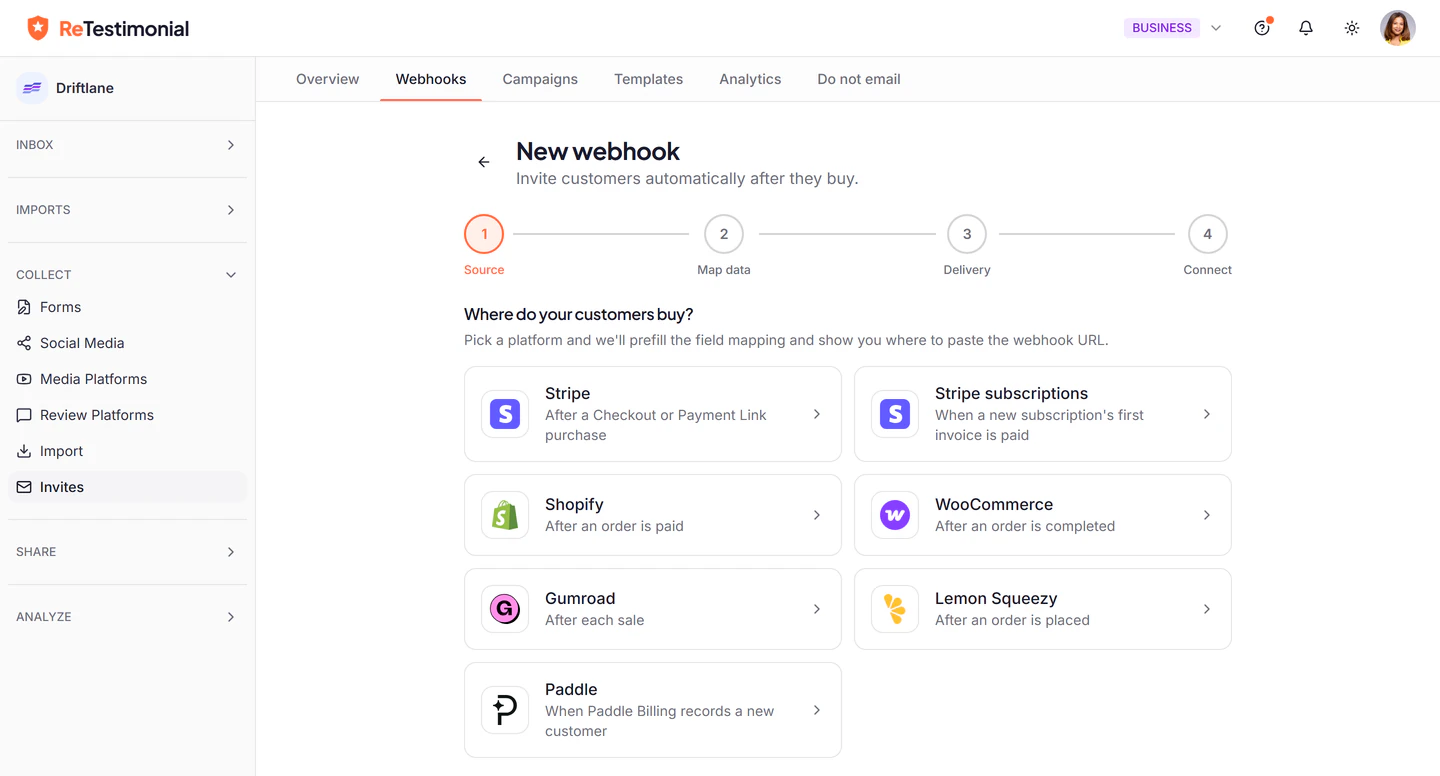
Connect Stripe, Shopify, WooCommerce, Gumroad, Lemon Squeezy, Paddle, or any tool that sends a webhook. After each order, Smart Invites emails the customer your form, with two reminders at most and a one-click unsubscribe in every email.
On every plan, share your form's link yourself: in your order email, on your thank-you page, in a support reply.
Smart Invites: choose where your customers buy. 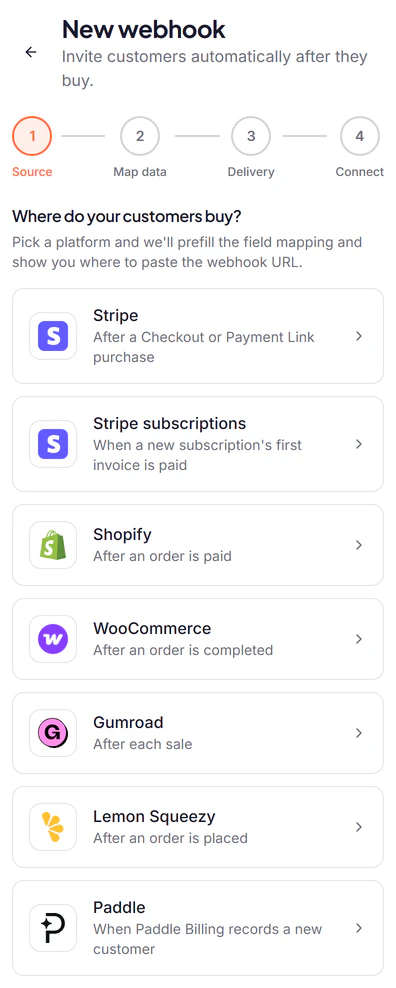
Smart Invites: choose where your customers buy. They answer in a minute
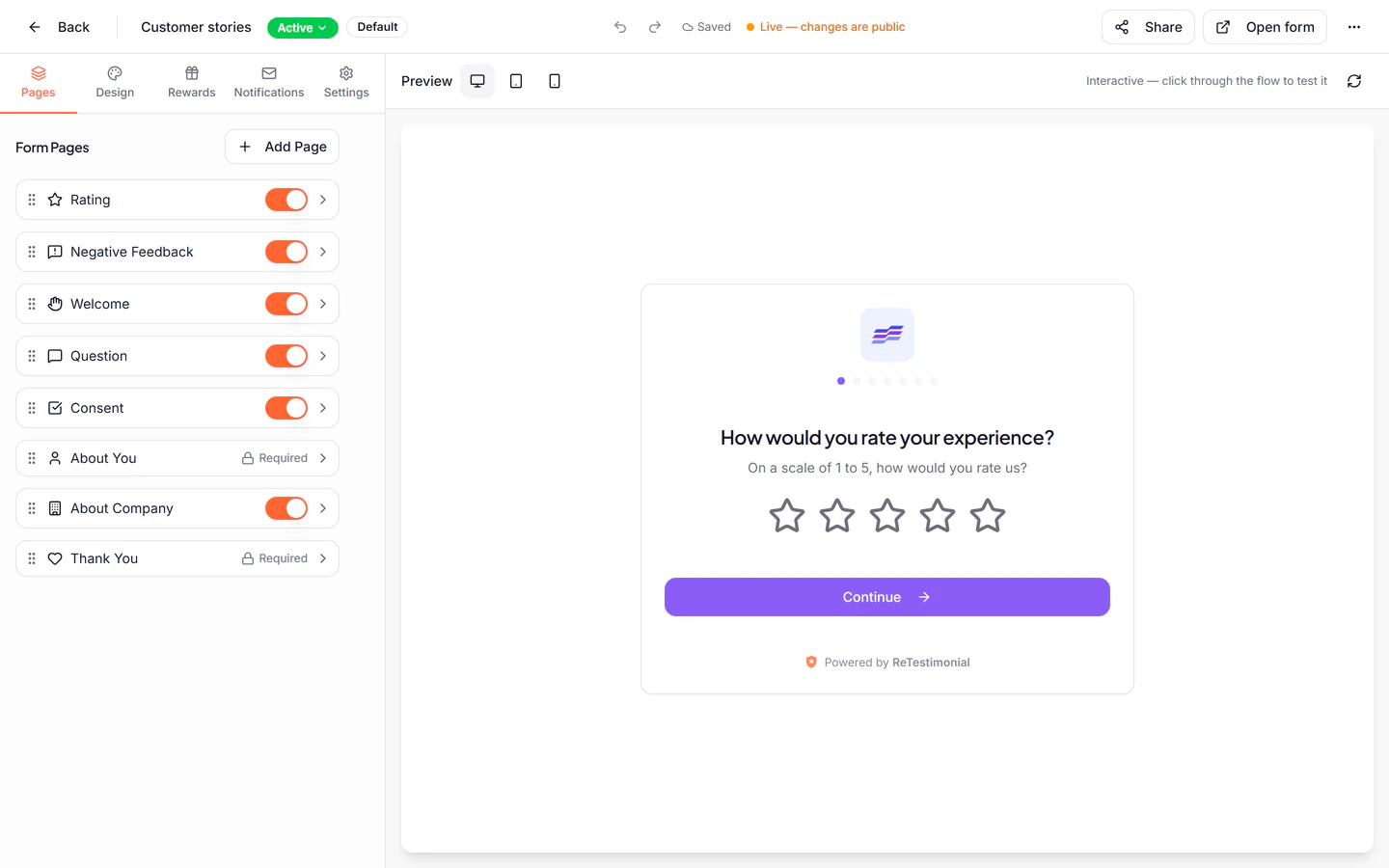
Your form asks for a star rating, your own question and, if they like, a short video. It can end with a consent step they tick before sending.
The form's first page, in the form builder's working preview. 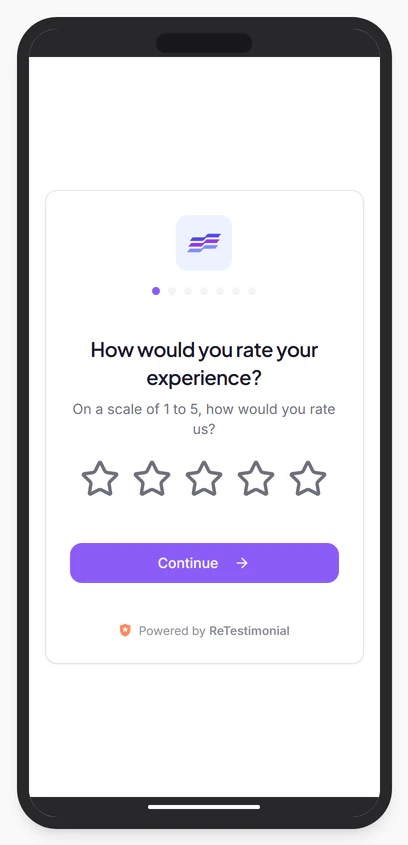
The form's first page on a phone, in the form builder's Mobile preview. You decide what goes live
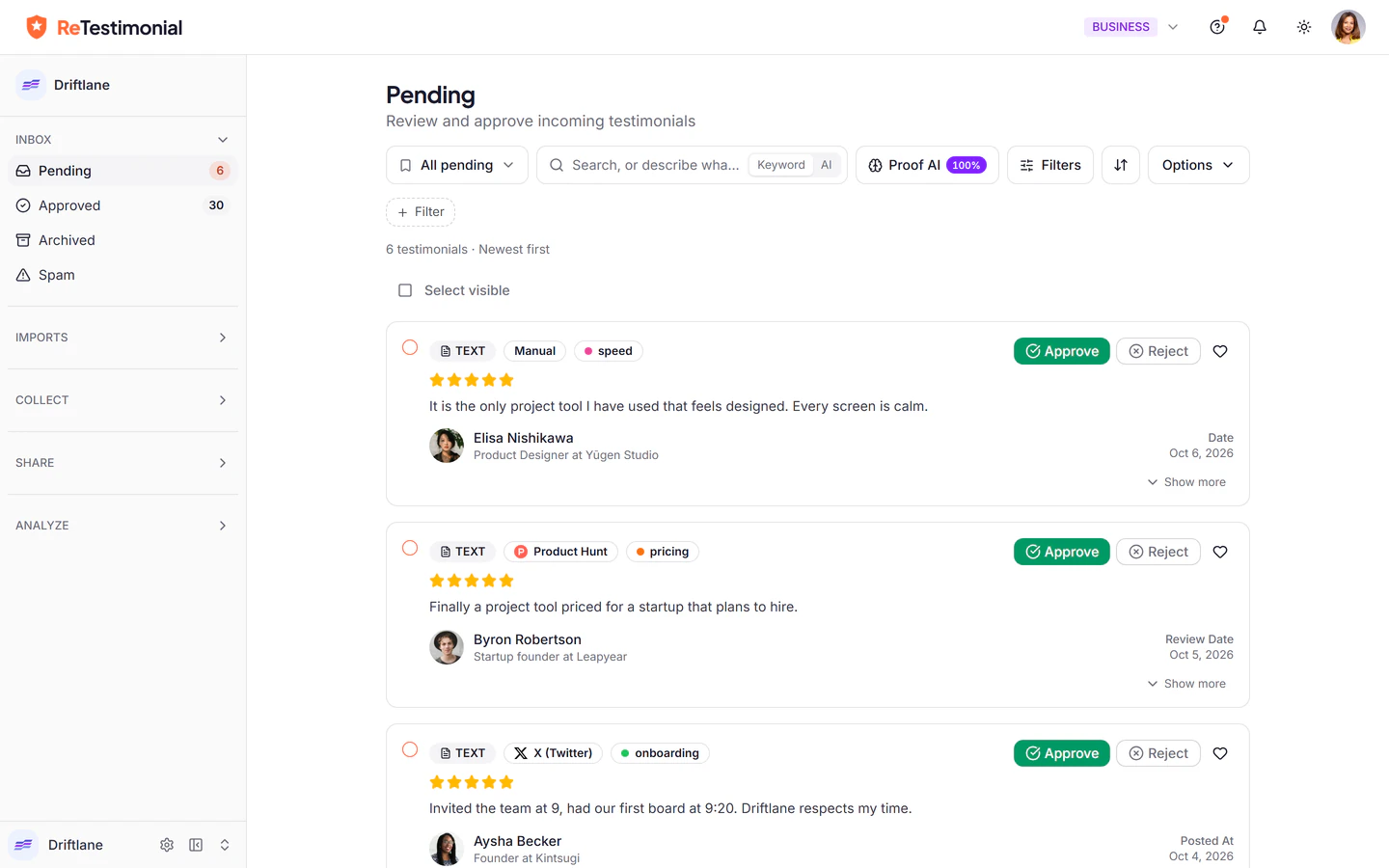
Every answer waits in Pending until you approve it. Nothing reaches your site before you've read it.
The Pending inbox, with Approve and Reject on every testimonial. 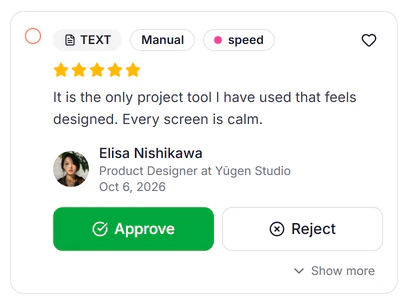
A testimonial in Pending, with Approve and Reject. It's on your product page
An Auto-sync widget shows each testimonial you approve, in the style you chose. Its embed code goes on Webflow, WordPress, Framer, Squarespace, Wix, Shopify or any HTML page.
A live widget with one of Tidewell's made-up testimonials.
Pick a look. It's the real widget.
Each style below is drawn by the same code that runs on your site, with Tidewell's testimonials. Choose from 64 styles and match your colours.
Classic Carousel
These colours are free on every plan. Any other colour, and removing the ReTestimonial badge, come with Pro. See every widget style
One testimonial, many places.
A testimonial a customer gave you can work beyond your website.
- An image for social
- Turn it into a ready-to-post image in the sizes social networks use. On every plan.
- A short video
- Set the words and stars in motion for a post or a story. On every plan, with the vertical size from Pro.
- Stars in Google Business
- A widget can add review markup for the testimonials you collected, so the page is eligible for review stars. Google decides when to show them.


Start collecting free. Ask automatically on Premium.
Every plan
Free to start
- A testimonial form with your questions, a star rating and a consent step
- Written and video answers: 10 written and 2 video testimonials on Free
- Show them on a Wall of Love page and in 31 widget styles, all 64 from Pro
- Turn one into an image for social or a short video
Smart Invites
$49 a month per active project, on Premium and Business
- An ask after each order from Stripe, Shopify, WooCommerce, Gumroad, Lemon Squeezy, Paddle, or any tool that sends a webhook
- Three emails at most: the ask and two reminders, each with a one-click unsubscribe
- Never the same customer twice within 90 days
- 500 customers a month on Premium, 1,000 customers a month on Business, per project
- Every video testimonial you collect
$49 is Premium's price, paid monthly. Review markup for Google's stars is on Business. Limits are per project. Compare every plan
Questions
Can I put my Trustpilot reviews on my website?
Trustpilot's terms let a business show its Trustpilot reviews on its own website through Trustpilot's own widgets, its TrustBoxes, and its brand guidelines ask businesses not to use other widgets or applications to show them. So use Trustpilot's widget for your Trustpilot reviews. Check your own Trustpilot plan and terms; this isn't legal advice.
Can my Trustpilot widget and a ReTestimonial widget sit on the same page?
Yes. They are separate embeds. Put Trustpilot's widget where you want your Trustpilot rating, and a ReTestimonial widget where you want the testimonials your customers sent you.
How do I get testimonials from my customers?
Share your testimonial form's link wherever you talk to customers: an order email, a thank-you page, a support reply. On Premium and Business, Smart Invites can ask after every order from Stripe, Shopify, WooCommerce, Gumroad, Lemon Squeezy, Paddle, or any tool that sends a webhook, with three emails at most and never the same customer twice within 90 days.
Can customers answer on video?
Yes. A question can take a written answer, a video, or either. Free keeps 2 video testimonials, Pro 10 per project, and Premium and Business every one you collect.
Do new testimonials go straight onto my site?
No. A new testimonial waits in your Pending inbox until you approve it, so you see each one before a visitor does.
Will my testimonials show stars in Google?
On Business, a widget can add review markup for the testimonials your customers gave you directly, which makes the page eligible for review stars. Google decides whether to show them. Reviews from review sites are never included.
Do I need my customers' permission?
Ask for it. A form can end with a consent step the customer ticks before sending, and you can make it required.
Is ReTestimonial affiliated with Trustpilot?
No. ReTestimonial is not affiliated with or endorsed by Trustpilot.
Put your customers' own words beside Add to basket.
Collecting and showing testimonials is free on every plan. Smart Invites, which ask after every order, are on Premium and Business.
Trustpilot is a trademark of Trustpilot A/S. ReTestimonial is not affiliated with or endorsed by Trustpilot.