Spam protection
Junk goes to Spam. Your customers go straight through.
Every answer to your testimonial forms gets a spam score the moment it arrives. Junk lands quietly in Spam, with no email and no alert, and nowhere near your website. Real customers see their thank-you, and nobody solves a puzzle.
On by default, on every plan. Free includes 10 text and 2 video testimonials. No credit card.
3 in Pending, 2 in Spam.
Pending 3
Spam Score: 0/100
Very low spam likelihood
No signs at all.
Spam Score: 15/100
Very low spam likelihood
Detected signals:
- Content is too short+15
Spam Score: 45/100
Moderate spam likelihood
Detected signals:
- Too many URLs in content+25
- Suspicious spam patterns detected+20
Spam 2
Spam Score: 70/100
High spam likelihood
Detected signals:
- Duplicate content detected+35
- Suspicious spam patterns detected+20
- Excessive repeated characters+15
Spam Score: 100/100
Very high spam likelihood
Detected signals:
- Email domain is blacklisted+100
Never stored 2
- qweFilled in the field people can't see. Saw the thank-you; nothing was kept.
- Review HelperThe sixth answer from one address this hour. Refused: "Rate limit exceeded".
Each score above comes from the rules your forms use. Driftlane is our made-up demo project, and its customers' faces are stock photos.
The same thank-you page. Only one of them reaches you.
Junk isn't refused, so a bot gets nothing from trying, and a real customer caught by mistake isn't lost. It's set aside in Spam, and nothing it touches goes anywhere.
| What happens | A real customer | Junk |
|---|---|---|
| The thank-you page | Yes | Yes, the same one |
| Where it lands | Your inbox | Spam |
| Notifications, form emails and webhooks | As you set them up | None |
| A reward | If your form gives one | None |
| The form's Analytics | Counted | Not counted |
| Your plan's allowance | Counted | Not counted |
| Your widgets and walls | Once you approve it | Never |
A score you can read, out of 100.
No AI and no black box. Each sign adds points, and at your threshold the answer goes to Spam.
Who sent it
- On your Blacklist or Domains+100
- Too many answers from one address this hourRate Limit (per hour), across the project's forms+60
- The same words from the same name, already in the project+35
What they wrote
- Words that look like random letters+30
- More than two links+25
- Common spam phrases+20
- Under 30 charactersnot for an answer with a video+15
- One character four times in a row+15
- Mostly capitals+10
At the default 60, a sender on your Blacklist or Domains, or a burst from one address, is enough on its own. The writing signs need company: one or two of them can't reach 60; it takes at least three.
Growth Partners
“Great tool! Our members earn passive income on the side. https://growth-partners.example/join https://growth-partners.example/plans https://growth-partners.example/faq”
- Too many URLs in content+25
- Suspicious spam patterns detected+20
Score 45Pending, with a Suspicious badge
Quick Deals
“Amazing app!!!! Buy now and save on every plan this week.”
- Duplicate content detected+35
- Suspicious spam patterns detected+20
- Excessive repeated characters+15
Score 70Spam, at the default 60
Rank Booster
“We can put your website on the first page of search results by Friday.”
- Email domain is blacklisted+100
Score 100Spam, at the default 60
Before any score
- A field nobody can see
- People never see it; bots fill it in. Such an answer gets the usual thank-you and is thrown away: it never reaches Spam.
- The form's own limit
- One address may send 5 answers an hour to a form, unless you change it. The next one is refused with “Rate limit exceeded”.
- A ceiling for floods
- Past a day's ceiling a form pauses before a flood can bury you, and your team is told.
Change it in a minute. Or never touch it.
Each project has its own settings: Spam Settings on its Spam page. A strict project never makes another strict.
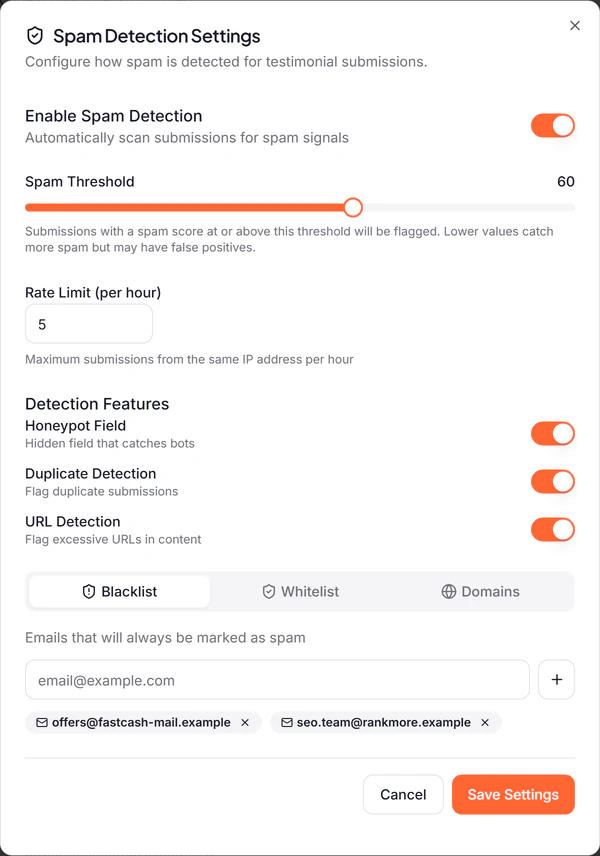
- Spam Threshold
- 0 to 100 in steps of 5, 60 to start. Lower catches more junk, and more real customers too.
- Rate Limit (per hour)
- How many answers one address may send across the project's forms in an hour, 1 to 100. One more adds 60 points.
- Honeypot Field, Duplicate Detection and URL Detection
- On from the start. Switch any of them off when it gets in your way.
- Blacklist, Whitelist and Domains
- Up to 500 entries each. The Whitelist wins over both block lists, but not over the form's own limit or the hidden field.
Four setups, and when to use them
Leave it alone
Most projects. Every check is on from the first answer.
- Spam Threshold 60
- Rate Limit (per hour) 5
- Every switch on
Collecting at an event
Many answers arrive from one Wi-Fi in an hour.
- Raise Rate Limit (per hour) here
- Raise the form's Max Submissions per Hour
- Or a Spam Threshold above 60
One sender keeps trying
The same address, or the same company's addresses, again and again.
- Their address on Blacklist
- Or their domain on Domains
A customer keeps getting caught
A real person writes in a way the signs don't like.
- Not Spam on their testimonial
- Their address on Whitelist
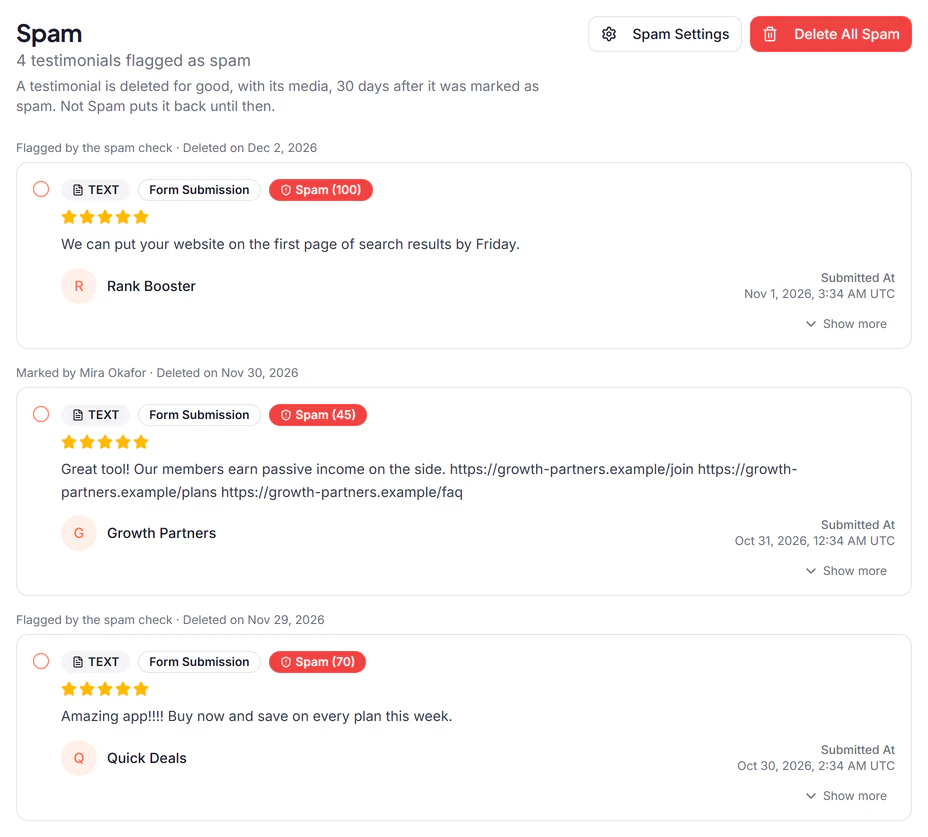
Caught by mistake? It waits 30 days for you.
Not Spam puts a testimonial back where it was. An answer the check caught then arrives as if it had come in normally: approved if your form approves on its own, with its notification, emails and webhooks. It earns no reward.
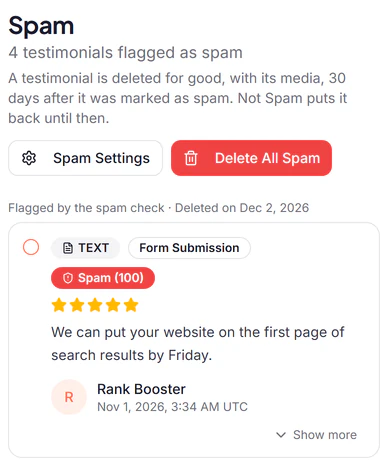
Each card says who put it there and the day it goes, counted from the moment it was marked. After that, a nightly cleanup deletes it with its media.
The grey zone has a badge
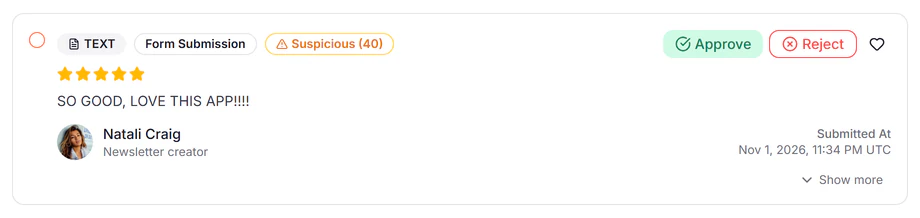
An answer that scores above 30 but under your threshold reaches Pending with a Suspicious badge. Point at it to see the signs, then approve it, or use Mark as Spam from its menu and let Spam clear it for you.
Mark as Spam on an approved testimonial takes it off your widgets, walls, share pages and video player at once.
Put a form out tonight. Spam protection is already on.
Start free — no cardA flood stops at the form.
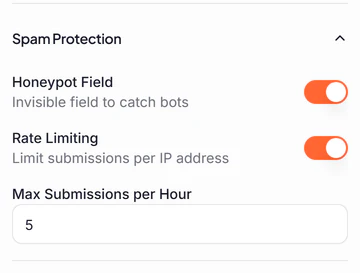
Each form keeps its own two locks, under Spam Protection in its Settings, and they work before any score.
- Honeypot Field
- The field people can't see. It works while it's on here and in the project's settings.
- Rate Limiting and Max Submissions per Hour
- 5 an hour from one address to start, up to 1,000. Past it, an answer is refused with “Rate limit exceeded”, even from the Whitelist. Raise it, or switch it off, for an event.
What it leaves to you.
It guards the door strangers use. Some things are yours to decide.
- Reviews you import or add yourself
- Only answers to your forms are scored: you chose the rest. A file import still skips senders on your block lists.
- A believable fake, written by a person
- No rule can tell. That's what Pending is for: while your form asks for approval (Require Approval is on to start), nothing reaches your site until you approve it.
- Learning from your clicks
- It doesn't. Your lists change only when you change them, so nothing drifts behind your back.
- AI
- None. Every point on a score comes from a sign you can read on this page.
Who can do what
Roles come from your team settings. The owner and Admins hold the keys.
- Open Spam
- The owner, Admins, Members and Viewers
- Not Spam and Mark as Spam
- The owner, Admins and Members
- Delete, and Delete All Spam
- The owner and Admins
- Spam Settings and the lists
- The owner and Admins
On every plan
Free, Pro, Premium and Business: every plan has all of it, switched on in every new project. Spam doesn't use your plan's allowance of testimonials.
Questions
The details are in the guide: Keep spam out of your inbox.
Will my customers have to solve a CAPTCHA?
No. There's no puzzle and no checkbox on your forms. The checks happen after someone clicks submit, and they see their thank-you either way.
What happens to an answer flagged as spam?
It's saved in Spam, not thrown away, so nothing real is lost. No notification, form email, webhook or reward goes out, the form's Analytics don't count it, it doesn't use your plan's allowance, and it never appears on your widgets or walls.
Will I get an email when spam arrives?
No. Spam is silent on purpose. Open Spam in your project's inbox when you want to look.
What if a real customer ends up in Spam?
Click Not Spam. The testimonial goes back where it was, and an answer the check caught arrives as if it had come in normally: approved if your form approves automatically, with its notification, emails and webhooks. It earns no reward. To keep that customer out of Spam, add their address to Whitelist.
How long is spam kept?
30 days from the moment it was marked, then it's deleted with its media by a nightly cleanup. Each card in Spam says the day it goes.
Can I make it stricter or more relaxed?
Yes, per project. Spam Threshold runs from 0 to 100 in steps of 5, 60 by default; lower catches more. Rate Limit (per hour) takes 1 to 100, and Duplicate Detection and URL Detection can each be switched off.
Can I block one sender, or a whole domain?
Yes. Add an address to Blacklist, or a domain to Domains, and their answers go straight to Spam whatever your threshold. Each list holds up to 500 entries. A domain matches exactly, so blocking example.com doesn't block mail.example.com.
Does it stop floods?
Each form has its own limit per address, 5 an hour by default, and refuses the rest with "Rate limit exceeded". After 500 answers to one form, or 1,000 to one project, in 24 hours, the form pauses and your team is told.
Does it check reviews I import?
No. Only answers to your forms are scored: what you import or add yourself, you chose. A file import still skips rows from senders on your block lists.
Does it use AI?
No. It adds up signs you can read: who sent the answer, and what's in it. It doesn't learn from your clicks, so your lists change only when you change them.
Is it on the Free plan?
Yes. Spam protection is on every plan (Free, Pro, Premium and Business), and it's switched on in every new project.
Who on my team can change it?
The owner and Admins change the settings and lists, and the owner and Admins delete spam. The owner, Admins and Members can use Mark as Spam and Not Spam.
Open your form to the world. Keep the junk out of sight.
On in every new project, on every plan. Nothing to set up.