Tags & organization
Tag once. Find forever.
Make your own tags, put them on one testimonial or a whole selection, and filter by them anywhere. Your widgets and Wall of Love pages fill themselves from the tags you pick.
Tags are on every plan, Free included, with 10 text and 2 video testimonials. No credit card.
 Sienna HewittFounder at Beacon Labs
 G2
We moved three client projects into Driftlane in one afternoon. Nobody needed a training call, which has never happened with a new tool here.
 Nicolas TrevinoHead of Growth at Framehouse
 X (Twitter)
Shipped our launch plan in Driftlane this week. First time the whole team could see what was blocked without asking in Slack.
 Joseph GonzalezCTO at ParcelioG2
The GitHub sync is the reason engineering agreed to use it. Pull requests close the task on their own and the board is never out of date.
 Rene WellsMarketing Lead at Quartz & Co
 Google
Support answered in eleven minutes on a Sunday. The fix was a setting I had missed, and they sent a short video showing where it was.
 Zara BushCOO at Loomfield
 Capterra
The weekly digest replaced our Monday status meeting. I read it with coffee and know where every project stands.
 Marco GrossAgency owner at Northbeam StudioX (Twitter)
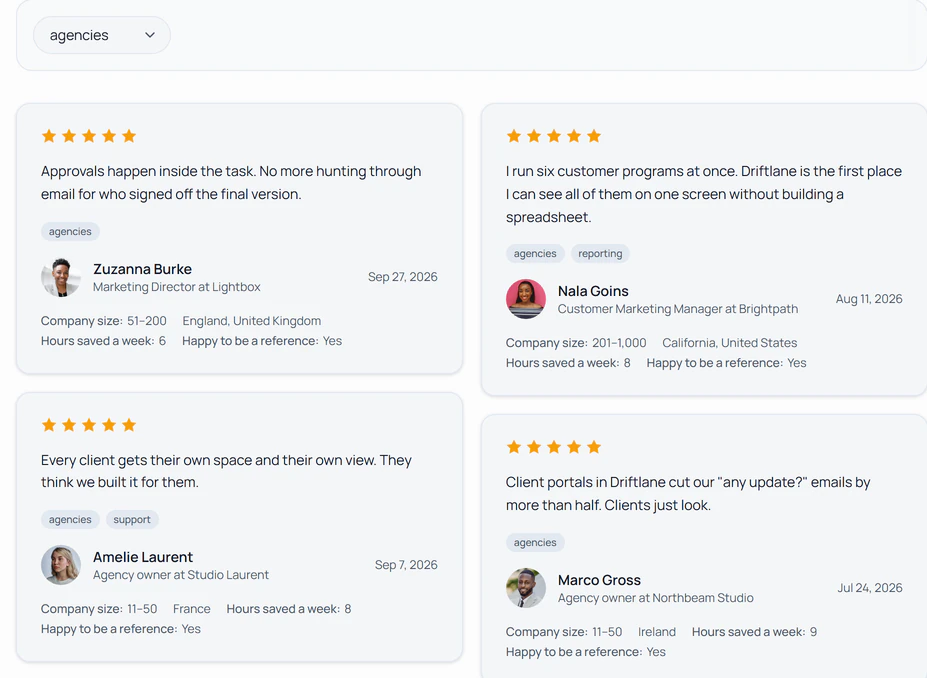
Client portals in Driftlane cut our "any update?" emails by more than half. Clients just look.
 Orlando DiggsFounder at Lumen AnalyticsGoogle
Setup took less time than the demo call for the tool we used before. We were planning a real sprint in it by lunch.
 Lana SteinerHead of Customer Success at FernwoodG2
Onboarding new customers is now a template we copy. The handover from sales to success finally has one home.
 Maxwell TanEngineering Manager at CorelyG2
Fast. Keyboard-first. It stays out of the way, which is the highest praise my engineers give anything.
 Ammar FoleyFounder at Bold North GearCapterra
Flat pricing was the deciding factor. We added four seasonal contractors and the bill did not move.
 Harriet RojasHead of Marketing at Solstice HealthCapterra
Campaign timelines that the whole team trusts. We have not missed a launch date since we switched.
 Nala GoinsCustomer Marketing Manager at Brightpath
 LinkedIn
I run six customer programs at once. Driftlane is the first place I can see all of them on one screen without building a spreadsheet.
 Abraham BakerOperations Director at Norton & CoG2
Migration from our old tool took a weekend. A couple of custom fields needed re-mapping, and the import flagged every one of them.
 Noah PierreProduct Marketing at Juniper Labs
 Product Hunt
The launch checklist template alone was worth the switch. Clean, quick, and it does not try to be a wiki.
 Sophia PerezFounder at Nova ThreadsGoogle
I run a five-person shop. Driftlane gave us a process without making us feel like a corporation.
 Youssef RobersonHead of Sales at MeridianCapterra
Deals that close create their kickoff project automatically. Sales stopped being the bottleneck for delivery.
 Olivia RhyeHead of Marketing at NorthwindG2
We replaced three tools with it. The roadmap view is the one I put on screen in every leadership meeting.
 Phoenix BakerFounder at RelayProduct Hunt
Signed up after the Product Hunt launch and never left. The free plan was enough to prove it to my co-founder.
 Drew CanoFull-stack developerG2
The API is boring in the best way. I wired our deploy pipeline to it in an evening.
 Demi WilkinsonGrowth Marketer at CadenceX (Twitter)
Planning a quarter used to take me two days. In Driftlane it took a morning, and people read it.
 Amelie LaurentAgency owner at Studio LaurentGoogle
Every client gets their own space and their own view. They think we built it for them.
 Adriana O'SullivanCustomer Success Lead at BoltshiftCapterra
Their support team knows the product. I have not once been asked to try clearing my cache.
 Hasan JohnsMarketing Lead at QuotientLinkedIn
Good reporting out of the box. I would like more chart types, but what is there is accurate and fast.
 Zahra ChristensenSaaS founder at CapsuleProduct Hunt
We are eight people. Driftlane costs less than our coffee budget and saves us a meeting a day.
 Dillan NguyenProduct Manager at SisyphusG2
The dependency view caught a slip three weeks before it would have hit our launch. That one catch paid for the year.
 Jackson ReedFounder at HourglassG2
Switched from a tool we had used for six years. The importer brought everything across, comments included.
 Mathilde LewisHead of Ops at GoodwellLinkedIn
Capacity planning that people keep up to date, because updating it takes ten seconds.
 Kari RasmussenEcommerce owner at MagnoliaGoogle
Holiday season used to be chaos. This year every promotion had an owner and a date, and we hit all of them.
 Zuzanna BurkeMarketing Director at LightboxCapterra
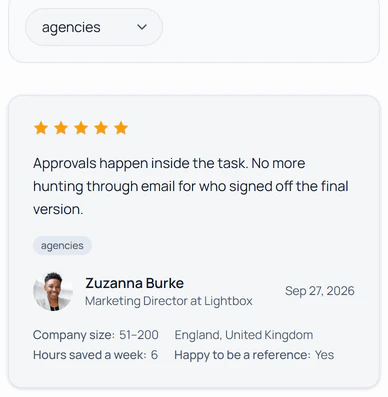
Approvals happen inside the task. No more hunting through email for who signed off the final version.
 Florence ShawHead of Product at LuminaryG2
Roadmap, sprints and customer requests in one tool that loads instantly. I stopped apologising for our tooling.
Rename a tag: every card, rule and view that uses it follows.
Driftlane is our made-up demo project. Its reviewers' faces are stock photos.
Your names. Your colours. One list.
Tags live with the project, so everyone on the team picks from the same list. Open it from the inbox: Options, then Manage Tags.
- Create
- Type a name and press Enter. A project can't have two tags that differ only in capitals.
- Colour
- Pick one of 9, or none. The colour shows on each inbox card and wherever you pick or filter by tags.
- Rename and delete
- The owner and Admins keep the list tidy; everyone who tags can add to it.
- Room to grow
- Up to 200 tags in a project, each name up to 50 characters.
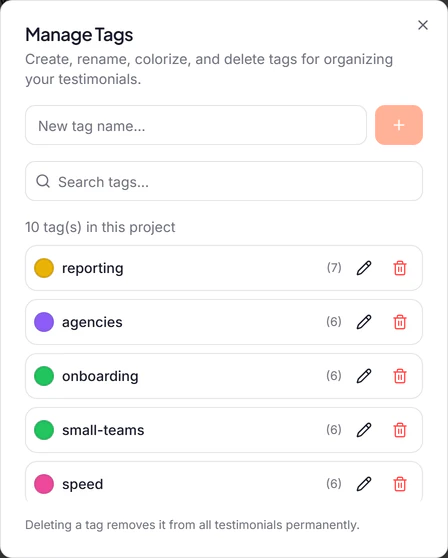
One colour per kind of tag
Suggestions, not rules: the colours mean what you decide.
- Needs a lookneeds-edit
- Objections answeredpricing
- Results and numbersreporting
- Stage of the customeronboarding
- Product areaintegrations
- Use casesupport
- Who it's fromagencies
- Where it goeshomepage
- Housekeepinglegacy-plan
One card, a whole selection, or a whole file.
Tag as testimonials come in, or catch up on a backlog in a few clicks.
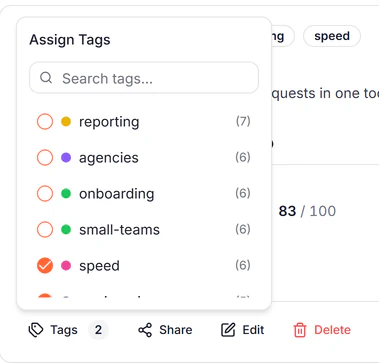
On a card
Open a testimonial, click Tags and tick the ones that fit.
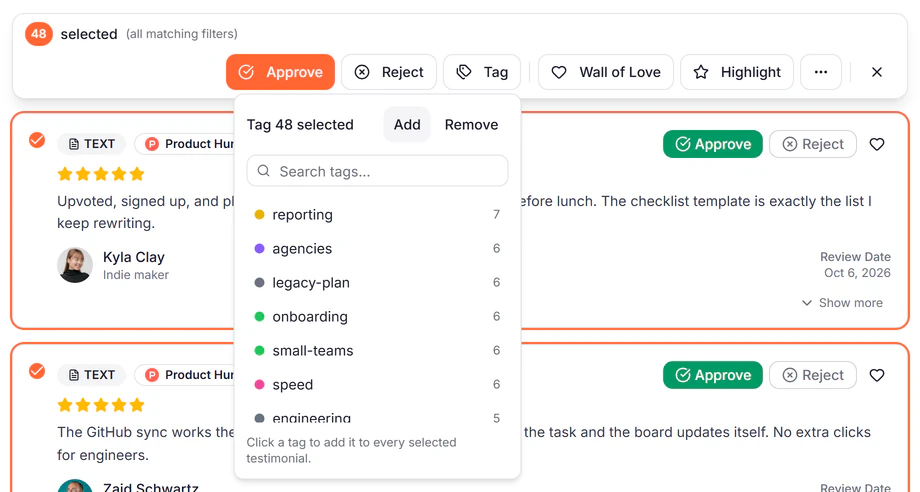
On a selection
Filter, Select all, then Tag: it goes on every match, not only the ones on screen. Bulk actions
customers.csv
On import
Map a tags column in a CSV, Excel or JSON file, or use Apply tags to all imported testimonials. Create the tags first: ones the project doesn't have are skipped, and the import says which.
Social posts and videos you collect can be tagged from their own pages too. The browser extension tags as you capture, and suggests tags from your own list.
Two clicks to the quote you need.
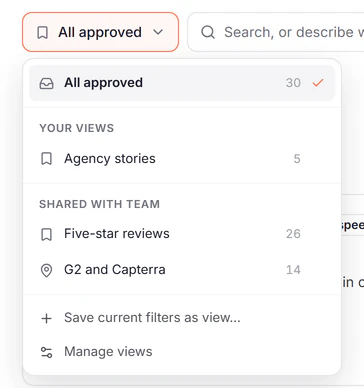
The Tags filter keeps testimonials with any of the tags you pick, alongside every other filter: rating, source, date, type.
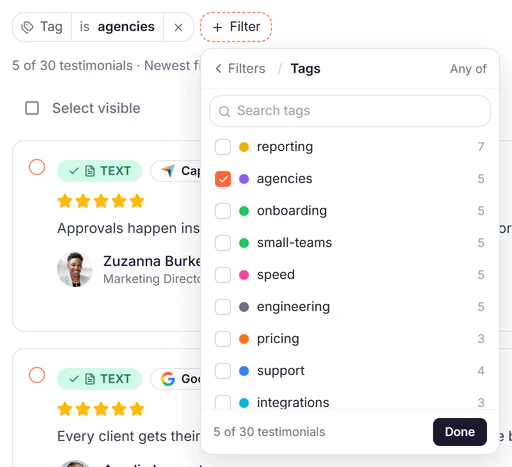
- Save it
- Keep a filter as a view: your own, or one the whole team sees.
- Share it
- The filter is in the page's address, so a link opens the same list for a teammate.
- Ask for it Premium and Business
- Describe what you want, like “agency quotes about onboarding”, and AI search turns your words into your tags.
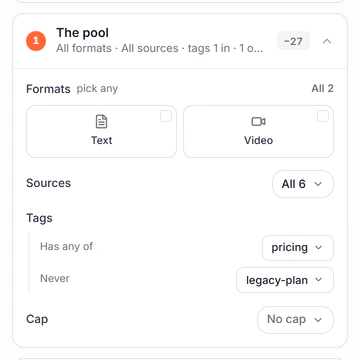
Pick a tag. The widget fills itself.
Auto-sync rules read your tags: keep testimonials with any of them, and never show ones with others. New proof that gets the tag shows up on its own.
Pricing page
Has any ofpricingNeverlegacy-plan
Answers to the price question, and nothing about a plan you no longer sell.
Agency landing page
Has any ofagencies
Agencies hear from agencies.
Developers page
Has any ofintegrationsengineering
The people who'll set it up, on the things they'll set up.
On Premium and Business, a Proof Match rule can use different tags on different pages of your site. Proof Match
Visitors can filter your wall by tag
Turn on Show tags to print tags on a Wall of Love's cards, and the Tags filter on its hosted page: “Narrow the wall by tag.”
Tags stay private unless you turn one of these on. Widgets never show them.
Your library, sorted by Friday.
Start free — no cardRename it. Everything that uses it follows.
One rename changes the tag everywhere it's used, in the same step, so no widget is left looking for a name that's gone.
- Every testimonial with itIts name changes on each one, in the same step.
- Widget rulesAuto-sync rules that keep or leave out the tag.
- Proof Match rulesRules that pick different tags on different pages.
- Wall of Love rulesThe wall's own auto-sync rules.
- Saved viewsPersonal and team views that filter by it.
- Delete tells you what's left
- It takes the tag off every testimonial, then says how many widgets, walls and saved views still use it, so you can take it out there.
- Archiving keeps tags
- Archive or reject a testimonial and it leaves your widgets and walls but keeps its tags, ready if you restore it.
- Your other tools hear about it
- The CSV export has a Tags column. On Premium and Business, webhooks carry each testimonial's tags, and a rename or a delete sends the change.
The whole team tags. Admins keep the list tidy.
Teammates are on Premium and Business, each with a role per project.
A Member who opens Manage Tags reads: “Only an admin or the workspace owner can rename, recolour or delete a tag.” Team roles
- Create tags and tag testimonials
- The owner, Admins and Members
- Rename, recolour and delete tags
- The owner and Admins
- Tag a file as it's imported
- The owner and Admins
- See tags and filter by them
- The owner, Admins, Members and Viewers
Tags are on every plan.
| Feature | Free$0 | Pro$29/mo | Premium$49/mo | Business$79/mo |
|---|---|---|---|---|
| Tags, their colours and the Tags filter | ||||
| Tag one testimonial, a whole selection, or a file on import | ||||
| Saved views by tag | ||||
| Widgets and Wall of Love pages that fill themselves from tags | ||||
| Proof Match: different tags on different pages of your site | – | – | ||
| AI search that finds by tag | – | – | ||
| Webhooks that carry tags | – | – | ||
| Teammates who tag | – | – | ||
| File formats you can import | CSV | CSV, Excel, JSON | CSV, Excel, JSON | CSV, Excel, JSON |
Monthly prices, per active project. Tags are on every plan, Free included, with 10 text and 2 video testimonials. See every plan
Questions
Tagging a big backlog? Bulk actions
How many tags can I make?
Up to 200 in a project, each name up to 50 characters. A testimonial can carry up to 30 when you tag it on its own.
Can I tag many testimonials at once?
Yes. Select them in the inbox (or Select all to take every match of your filters), click Tag in the bar and pick a tag to add or remove. A file import can also tag every row it brings in.
Do visitors see my tags?
Never on widgets. On a Wall of Love, only if you turn on Show tags for its cards, or the Tags filter on its hosted page. Otherwise tag names stay yours.
What happens when I rename or delete a tag?
A rename changes the tag on every testimonial and in every widget rule, Proof Match rule, Wall of Love rule and saved view that uses it, all at once. A delete takes it off every testimonial, then tells you how many widgets, walls and saved views still filter on it, so you can take it out there.
Does archiving or rejecting a testimonial remove its tags?
No. Archived and rejected testimonials keep their tags, so they're still sorted if you restore them.
Can AI tag testimonials for me?
No: tags are yours. On Premium and Business, Proof AI reads each testimonial's themes, personas and use cases for you, and the inbox's AI search finds testimonials by your tags when you describe what you want.
Are tags case-sensitive?
A project can't have two tags that differ only in capitals. A file import or a copy from another project takes your project's own spelling.
Can I bring my tags from another tool?
Yes. Create the tags in Manage Tags, then import a CSV, Excel or JSON file with a tags column, or tag every row as it comes in. Tags your project doesn't have yet are skipped, and the import says which.
Do tags come with a testimonial I copy to another project?
Yes. The copy keeps its tags, and any the other project doesn't have yet join its list, with their colour.
Which plans include tags?
All of them, Free included. Proof Match is on Premium and Business, webhooks on Premium and Business and teammates on Premium and Business.
Stop scrolling. Start filtering.
Tags are on every plan, Free included, with 10 text and 2 video testimonials. No credit card.