See which videospeople finish
Every video testimonial gets its views, how far each viewer got and how many finished, in your widgets, on its share page and wherever you embed it. Then you put the one people finish where buyers decide.
- Free plan forever
- No card needed
- Video analytics from Pro
A sample video, 9 seconds long. In a widget, skipping ahead counts as watched up to that point.
What the report counts
- Views
- 0
- Watch timeestimate
- 0s
- Completion
- —
- Each mark is counted the moment the playhead passes it.
- Counted from the first press of play
- No cookies
- Nothing to install
- Follows your trim
The sample video is stock footage. Driftlane, further down, is our made-up demo project, and its reviewers' faces are stock photos.
Your most played video isn't always your best one
Ranked by views
Ranked by completion
- 1
 665
- 2
 502
- 3
 419
- 4
 224
- 5
 154
- 6
 56
- 166%
- 262%
- 343%
- 437%
- 530%
- 620%
Lily-Rose Chedjou is fourth by views, with 224 views, and first by completion: 66% of the people who pressed play stayed to the end. That's the one to put on the pricing page.
Katherine Moss is second by views and fourth by completion: 37% finish. Plenty of clicks, and most viewers leave early. A trim of the opening is the first thing to try.
A view tells you someone was curious. A finish tells you they believed it.
One play, five moments
Play
One view
A press of play. A replay after the end is another.
25%
A quarter watched
The first mark. Early leavers stop before it.
50%
Half watched
The estimate counts half the video.
75%
Three quarters
Most of the story told.
95%
Complete
The last seconds are often a logo or a thank you, so this is the finish line.
- Watch time is an estimate
- It's built from those marks: a 1:20 video watched past halfway adds 40 seconds. The report calls it an estimate, because it is one.
- A view is a press of play
- A muted preview, a hover or a tab left open counts nothing. Autoplay counts only once someone interacts with it.
- Trimmed means measured as trimmed
- Cut a slow opening and every mark, completion and estimate follows the part that plays.
One report for every video testimonial
- 7D, 30D, 90D or ALL
- 30D opens first. Widget plays reach back 90 days; share and embed plays as far as the video goes.
- All videos, or one
- Pick one video and every figure on the page narrows to it.
- All standalone, Embed only, Share only
- See the plays on share pages and through the embed code apart.
Open it from Insights, or straight from a video in your inbox: More, then Video analytics. Each month's video plays and how many were watched to the end also go into the Monthly report, which you can print or save as a PDF for a client.
Counted wherever the video plays
In your widgets
1,549 plays · 77%Plays inside widgets added with the script code, counted for each video.
Widget builderOn its share page
308 plays · 15%Every video has a page of its own. Send the link; its plays, marks and completions count.
Share pages and embedsWherever you embed it
163 plays · 8%The Embed video code puts the player in a blog post or a help article, and counts its plays.
Video hosting
Plays in a Wall of Love, and in widgets added with the plain iframe code, aren't counted here. Videos linked from YouTube, Vimeo or Loom count their plays in your widgets, not watch time.
Three changes to make the week you open it
- Change 1
Lead with the one they finish
Read the completion beside each video's views. Move the video people finish to the first card of your widget, or onto the pricing page on its own.
Widget builder - Change 2
Trim where they leave
When completion sags, the opening is usually too slow. Trim it in the inbox and every figure measures the part that plays, so you see at once whether the cut helped.
Testimonial editor - Change 3
Send the one that holds attention
Send your strongest video by link to the prospect who asked for proof, then watch its share page plays and completions arrive under Share only.
Share pages and embeds
See what happened after the video
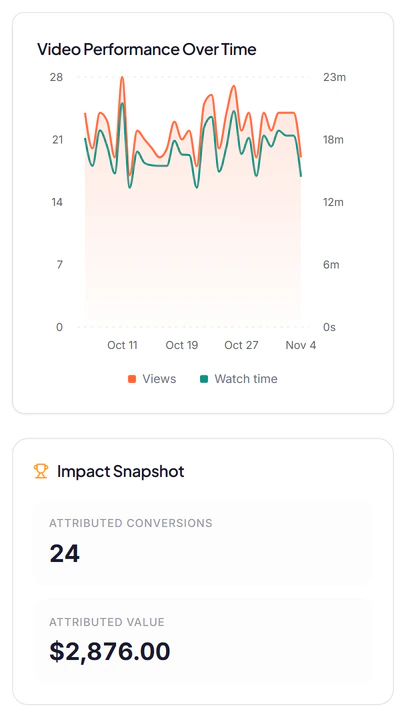
Inspect a video to see the conversions that followed a widget view showing it, and their value, one total per currency: purchases, sign ups or any event you track.
Credit goes to the last widget view before each conversion: the view that showed the video, not the play. For other models and the full breakdown, open Proof Impact.
Proof Impact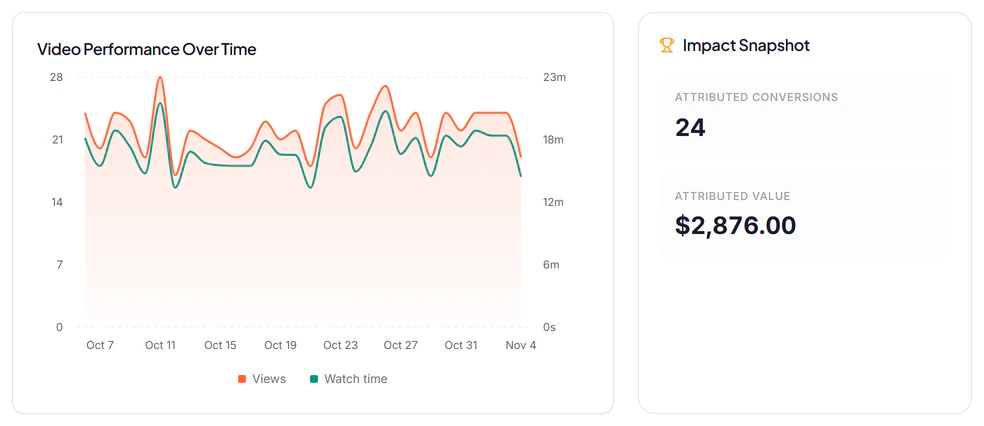
Counted fairly, so you can act on it
Inflated views are easy to produce and useless to decide with. These rules keep the report honest.
- One view per press of play. A replay after the end counts again.
- Muted autoplay and hover previews count nothing until someone interacts.
- No cookies. Unique viewers are browsers, per video, never people.
- In widgets, Global Privacy Control and Do Not Track are honoured by default, and your consent setting applies.
- Traffic that names itself as a bot or a headless browser isn't counted.
- Widget plays are kept 90 days; share and embed plays as long as the video.
Start free. Turn the report on when your videos arrive.
| Video analytics | Free$0 | Pro$29/mo | Premium$49/mo | Business$79/mo |
|---|---|---|---|---|
| The video analytics report | Not included | Included | Included | Included |
| Inspect: one video's widget and standalone figures | Not included | Included | Included | Included |
| Video plays in the Monthly report | Not included | Included | Included | Included |
| Plays and completions per widget, in widget analytics | Not included | Included | Included | Included |
| Send plays to Google Analytics 4 or Tag Manager | Not included | Included | Included | Included |
| Impact Snapshot: conversions after a video | Not included | Not included | Included | Included |
| Unique viewers for widget plays | Not included | Not included | Included | Included |
What people ask before they trust the numbers
What counts as a view?
A press of play. In a widget, on a video's share page or through the Embed video code, every start is one view, and a replay after the end is another. A muted preview or a hover counts nothing.
Is watch time exact?
No, and the report says so. It's an estimate from how far each view got: a view that passed the 50% mark counts as half the video, one that stopped before 25% counts as nothing. An 1:20 video watched past halfway adds 40 seconds.
What does completion mean?
The share of views that reached 95% of the video. The last few seconds of a testimonial are often a logo or a thank you, so 95% is the honest finish line.
Does autoplay count as a view?
Only once someone interacts with it. A player set to play muted on its own counts nothing while it plays to nobody in particular.
Are plays in a Wall of Love counted?
Not in this report. Plays in a Wall of Love, and in widgets added with the plain iframe code, are left out. Widgets added with the script code, share pages and the Embed video code are counted.
Do YouTube, Vimeo or Loom videos count?
Their plays in your widgets count as views. They play in that site's own player, so there's no watch time or completion for them, and they stay out of the rates.
Does trimming a video change its numbers?
Yes. Every player plays only the part you kept, and the report measures that part: the marks, the completion and the watch time estimate all follow your trim.
How long are plays kept?
Plays in your widgets are kept for 90 days, so ALL shows the last 90 days of widget plays. Plays on share pages and through the Embed video code are kept as long as the video is.
Are cookies used? What about consent?
No cookies. In your widgets, Global Privacy Control and Do Not Track are honoured by default, and your project's consent setting applies. Traffic that names itself as a bot or a headless browser isn't counted.
Can I see who watched?
No. Unique viewers counts browsers, per video, and only under Inspect. A widget play can be tied to a browser only on Premium and Business, for a visitor who allows tracking; otherwise the report shows a dash rather than a partial count.
Can I get the numbers out?
There's no download from the report. On Pro, Premium and Business, your widgets can send the same play, progress and completion events to your own Google Analytics 4 or Tag Manager.
Which plans include it, and who can open it?
The report is on Pro, Premium and Business; the Impact Snapshot on Premium and Business. Everyone on the project can open it, Viewers included.
Your best video is already on your site. Find out which one it is.
Collect your first video testimonials free. The report counts every play from the day you turn it on, on Pro, Premium and Business.
Start free- Free plan forever
- No card needed
- Video analytics from Pro
- Play100%
- 25%82%
- 50%65%
- 75%52%
- 95%46%