Testimonial translations Business
Their words. In every language.
Your site speaks German. Your testimonials still speak English. Translate every customer story into 33 languages, fix any word you like, and let each widget show visitors the language of the page they’re on. The customer’s original never changes.
Translations are on Business. The widget’s own texts can be reworded from Pro.
Driftlane is a made-up company. Its customers wrote in Spanish, English and German; Original shows each as written. The line under a translated review is the widget’s Mark translated reviews option.
Overview · 1:41
Her words. Their language.
Follow Talia’s review from her own words to Driftlane’s German, Japanese and Arabic pages: translated by AI, one word corrected by a person, and shown in each visitor’s language.
8 chapters · Captions · Full transcript
Read the transcript
Not quite for you
Driftlane's site speaks German now. Japanese, too, and Arabic. But the stories on it are still in English. And a page in your language, with proof in someone else's, still reads as not quite for you.
Her words, in German
Talia's story came in last week, in her own words. Add German, and AI translates it for one credit, saved the moment it's done. Her name stays hers. Only the language changes.
Your word for it
It's marked as AI, so you know what to read. Sam swaps one word for the one Driftlane's German site uses, and saves. Now it's his translation, and no bulk run will overwrite it.
The whole collection
Then the rest, in one pass: every approved story into German, Japanese and Arabic, in the background. It skips what's already translated, and leaves your edits alone.
Let the page decide
On the widget, show testimonials in the visitor's language. It reads the page's own language first, then the browser's. Where a story has no translation yet, the original stays.
On every page
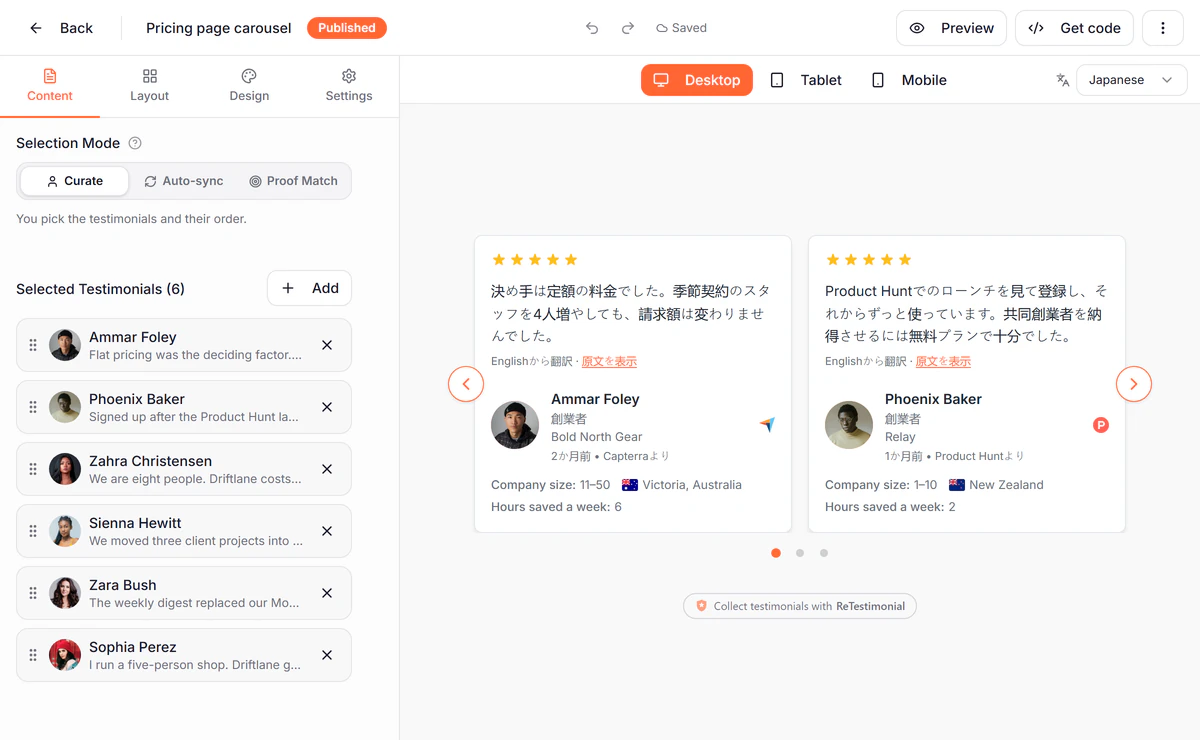
So one widget tells her story in German, in Japanese, and right to left, in Arabic. The small words follow, too: “Read more” becomes “Mehr lesen”.
Their choice
On your Wall of Love, visitors can pick their language, or go back to Talia's own words.
Her words. Their language.
Testimonial translations, in thirty-three languages. On Business.
Translated pages. Untranslated proof.
Everything on the page speaks German except the part people trust most. Drag the line and watch the page become one language.



73%of consumers want product reviews in their own language. CSA Research, 2020, 8,709 consumers in 29 countries.
Translate once. It shows everywhere.
One review or the whole collection, by AI or by hand. Every widget and wall set to translate picks it up on its own.
Translate
AI translate turns a review into another language in seconds, for 1 credit. Names and brand names stay as written, job titles read naturally, and links and formatting survive. Change any word and save: from then on, that translation is yours.
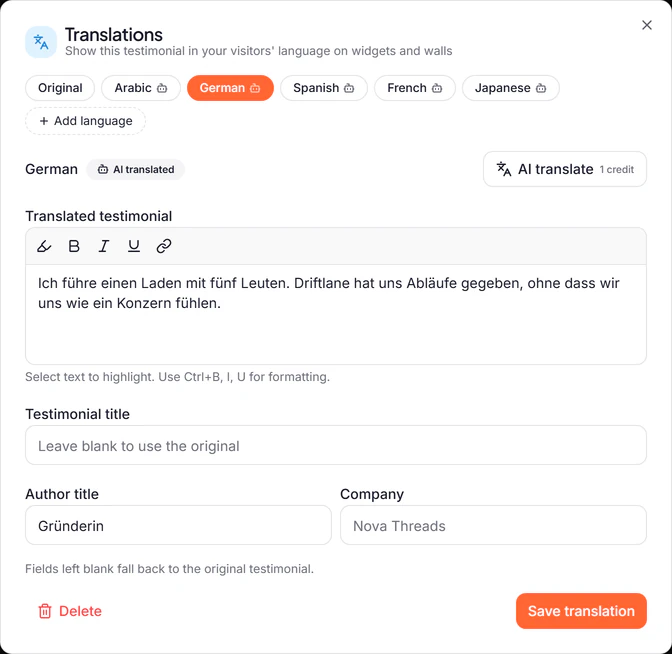
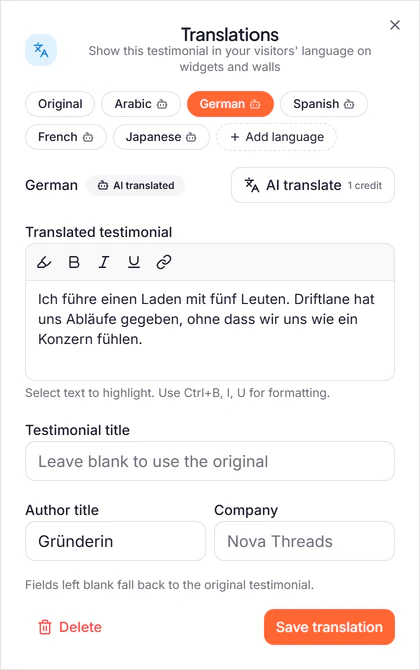
A Driftlane review in German: the AI’s work is marked AI translated, and every field can be edited. Do the whole collection
Pick up to 200 testimonials in the inbox and up to 10 languages. It runs in the background, skips what’s already done, and never overwrites your edits.
Find what’s left with the inbox’s Not translated filter. Bulk actions
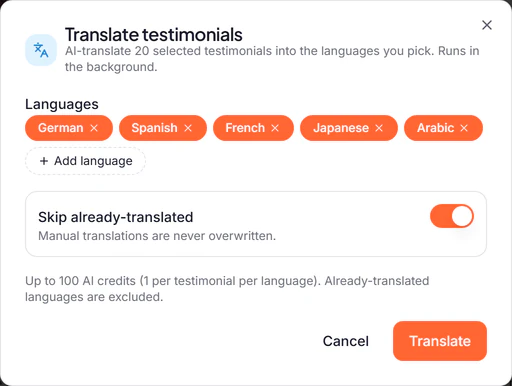
Translate testimonials, from the inbox: Skip already-translated is on from the start. Set the widget once
Choose Visitor’s language and every new translation reaches the live widget by itself. No code, no republish. Translation coverage shows what’s still missing.
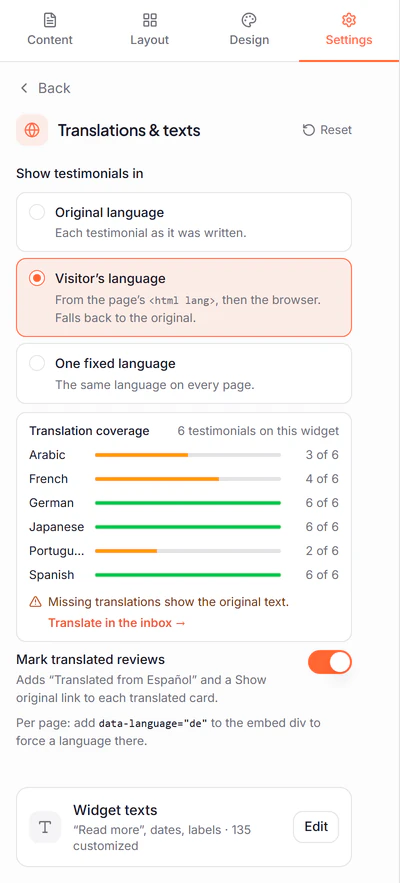
The widget’s Translations & texts: Visitor’s language, how much is translated, and a link to finish the rest.
One embed. Every version of your site.
No widget per language. Paste the same snippet on every page, and the widget reads the language each page already declares. Pick a page:
Works with any site that sets its page language: the lang on <html>, which i18n frameworks and translation plugins write for you. A review with no translation in that language shows as written.
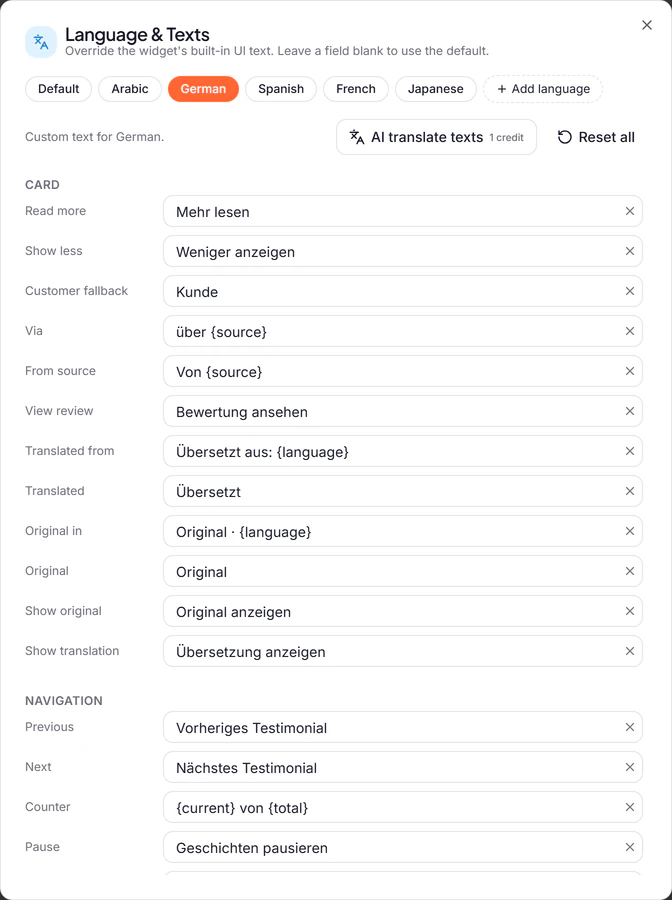
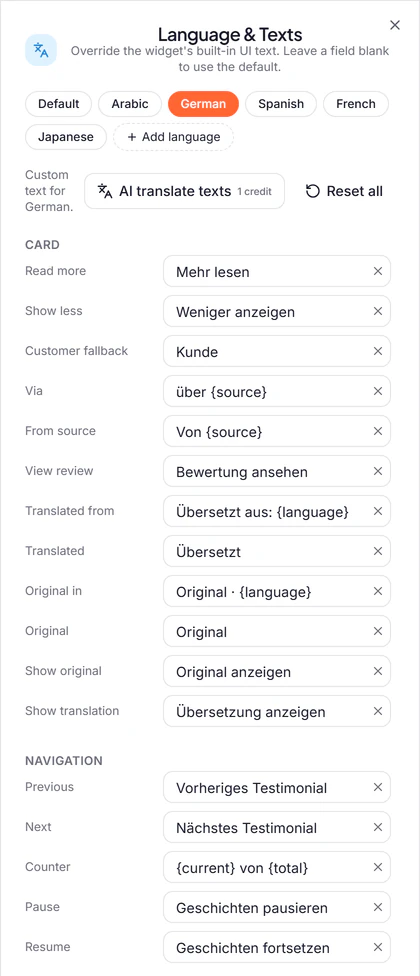
“Read more” becomes “Mehr lesen”.
The widget’s own 75 words follow the language too: buttons, labels, “via Google”, “3 days ago”. One click translates a set (1 credit per language), and you can reword any of them.
- Your wording Pro+
- Say “Read the story” instead of “Read more”, in one default set every language starts from.
- A set per language Business
- Language & Texts keeps one set per language, written by you or by AI translate texts.
- Dates that read like home
- Exact dates take the language’s own form: Aug 18, 2026, 18. Aug. 2026 and 2026年8月18日.
Let visitors choose. Or read the original.
Turn on a Wall of Love’s translations and its page follows the visitor’s browser, or one language you pick. Switch on the Language selector and visitors choose from native names, or go back to the customer’s own words.
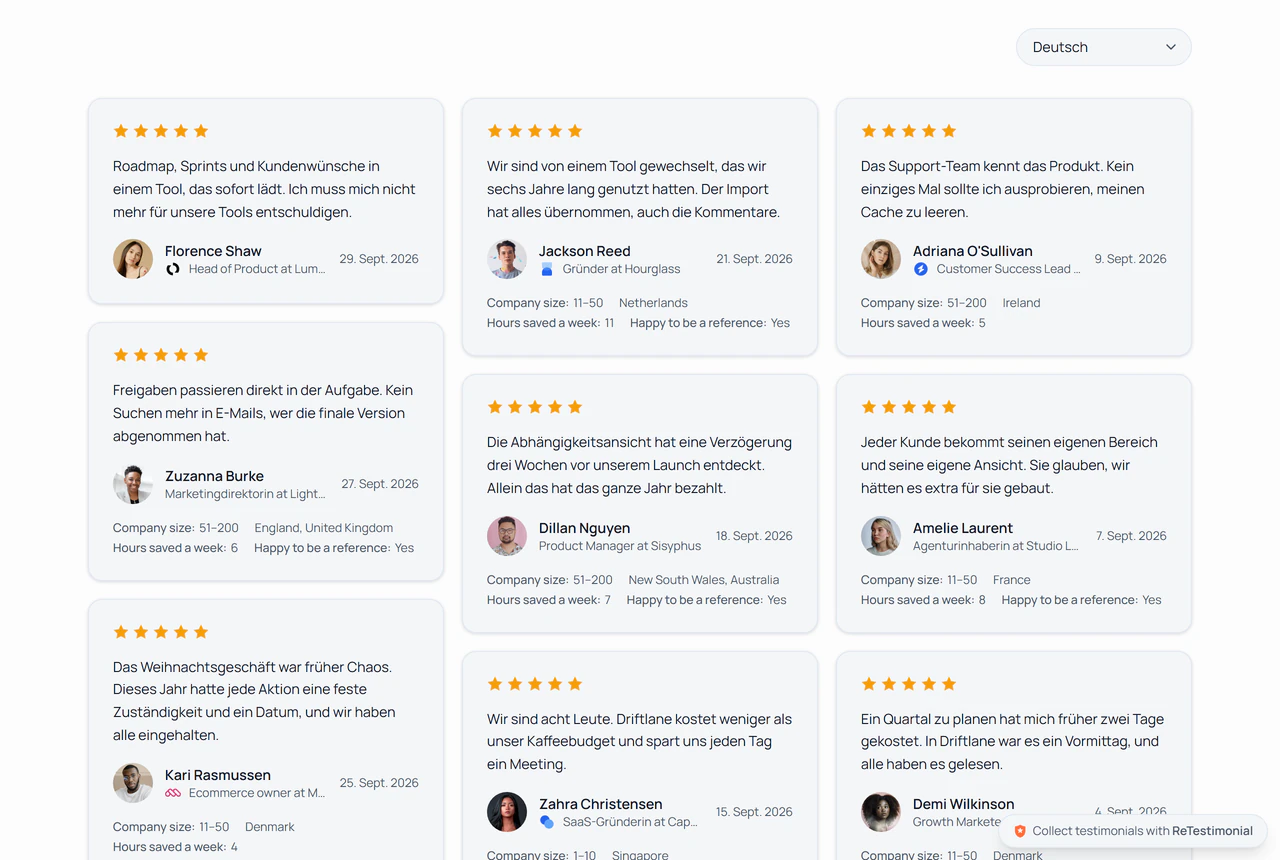
?lang=de. Visitors switch languages from the menu at the top.- A link for each market
- Each language has its own address,
?lang=de, to share in that market’s newsletter or ads.?lang=originalshows every review as written. - Readable by search engines
- The wall is built on our server. Each language’s page names itself as canonical and points to the others with hreflang, so search engines can tell the versions apart.
- On your site, too
- An embedded wall follows
data-languageand your page’s<html lang>, as a widget does. The language menu is the hosted page’s.
Not yet on walls: their own words (“Search testimonials”, “Original”) stay in English, and they don’t mirror right to left. Wall of Love
Still their words.
A testimonial is worth something because a customer said it. Translation changes the language, never who said it or what they meant.
The original never changes
Each translation sits beside it, one per language. Delete a translation and the review is as it was.
Names stay theirs
Author names are never translated, and brand names stay as written.
You can see what the AI wrote
Its translations are marked AI translated. Anything you edit is yours, and no bulk run overwrites it.
Visitors can read the original
Turn on Mark translated reviews and each translated card says “Translated from Español”, with a Show original link. On a wall, visitors pick Original.
Mark translated reviews works on the Classic, Coverflow, Cards Stack, Progress and Filmstrip carousels and the Masonry wall, and its words (“Translated from”, “Show original”) are part of the widget’s texts, so they translate too.
What isn’t translated
- Collection forms, share pages and emails
- What’s said in a video, and its transcript and captions
- Author names (on purpose)
- A wall’s own words, like “Search testimonials” and “Original”
- Right to left on walls, testimonial images and social videos
33 languages, in their own words.
Visitors pick from these names on a wall. Regional languages are their own: Brazilian Portuguese isn’t Portugal’s, and Simplified and Traditional Chinese are separate. 2 are written right to left.
- English
- Español
- Français
- Deutsch
- Italiano
- Português
- Português (Brasil)
- Nederlands
- Polski
- Svenska
- Norsk
- Dansk
- Suomi
- Čeština
- Slovenčina
- Magyar
- Română
- Ελληνικά
- Български
- Türkçe
- Русский
- Українська
- العربية
- עברית
- हिन्दी
- Bahasa Indonesia
- Bahasa Melayu
- ไทย
- Tiếng Việt
- 日本語
- 한국어
- 简体中文
- 繁體中文
One credit. One review. One language.
AI translation is priced in credits, so you pay for what you translate and nothing else. A translation that fails is refunded. Your own edits cost nothing.
120 AI credits
40 testimonials × 3 languages × 1 credit
Covered by the 150 credits Business includes each month for an active project.
Credit packs: 100 for $9.99, 500 for $39.99 and 1,000 for $69.99. Credits are shared with the other AI features.
| Feature | Free$0 | Pro$29/mo | Premium$49/mo | Business$79/mo |
|---|---|---|---|---|
| Testimonial translations, one at a time and in bulk | – | – | – | |
| Widgets and walls in the visitor’s language | – | – | – | |
| Reword the widget’s texts | – | |||
| A set of texts per language, translated by AI | – | – | – | |
| AI credits included, per active project each month | 0 | 0 | 50 | 150 |
Monthly prices, per active project. Start on Free: your testimonials and widgets come with you when you move to Business. See every plan
Questions
How does the widget know which language to show?
In the widget builder, open Settings → Translations & texts and choose under “Show testimonials in”: Original language (where every widget starts), Visitor’s language or One fixed language. Visitor’s language reads your page’s <html lang> first, then the visitor’s browser. On Business, while Visitor’s language or One fixed language is chosen, adding data-language="de" to the embed pins that one page to German. A testimonial with no translation in that language shows its original text.
Is a translated testimonial still the customer’s testimonial?
The original is never changed: each translation is stored beside it. Author names are never translated, and AI translations are marked so you know what to read. Turn on Mark translated reviews and each translated card says which language it was written in, with a Show original link (on the Classic, Coverflow, Cards Stack, Progress and Filmstrip carousels and the Masonry wall). On a wall, visitors can always pick Original.
Can I fix what the AI wrote?
Yes. There’s no approval step: an AI translation shows as soon as it’s done. Open the testimonial’s translations, change any field and click Save translation. Bulk runs never overwrite a translation you edited, and a one-off AI translate warns you before it does.
What does it cost?
1 AI credit translates one testimonial into one language, and a failed translation is refunded. Business includes 150 AI credits per active project each month, shared with the other AI features. Credit packs: 100 for $9.99, 500 for $39.99 and 1,000 for $69.99.
Do Arabic and Hebrew work?
Yes, in widgets. Many widget styles set the right-to-left direction themselves, and the rest follow your page’s direction, which an Arabic or Hebrew page already sets. Walls, testimonial images and social videos don’t mirror yet.
What happens to buttons and dates?
The widget’s 75 built-in texts (“Read more”, “via Google”, “3 days ago”) can have a set per language, written by you or translated by AI for 1 credit per language. Exact dates follow the language on their own: Aug 18, 2026, 18. Aug. 2026 and 2026年8月18日.
Can search engines read the translations?
A hosted Wall of Love is built on our server, and each language has its own address (?lang=de). That page names itself as the canonical one and lists the other languages with hreflang, so search engines can tell the versions apart. Widgets are drawn in the visitor’s browser; with review markup on Business, the markup carries the translated text. Whether a page ranks is up to the search engine.
What isn’t translated?
Collection forms, share pages and emails. What’s said in a video, and its transcript and captions. Author names (on purpose). A wall’s own words, like “Search testimonials” and “Original”. Right to left on walls, testimonial images and social videos.
What happens if I downgrade?
Widgets and walls go back to showing the original language. Your translations are kept, read-only, and come back when you return to Business.
Say it in their language.
Your customers already wrote your best copy. Now every market can read it.