 Dillan NguyenProduct Manager, Sisyphus
The dependency view caught a slip three weeks before it would have hit our launch. That one catch paid for the year.
Underlined: the words the reading points to.
AI sentiment analysis
ReTestimonial's AI reads every testimonial for how the customer feels, what they're talking about, the problem they had and the result they got, and scores how strong it is as proof. Then the best ones go where they'll work: your widgets, your walls, your pages.
On Premium and Business, with 50 readings a month included per project.
Dillan NguyenProduct Manager, SisyphusThe dependency view caught a slip three weeks before it would have hit our launch. That one catch paid for the year.
Underlined: the words the reading points to.
Sentiment
Positive 95/100
Showcase score (AI score in the inbox)
88/100
Pain point → outcome
Launch delays from missed dependenciesPrevented launch-blocking issue
Quote it suggests
“The dependency view caught a slip three weeks before it would have hit our launch. That one catch paid for the year.”
Real readings from Proof Intelligence, of reviews of Driftlane, our made-up demo product. The faces are stock photos.
A star rating says how happy someone was. The showcase score asks a different question: would this convince a stranger? A specific result, a problem solved or a doubt answered scores higher than warm praise.
 Phoenix Baker Founder, RelaySigned up after the Product Hunt launch and never left. The free plan was enough to prove it to my co-founder.★★★★★AI score 72
 Jackson Reed Founder, HourglassSwitched from a tool we had used for six years. The importer brought everything across, comments included.★★★★★AI score 72
 Adriana O'Sullivan Customer Success Lead, BoltshiftTheir support team knows the product. I have not once been asked to try clearing my cache.★★★★★AI score 78Dillan Nguyen Product Manager, SisyphusThe dependency view caught a slip three weeks before it would have hit our launch. That one catch paid for the year.★★★★★AI score 88
 Sienna Hewitt Founder, Beacon LabsWe moved three client projects into Driftlane in one afternoon. Nobody needed a training call, which has never happened with a new tool here.★★★★★AI score 88
 Demi Wilkinson Growth Marketer, CadencePlanning a quarter used to take me two days. In Driftlane it took a morning, and people read it.★★★★★AI score 88
 Noah Pierre Product Marketing, Juniper LabsThe launch checklist template alone was worth the switch. Clean, quick, and it does not try to be a wiki.★★★★★AI score 78
 Youssef Roberson Head of Sales, MeridianDeals that close create their kickoff project automatically. Sales stopped being the bottleneck for delivery.★★★★★AI score 82
 Abraham Baker Operations Director, Norton & CoMigration from our old tool took a weekend. A couple of custom fields needed re-mapping, and the import flagged every one of them.★★★★★AI score 72
 Hasan Johns Marketing Lead, QuotientGood reporting out of the box. I would like more chart types, but what is there is accurate and fast.★★★★★AI score 62
One reading answers three questions about a testimonial, and keeps up to 8 answers to each list. Here is Dillan Nguyen's, from the hero, as the product shows it.
A main theme, use case and feature, each with a scored list beside it. For Dillan Nguyen: Risk prevention, Launch planning, Dependency view.
A persona (here, Product managers) and, when the testimonial gives them away, a role, an industry and a company size. You filter by persona; Proof Gaps uses the rest to find who a page is for.
The problem the customer had and the result they got, the doubts they raise, what makes it believable, the lines worth quoting with why each works, and the kind of asset it would make best.
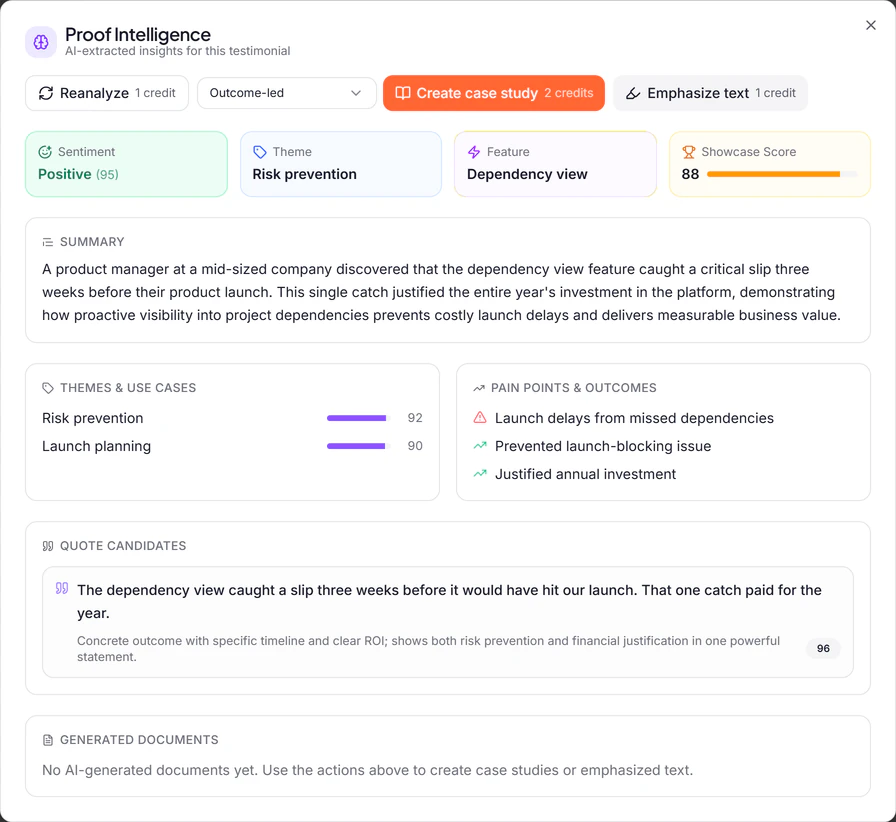
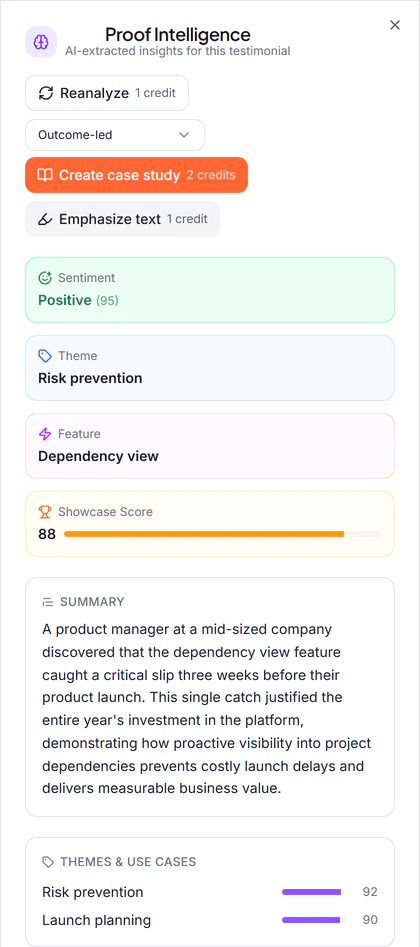
You read sentiment, the main theme, feature and use case, the showcase score, a summary, pain points and outcomes and quote candidates. Doubts, trust signals and key phrases work behind the scenes, in Proof Gaps and in the widget builder's suggestions.
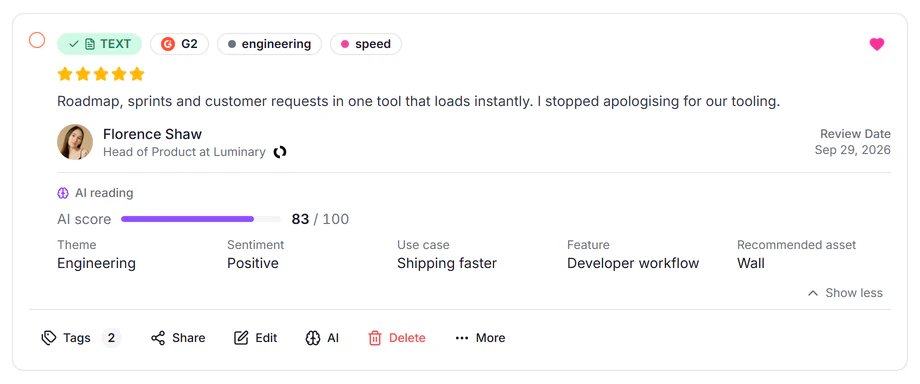
Show more on any card opens its AI reading: the AI score, theme, sentiment, use case, feature and recommended asset. A reading that no longer matches the testimonial says so.
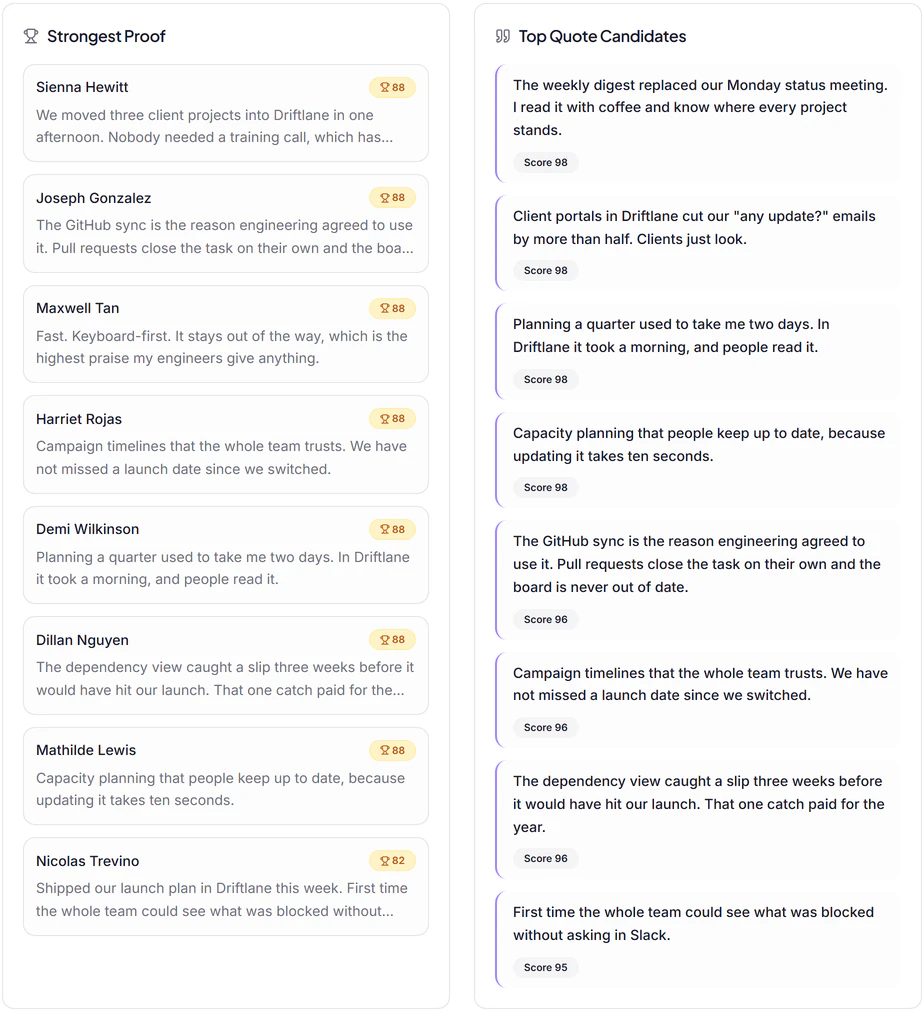
Insights adds every reading up: how people feel, what they talk about most, the problem they came with and the result they got, and the lines worth quoting. Readings reuse your project's own labels, so the same subject is counted as one.
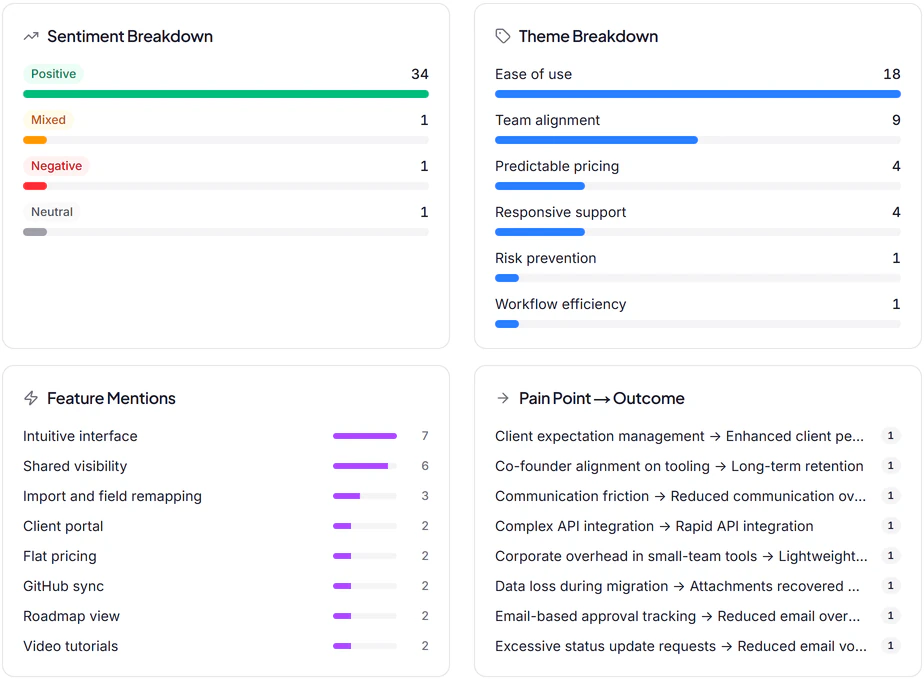
The result customers mention most is the promise they already believe.
The problems they came with are the questions your next visitors arrive with.
Top Quote Candidates, ranked, ready for a widget or an image, beside your Strongest Proof.
Your best testimonial is already in your inbox. Let it find you.
Start free — no cardAuto-sync keeps the sentiment, themes and minimum Showcase score you choose, sorts by AI score and can Diversify themes. The Strongest proof recipe sets it up in one click, for widgets and walls alike.
The widget builder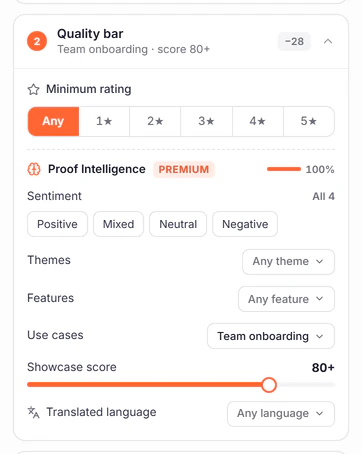
Filter the inbox by sentiment, theme, feature, use case or persona, sort by AI score, or describe what you want in a sentence.
AI search and filters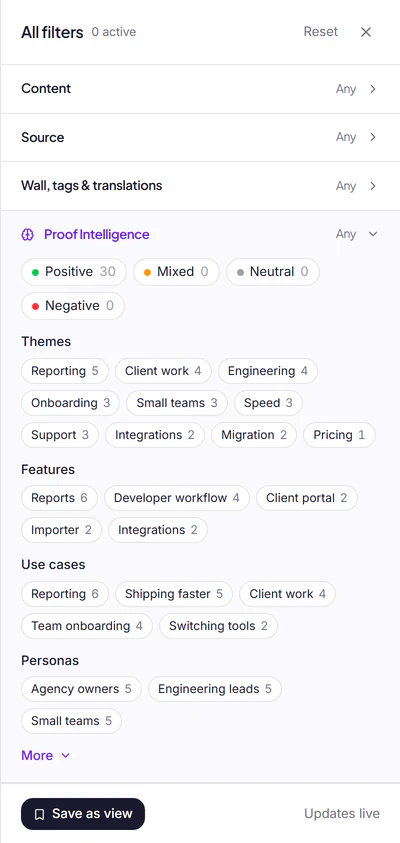
Proof Gaps checks each page's audience, use case, feature and doubt against the readings, and lists whom to ask.
Proof Gaps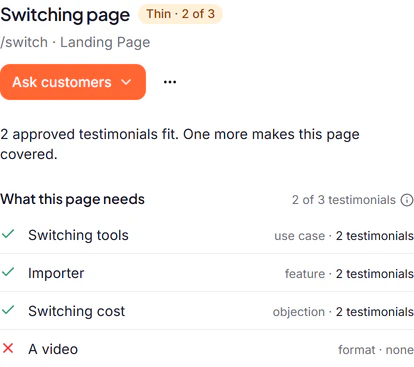
In the widget builder, Suggest objections with AI turns your customers' doubts into a list, Suggest metrics with AI finds their numbers and Suggest splits with AI pairs a problem with its result, at no credit cost. And one testimonial can become a case study (2 credits) or emphasized text (1 credit), written from its reading. The case study generator
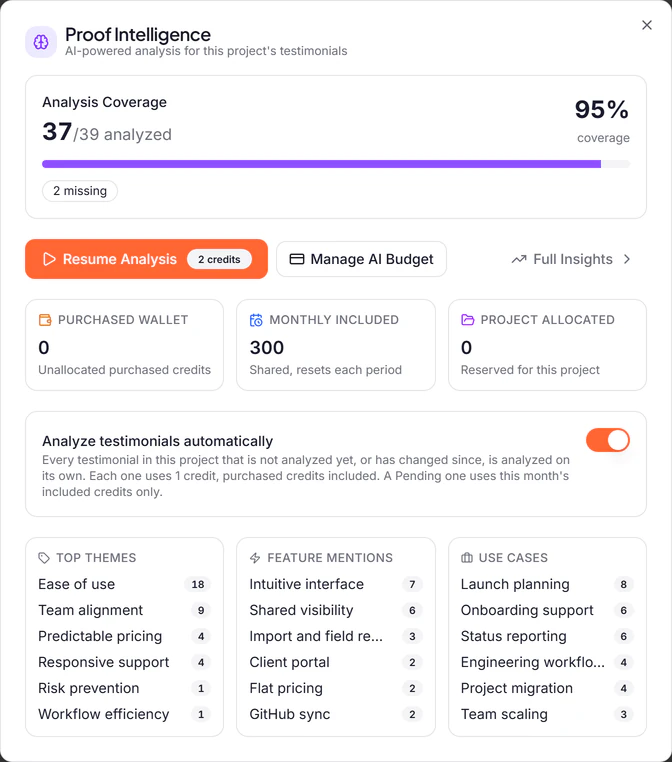
Premium includes 50 readings a month, and Business includes 150 readings a month for each active project. Need more? Packs of 100 credits ($9.99), 500 credits ($39.99), 1,000 credits ($69.99): between 7 and 10 cents a reading.
AI search, filters, sorting and the widget builder's suggestion buttons use no credits.
The details are in the guide: Proof Intelligence.
It's AI that reads each testimonial the way you would if you had the time: how the customer feels (Positive, Mixed, Neutral, Negative, with a score out of 100), what they're talking about, the problem they had, the result they got, and how strong the testimonial is as proof. In ReTestimonial it's called Proof Intelligence.
The star rating is what the customer gave. Sentiment is how they feel in their own words, so a four-star review with a complaint in it can read Mixed. The showcase score asks whether the testimonial would convince someone else: a specific result, a doubt answered or a before and after scores higher than warm praise. The inbox calls it the AI score.
The testimonial's words, and a video's transcript; its title and star rating; who wrote it: name, job title and company; where it came from, and when; and the answers to your custom fields. Nothing else: it doesn't read your website or other testimonials, only the labels your project already uses, so it files a new testimonial under the same names.
Usually within a few minutes of arriving, on its own. A large import or a backlog is read in batches, newest first, and Start Analysis in the Proof AI window queues everything waiting at once.
1 credit a reading. Premium includes 50 and Business includes 150 a month for each active project, and packs of 100, 500, 1,000 credits add more, which works out at 7 to 10 cents a reading. Approving or tagging a testimonial doesn't read it again, and a reading that fails gives its credit back.
No. A testimonial waiting in Pending is read automatically only from the month's included credits, never from credits you bought, and spam is never read at all. You can also switch automatic analysis off for a project, and nothing is read until someone starts it.
No. It never edits a testimonial, adds a tag, approves one or publishes one. Every quote it suggests is the customer's own words, checked against the testimonial, never rewritten.
No. Widgets and walls can use the readings to choose and order testimonials, but they show the testimonial itself, never its reading or its scores.
It's an AI's judgment of the words, kept only when it fits a fixed form, so read the scores as a guide, not a measurement. You can reanalyze any testimonial for a fresh reading. To see what proof actually did before a purchase, there's Proof Impact.
They stay on your testimonials. New testimonials aren't read on a plan without Proof Intelligence, and the filters and Insights that use the readings are on Premium and Business.
Premium and Business. The owner, Admins, Members and Viewers can see every reading. The owner, Admins and Members can read one testimonial again or turn it into a case study, and the owner and Admins can start the analysis of a whole project.
Every testimonial read, scored and filed, on Premium and Business.