 Capterra
 Yelp
 App Store
TEXTManualspeed
It is the only project tool I have used that feels designed. Every screen is calm.
 Elisa NishikawaProduct Designer at Yūgen StudioDateOct 6, 2026
Reviews from  Google,
 G2 and four more review sites, posts from
 X,
 LinkedIn,
 Instagram and
 TikTok, your own form answers and videos. Each one waits in Pending until you approve it.
The full inbox is on the free plan, with 10 text and 2 video testimonials. No credit card.
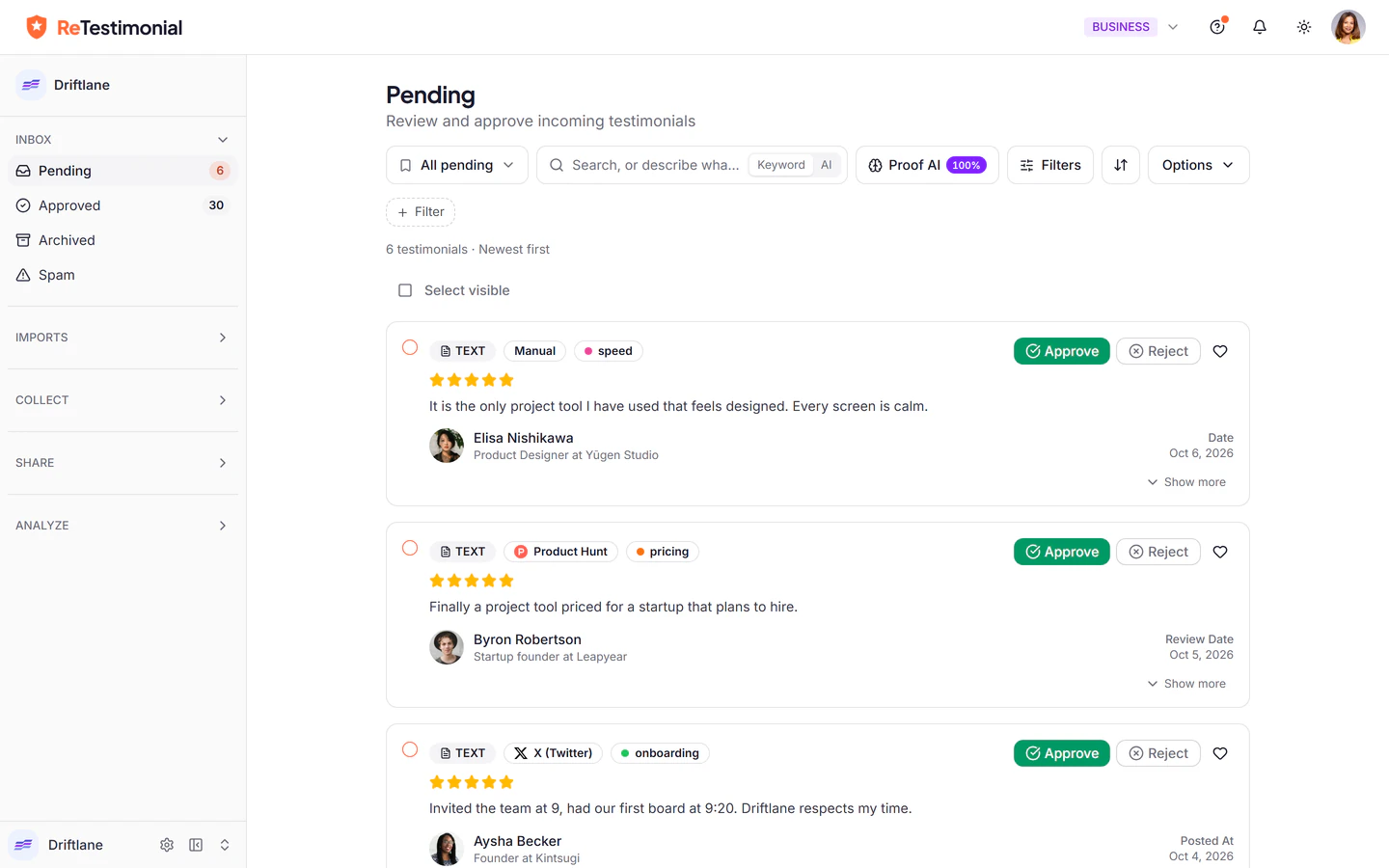
Connect a review site, paste a post's link, upload a file, or let your own forms collect them. However a testimonial arrives, it lands in the same list, with its author, stars, source and date.
Each review keeps the business, product or app it came from, so you can filter down to one of them.Google and G2 on every plan, the other four on Business.
Paste a post's link to import it.
XLinkedInInstagramTikTokPaste a video's link and it arrives as a video testimonial.
 YouTube
 Vimeo
 Loom
What you collect yourself.
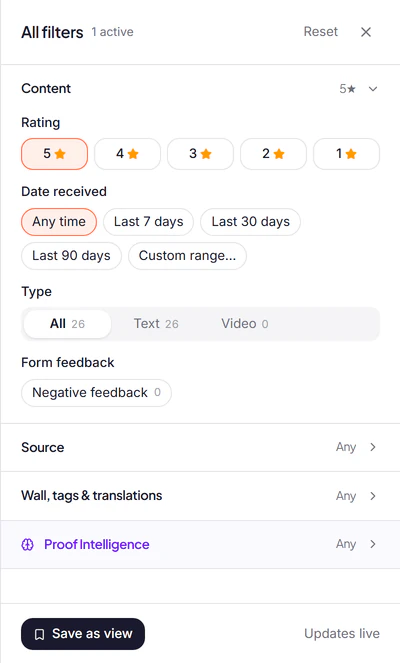
Add filters and the list narrows as you go. Each option shows how many testimonials it would leave, so you never filter your way into an empty list.
In the Pending view, J and K move between testimonials, and A approves the one you are on and takes you to the next. Try it on the demo project's six reviews.
Shortcuts work in the Pending view, and never while you type in a search box or a dialog. On a phone, every card has its own Approve and Reject buttons.
Pending
Review and approve incoming testimonials
It is the only project tool I have used that feels designed. Every screen is calm.
Elisa NishikawaProduct Designer at Yūgen StudioDateOct 6, 2026 Product Huntpricing
Finally a project tool priced for a startup that plans to hire.
 Byron RobertsonStartup founder at LeapyearReview DateOct 5, 2026X (Twitter)onboarding
Invited the team at 9, had our first board at 9:20. Driftlane respects my time.
 Aysha BeckerFounder at KintsugiPosted AtOct 4, 2026Googlesmall-teamssupport
Lovely product and kind support. The mobile app could be faster, but it gets better every month.
 Isla AllisonFounder at WildbloomReview DateOct 3, 2026
The CRM sync means my team never retypes a deal. Kickoff starts the day the contract is signed.
 Scott ClaytonSales Director at Meridian CloudDateOct 2, 2026G2agenciespricing
We run forty client projects in it. The per-workspace price means growth does not punish us.
 Marvin RobbinsAgency partner at Robbins & CoReview DateOct 1, 2026
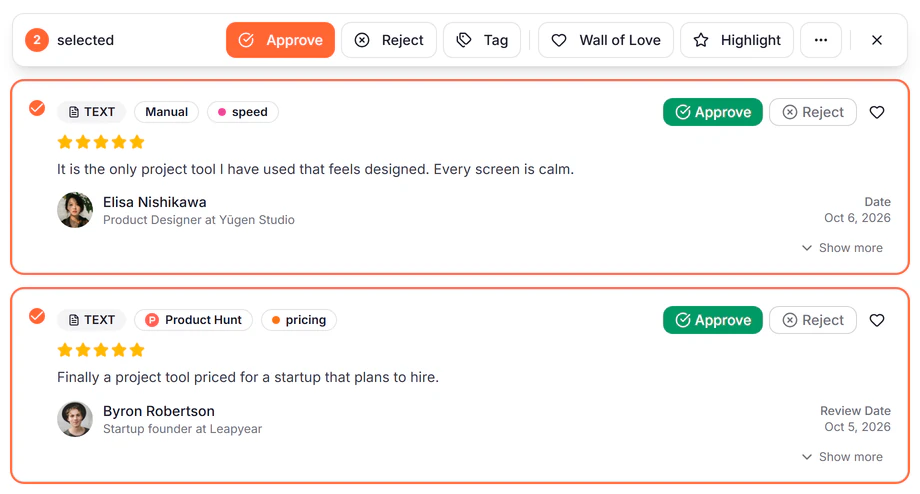
A copy of the Pending view. Nothing is saved or sent.
Tick testimonials, or select every one that matches your filters, across all pages. Then approve, reject, tag, add them to a Wall of Love, highlight them there, archive or delete them in one go. Deleting asks first, with the count. See bulk actions at work
Translate a selection too: up to 10 languages and 200 testimonials a run, in the background. Business
Bring every testimonial into one inbox.
Start free — no cardIt notes the theme, the sentiment, the feature and use case each testimonial mentions and the kind of asset it would suit, then scores it out of 100 as proof.
Premium and Business
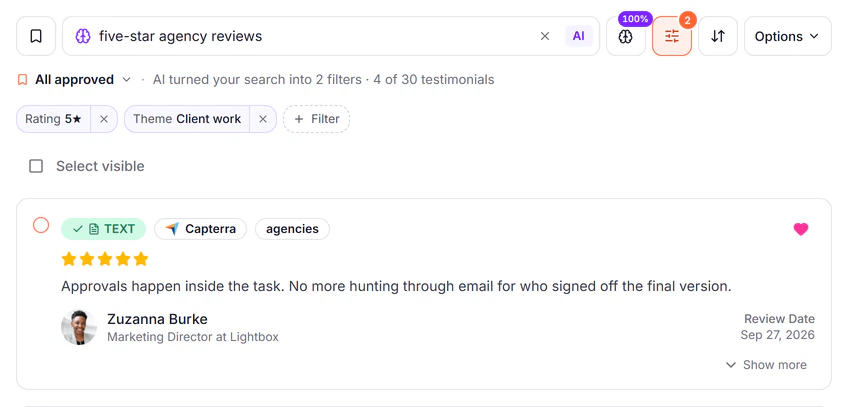
Describe what you are after and Proof AI turns it into filters, using your own sources, tags and themes. Each filter it made is a chip you can change or remove. AI search uses no credits.
Open a testimonial to see its score and what Proof AI read in it. Sort the list by AI score to put the strongest proof first.
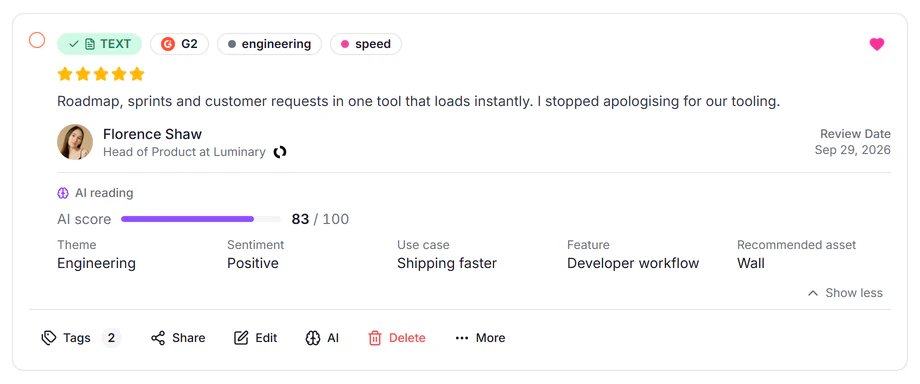
Open a card and work on it where it is: no export, no second tool.
Every submission gets a spam score from signals such as a hidden honeypot field, blocked addresses and domains, repeat submissions and links. At or above your threshold, it lands in Spam instead of Pending.
| Feature | Free$0 | Pro$29/mo | Premium$49/mo | Business$79/mo |
|---|---|---|---|---|
| The inbox: filters, saved views, keyboard and bulk actions | ||||
| Text testimonials | 10 | Unlimited | Unlimited | Unlimited |
| Video testimonials | 2 | Unlimited | Unlimited | Unlimited |
| Review sites to import from | Google, G2 | Google, G2 | Google, G2 | All 6 |
| Spam folder and spam settings | ||||
| Export a project as CSV | ||||
| Custom fields on cards | – | |||
| Proof AI: reading, AI search, sort by score | – | – | ||
| AI credits included per project each month | – | – | 50 | 150 |
| Translations | – | – | – |
Monthly prices, per active project. See every plan
Yes, all of it: filters, saved views, keyboard shortcuts, bulk actions, tags and the spam folder. The free plan has 10 text and 2 video testimonials on one project. Proof AI is on Premium and Business, translations on Business.
Your own forms (text and video), reviews from 6 review sites (Google, G2, Capterra, Yelp, Product Hunt, App Store), posts from X, LinkedIn, Instagram and TikTok, videos from YouTube, Vimeo and Loom, a CSV, Excel or JSON file, and the browser extension. Google and G2 on every plan, the other four on Business.
Not unless you ask for it. New testimonials wait in Pending. An import or a connected review site can be set to approve what it brings in, and spam goes to its own folder instead. Once approved, a testimonial can appear on widgets and walls that fill themselves, or you add it to them by hand.
There are 6, and they work in the Pending view: J or ↓ for the next testimonial, K or ↑ for the previous one, A to approve, R to reject, W to add to a Wall of Love, and Esc to let go. Approving moves you to the next testimonial, so after the first one, each approval is one key.
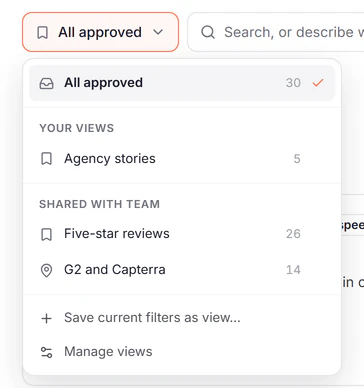
Yes. Save any set of filters and sort as a view, and keep it to yourself or share it with everyone on the project. A project holds up to 50 shared views, and each person up to 50 of their own. Views are on every plan.
It is part of Premium and Business, and its work is paid in AI credits: 1 to analyse a testimonial, 2 for a case study, 1 for short versions of a testimonial (a one-liner, a short quote and a social caption). Each project gets credits every month (Premium 50, Business 150), and you can buy more. Automatic analysis can be switched off per project. AI search does not use credits.
Each submission gets a spam score from signals like a hidden honeypot field, blocked addresses and domains, repeat submissions and links. At or above your threshold (60 out of 100 unless you change it) it goes to the Spam folder instead of Pending. Not Spam puts it back; otherwise it is deleted 30 days after it was marked.
The full inbox is on the free plan, with 10 text and 2 video testimonials. No credit card.