Testimonial software for online stores
Proof at the point of purchase.
Ask every buyer after the parcel arrives, about the thing they bought. Keep their photos and their words. Show each product's own reviews beside the buy button, on the pages your ads open and in your emails.
Free plan · no credit card

Linen Apron
$58
Stonewashed linen, cross-back straps and one deep pocket.
Free shipping over $75 · Returns within 30 days
Customer reviews
- 1A Rating Badge. on every plan. Its average and count are those of the reviews it shows; a click opens them.
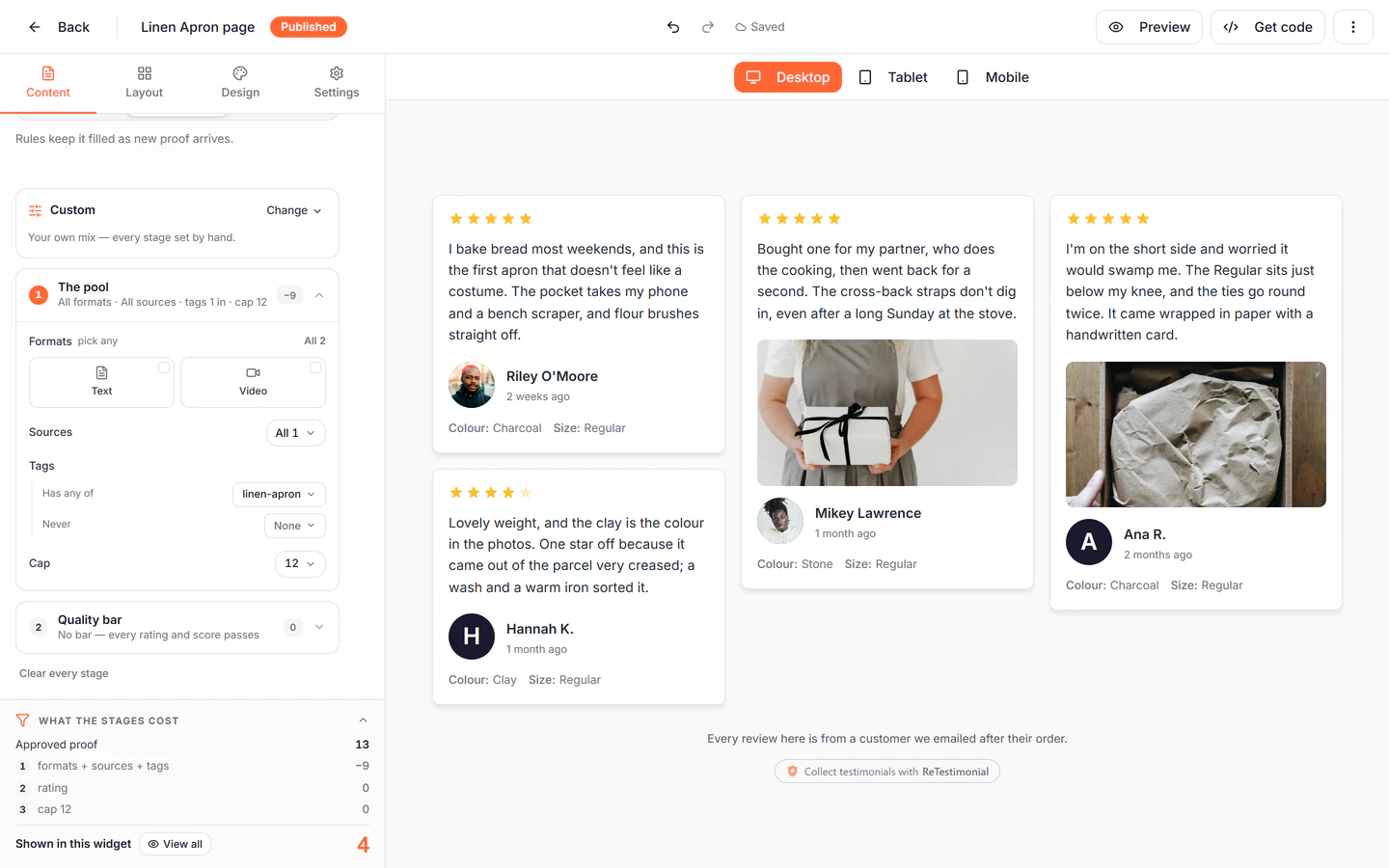
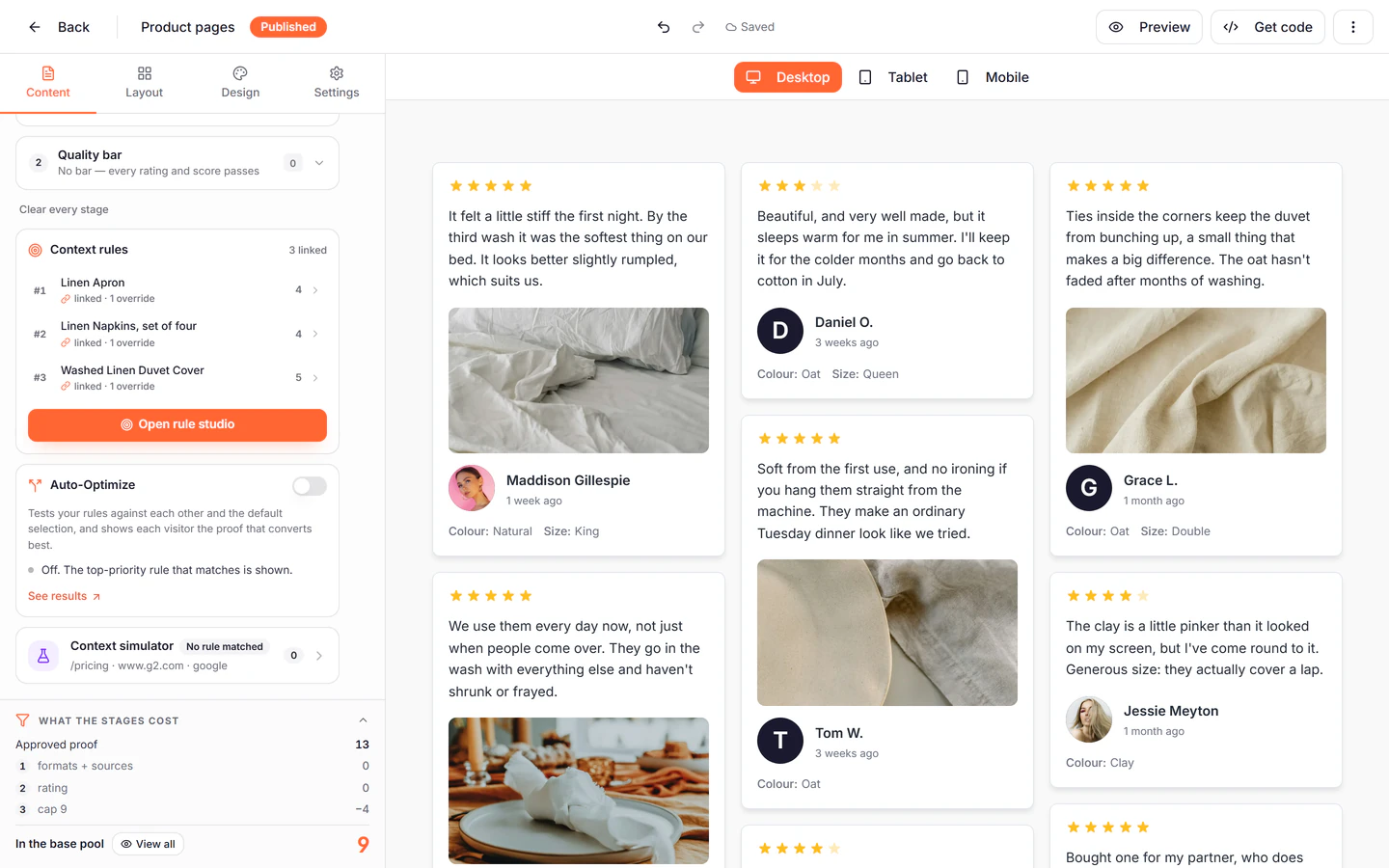
- 2This product's reviews. one widget per product with a tag (Auto-sync, "Tags: has any of"), on every plan, or one widget across every product page with Proof Match path rules, from Premium.
- 3Up to 3 photos. with each answer, taken on the customer's phone, on every plan. The colour and size they bought beside them are custom fields, from Pro.
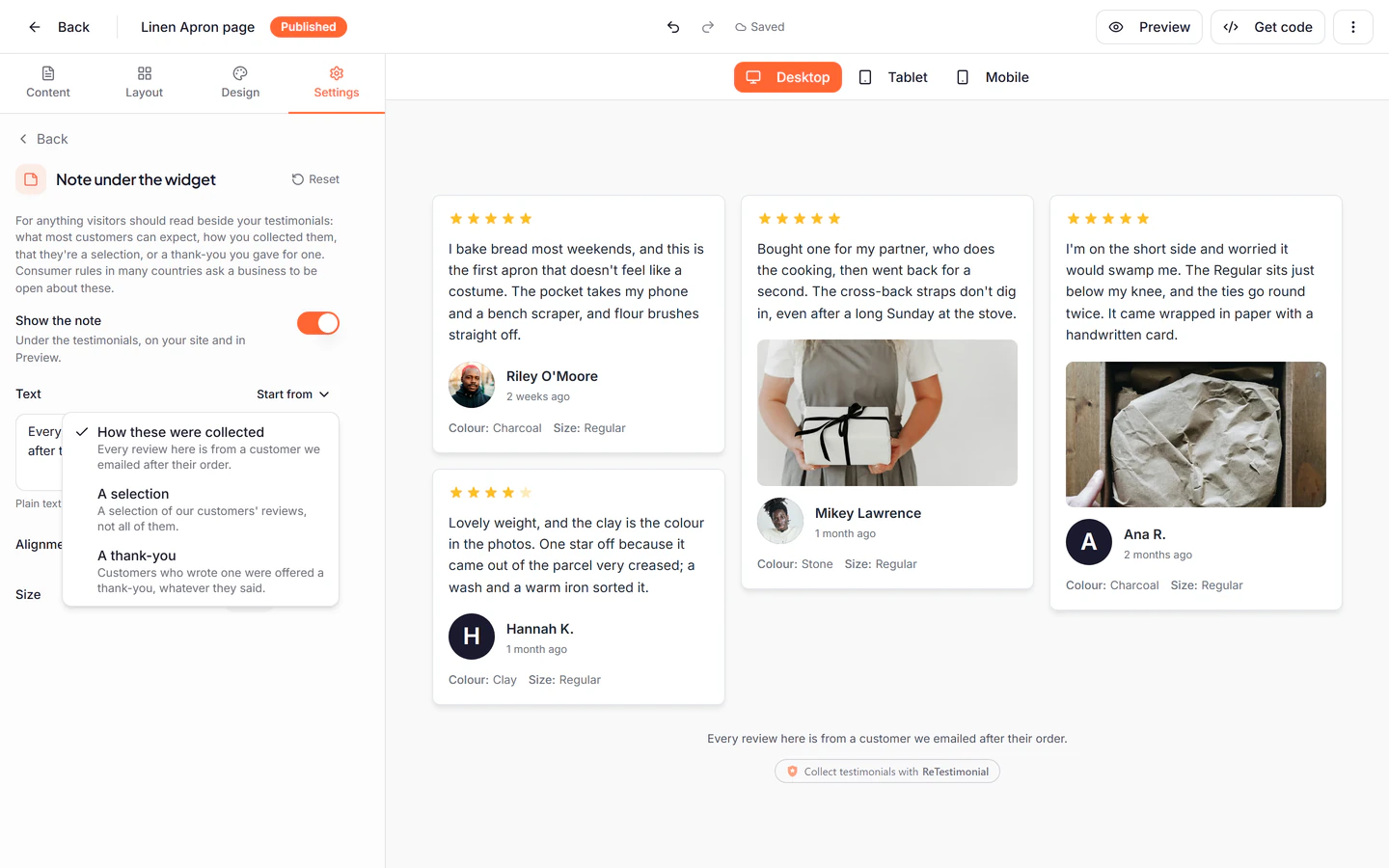
- 4A note under the widget. in your words, on every plan: here, how the reviews were collected.
Wren & Weft and its customers are made up. The badge and the reviews are ReTestimonial's own Rating Badge and Masonry grid, on every plan, each filled with the reviews tagged for the product you pick: the badge works out its own average and count. The colour and size on each review are custom fields, from Pro. The line under the reviews is the widget's note.
Every order is a review you haven't asked for yet.
Most happy customers never write a word unless someone asks. Ask every one of them, once the parcel has had time to arrive, about the thing they bought, without writing an email for each product.
1 Shopify sends
Order paymentOrder eventSignature checked{"name": "#1042","email": "madeleine.pitts@example.com","financial_status": "paid","line_items": [{"title": "Linen Apron","name": "Linen Apron - Oat / M","variant_title": "Oat / M","quantity": 1}],"customer": {"first_name": "Madeleine"}}2 ReTestimonial reads it
emailmadeleine.pitts@example.com- Name
customer.first_nameMadeleine- product (Extra field)
line_items[0].titleLinen Apron
Your subject line
How's your
{meta:product|order}?How's your Linen Apron?
An order with no product's name reads “How's your order?”.
3 It waits, then asks
- The wait you set10 days, so the ask lands after the parcel (up to a year)
- The first emailThe product's name in the subject, your words below it
- A reminder3 days later
- One last ask7 days after the first
- They answerEvery email still to come is cancelled
Smart Invites Premium+
How's your Linen Apron?

Wren & Weft via ReTestimonial <invites@campaigns.retestimonial.com>
The first email to madeleine.pitts@example.com, naming the Linen Apron. Subject: How's your Linen Apron?.
Wren & Weft Hi Madeleine, Your Linen Apron should have arrived by now. How is it? A few words, or a photo of it at home, helps the next person decide. It takes about a minute. Share my experience: https://reviews.wrenandweft.example Wren & Weft sent you this request through ReTestimonial. Unsubscribe: https://retestimonial.com/api/invites/unsubscribe/sample Powered by ReTestimonial: https://retestimonial.com
Madeleine and the order are made up. Each tile is the Smart Invites wizard's own preset: its event, whether it is signed, and the fields it reads, the product's name among them. The email is drawn by the product's own layout, with the store's words.
- From your store's own webhook
- Tiles for Shopify, Shopify POS, WooCommerce, Gumroad and Lemon Squeezy fill in the fields, the product's name among them, and show you where to paste the address. Shopify, Shopify POS, WooCommerce and Lemon Squeezy events are checked against their signature (Gumroad doesn't sign its own: keep its address private), and an event the store marks as a test is skipped. Send invites from Shopify
- There's no delivery event
- No store tells us a parcel arrived. Set a wait instead, up to a year, or start from Shopify's Order fulfillment event.
- Polite by design
- Three emails at most, stopped when they answer. Nobody is asked again for 90 days, and an unsubscribe is kept for good.
- In the shop too
- Shopify POS asks the day after a sale at the till, when a customer with an email address is on it.
- Each product to its own form Business
- Routing rules send each product's buyers to a form of its own, which tags everything it collects.
- Every buyer, the same way
- The webhook asks every order, not only the ones you expect to be happy: the rule in the US, the EU and the UK.
The product's name, from the order
Pick your store's tile in the Smart Invites wizard and the fields are filled in for you: the customer's email and name, and an Extra field called product, read from the order's first item. Write How's your {meta:product|order}? in your subject; an order without a product's name reads “How's your order?”. Merge tags in invite emails
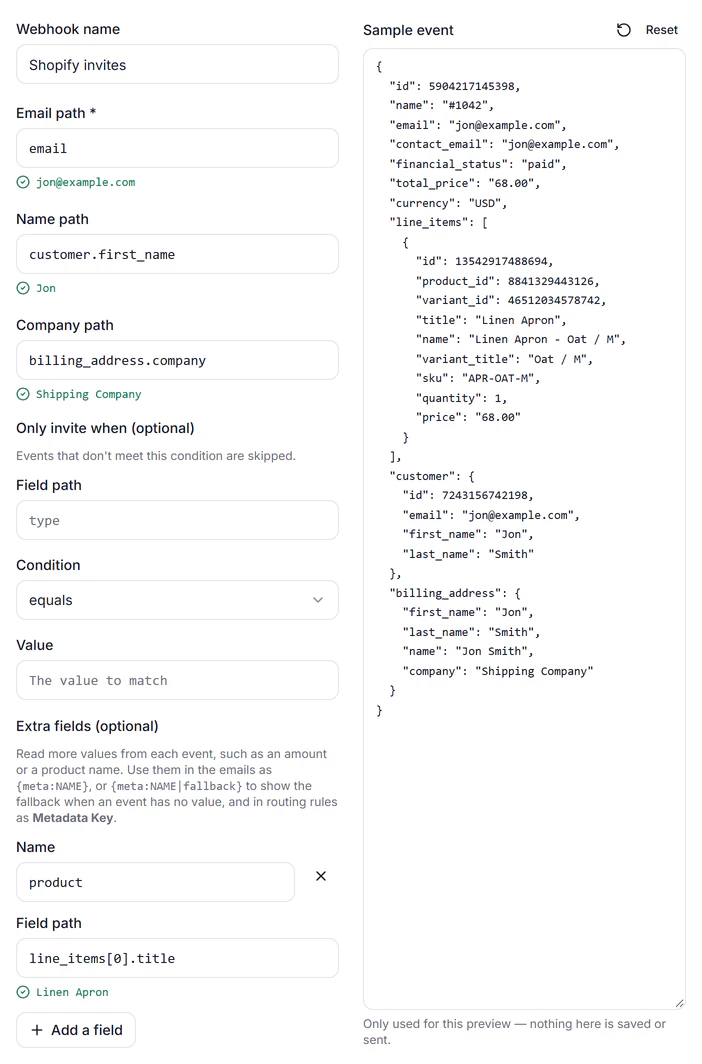
product read from line_items[0].title, “Linen Apron” in Shopify's own sample order.No webhook yet? Ask anyway.
On every plan, your form's link goes where your customers already look:
- in the shipping or delivery email your store already sends;
- in the parcel: print Receipt slips or Round stickers with your form's code from Share & embed;
- on your store, in a popup after an order, on exit or after a scroll.

What the customer meets
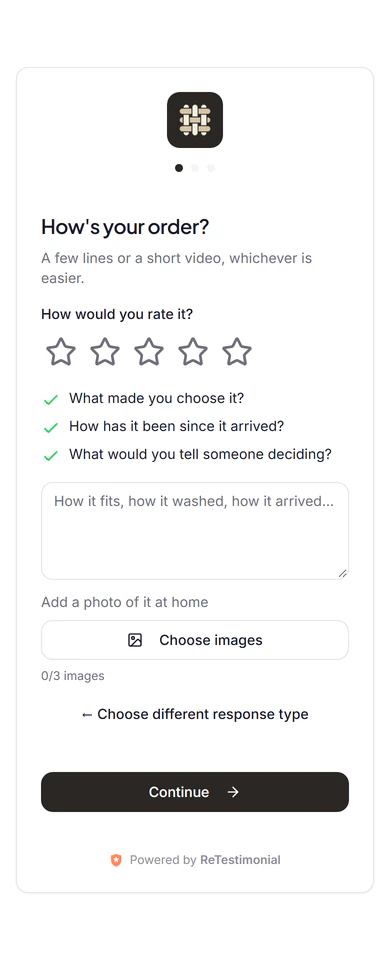
- Prompts about the thing they bought
- A star rating, then prompts such as “What made you choose it?”, “How has it been since it arrived?” and “What would you tell someone deciding?”. The question editor suggests them.
- Up to 3 photos
- Taken on their phone and sent with the answer: the apron in their kitchen, the bed on a Sunday morning.
- Or a short video
- Recorded in the browser, on a phone or a laptop, with no account and no app. Up to 2 minutes on Free and Pro, 3 on Premium and 5 on Business.
- The product already filled in Pro+
- A custom field called Product on the form is filled from the order, so you know what each review is about.
- Their permission, kept
- A Consent page keeps the sentence each customer agreed to, beside their answer.
- Waiting for you
- Every answer waits in Pending until you approve it, photos included, unless you switch off Require Approval or set an Auto-Approve Threshold.
The question every product page has to answer.
Will it fit? Is the colour right? How does it wash? Shoppers read past the stars for someone like them. Put the answer from someone who bought it next to the question.
Objection Answers Pro+
Write the questions shoppers ask you, and pick the reviews that answer each one. The three-star review that says the duvet sleeps warm sells it to the person who runs cold.
The detail that sells Pro+
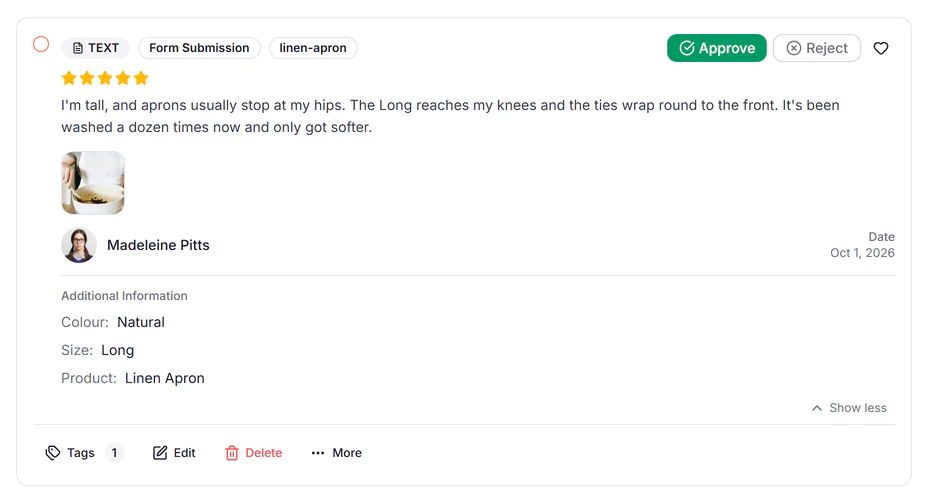
Custom fields such as Colour and Size show on the card, so the tall shopper finds the tall reviewer.
Photos, opened full size
A customer's photos show in a strip or a gallery and open in a lightbox.
Video for what needs showing Pro+
Product Cutaway plays a customer's video answer over their own photos, as a clip to post.
The product's own Objection Answers style, with Wren & Weft's questions and reviews.
Put it where they decide.
The product page, the page your ad opens, the cart, the email after the order, and the ad itself.
- Each product page, its own reviews
- One widget per product, set to Auto-sync with “Tags: has any of” its tag, on every plan. From Premium, one widget can cover every product page with Proof Match rules by path; a rule that finds too few reviews shows the widget's usual set.
- On Shopify and WooCommerce
- On Shopify, a script in a Custom Liquid section of your product template, with no app to install. On WooCommerce, the WordPress embed. Embed on Shopify
- The page your ad opens Premium+
- Proof Match by campaign: shoppers from your summer ad see the reviews about what the ad promised.
- Cart pages you control
- A Proof Toast or a Proof Bar, from Pro: a review that slides in, or a line along the edge.
- In your emails
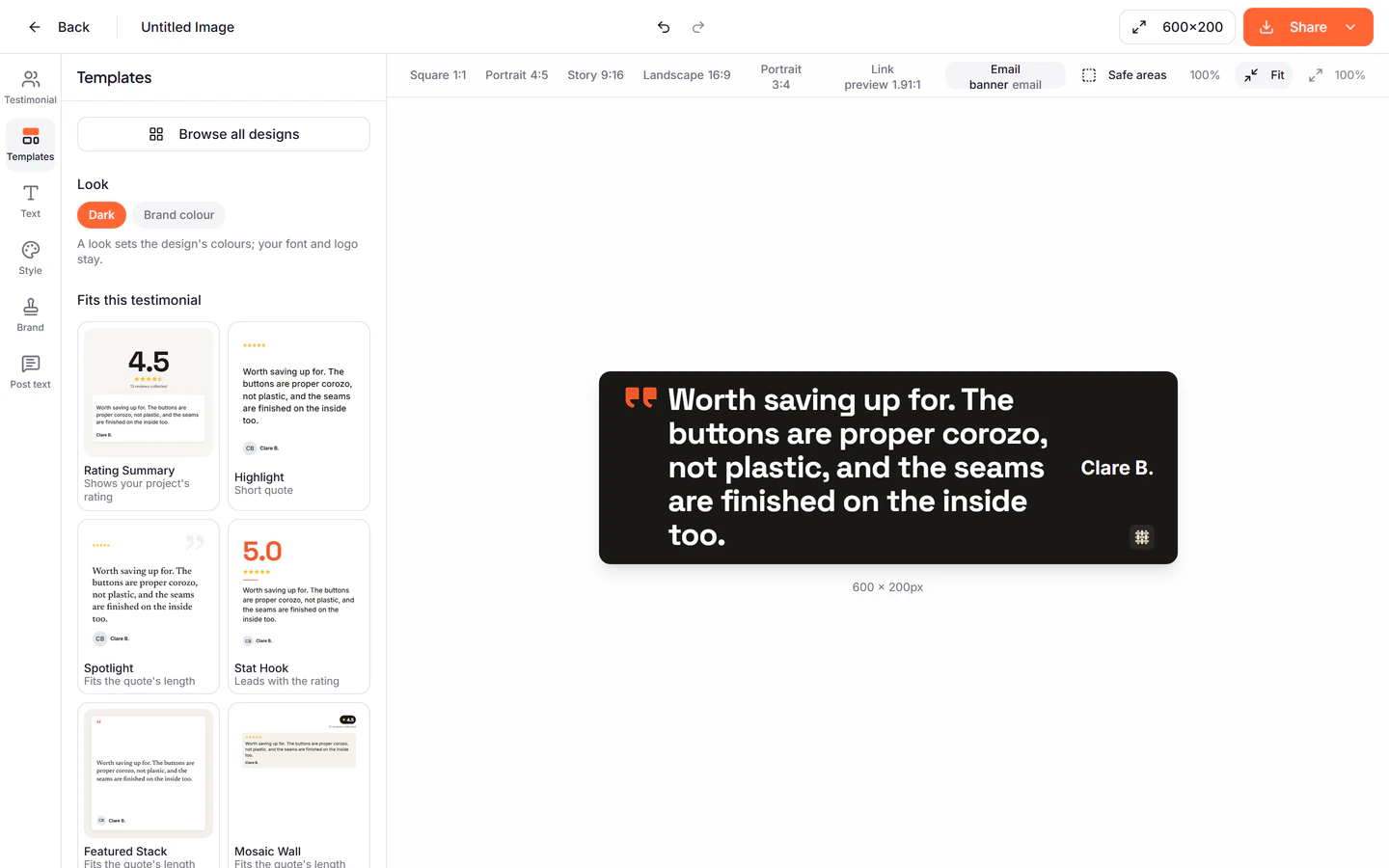
- An Email banner of 600 × 200 with one customer's words, on every plan, for the email after the order.
- Speed and your theme
- The loader is <14KB and loads after your page. A widget draws inside a shadow root: your theme's CSS rules can't reach into it, and its styles don't touch your page.
A customer's video, ready for your ads Pro+
From Pro, one video answer becomes a captioned clip in each shape a feed or a story asks for; a still image in 4:5 or 9:16 is on every plan. Their Consent page agreed to social channels and other marketing; you download it and post it yourself.

Keep your review app for the stars.
Most stores already run a product-review app, and it does its job well. ReTestimonial does the part it doesn't: the story behind the stars, in front of the people deciding.
A product-review app is for
- a star average under every product
- Google Shopping's product ratings, every review included
- questions and answers on the product page
- sending reviews on to retailers
ReTestimonial is for
- photos and video answers, and the words that settle a doubt
- on product pages, landing pages, emails and ads, not only under the product
- one ask per order that names the product
- a page of its own for every testimonial, to send in a reply
- which proof was on screen before an order
Bring your reviews over
Export a CSV from your review app and import it: stars, review, name and date are matched to their columns automatically. There's no preset for any one app. Free imports 25 rows at a time; XLSX and JSON, and undoing an import, from Pro. Import a CSV
Or the review you already have
A screenshot of a kind email or a message becomes a testimonial: Extract from screenshot reads it, on every plan. From Premium, an Instagram or TikTok post comes in by its link. Ask before you publish a private message.
Ask everyone. Hide nothing. Say how.
A store's reviews are the most regulated testimonials there are, and shoppers can tell a hand-picked wall of fives. What the US, the EU, the UK, Google and Shopify ask, from the bodies that set it.
Ask every buyer
Ask every customer the same way, not only the ones you expect to be happy. Inviting only satisfied buyers is deceptive in the US and cherry-picking in the UK. 16 CFR 255.2
Keep the three-star reviews
A review section can't hold back reviews for their rating and still read as all of them. Fashion Nova agreed to pay $4.2 million for hiding reviews under four stars. 16 CFR 465.7
The UK
Since April 2025, hiding negative reviews or giving positive ones more prominence is unlawful, with fines up to a tenth of turnover. CMA guidance on fake reviews
Say how they were collected
In the EU, a store that shows reviews says whether and how it checks they come from people who bought. One line under the widget does it. Directive (EU) 2019/2161
Thank-yous
A discount or a spin of the wheel for a review is allowed when it's the same whatever they write, and said beside the reviews. 16 CFR 465.4
Stars in Google
Google shows review stars for a product reviewed on its own page; reviews a business shows of itself get none. Shopping's product ratings need every review, low ones included. Google: review snippets
The Shop app
If your reviews also go to Shopify's Shop app, Shopify asks for no compensation for a review at all: no discount, no free product. Shopify: Shop review guidelines
4.0–4.7
Shoppers don't want perfect: purchase likelihood peaks between 4.0 and 4.7 stars, not at five (one retailer's year of sales, across 1,800 products). Spiegel Research Center, 2017
Say it under the widget
One line of yours under a widget or a Wall of Love, up to 280 characters, on every plan. A style that floats over the page, such as a toast, has no room for one. Start from a wording, then make it yours. Add a note under the widget
- How these were collected“Every review here is from a customer we emailed after their order.”
- A selection“A selection of our customers' reviews, not all of them.”
- A thank-you“Customers who wrote one were offered a thank-you, whatever they said.”
What the product holds to, in its code:
- A store's webhook asks before the customer has said a word, so who is asked can't depend on what they think.
- When a reward waits for your approval, every answer waits too, whatever its rating.
- A reward on your form never depends on the rating or the words.
- The Consent page keeps the sentence each customer agreed to.
This isn't legal advice. You decide what you publish.
See which proof was on screen before an order.
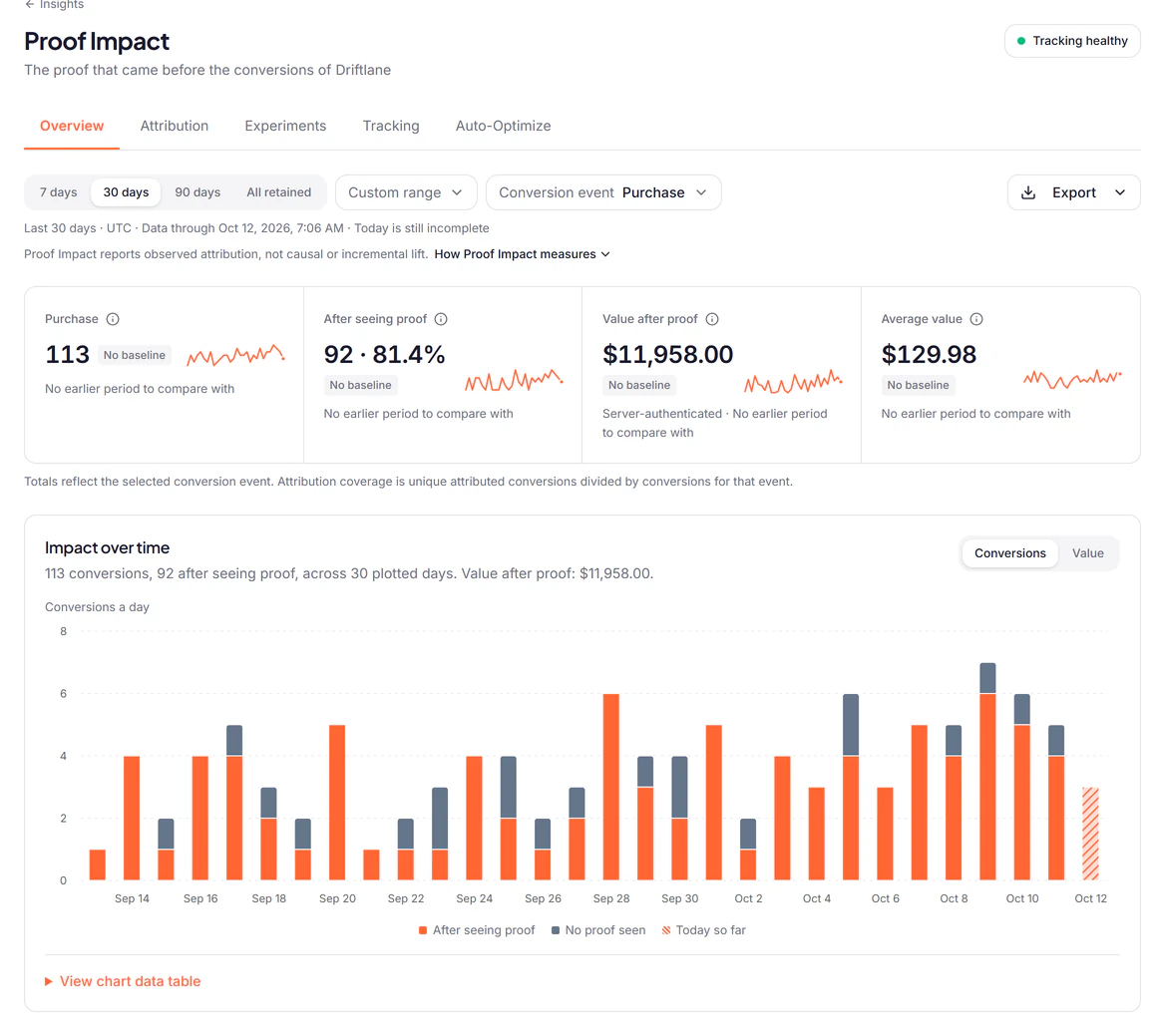
Proof Impact records which testimonials, widgets and pages a shopper saw before your order event: on your order confirmation page, or in the orders your server sends.
Proof Impact Premium+
- Observed attribution
- On Premium and up, Proof Impact shows which widget impressions were observed before checkout events, within the window you give each event (4 hours–30 days per event), with last-touch, first-touch or fractional credit. What came before, not what caused it; on Business, an experiment holds the widget back from some shoppers to measure the difference.
- On a hosted checkout
- It counts an order where our script runs on your order confirmation page, or when your server sends the order. On a checkout that runs no outside script, it can't.
- Views and clicks
- Widget views and top pages, and events in Google Analytics or Tag Manager, from Pro.
Priced for one store.
Start on Free, with no card. Every paid plan is priced per project, and one project holds every product you sell.
| Feature | Free$0 | Pro$29/mo | Premium$49/mo | Business$79/mo |
|---|---|---|---|---|
| Written testimonials | 10 in all | Unlimited | Unlimited | Unlimited |
| Video testimonials | 2 in all | 10 a project | Unlimited | Unlimited |
| Photos with an answer | 3 | 3 | 3 | 3 |
| Rating Badge and Review Summary | ||||
| Widget types | 4 | All 8 | All 8 | All 8 |
| Testimonials one live widget shows | 10 | 50 | Unlimited | Unlimited |
| Custom fields on cards (size, colour) | – | 2 | 5 | 5 |
| A thank-you for a review | – | |||
| Asks from orders, a month | – | – | 500 | 1,000 |
| A form per product, by the order | – | – | – | |
| One widget across product pages | – | – | ||
| Rows per file import | 25 | 100 | 500 | Unlimited |
| Captioned clips of a video | – | |||
| Star rating markup | – | – | – | |
| Proof Impact | – | – | ||
| Your own domain for forms | – | |||
| No ReTestimonial line on widgets | – |
Monthly prices, per active project; a year costs ten months. No setup fee. Every plan: forms with photos and video, the inbox, tags, auto-sync widgets, the Wall of Love, share pages and the CSV export. See every plan
Questions store owners ask
Is ReTestimonial a Shopify app?
No. A widget goes on your store as a script in a Custom Liquid section, with no app to install; the Shopify guide shows where. Asks after an order come from a webhook you create in your Shopify admin, from Premium.
Can it ask after the parcel arrives?
Shopify, WooCommerce and the other stores send no delivery event, so set a wait instead: the first email goes out after the days you choose, up to a year. Ten days after payment suits most parcels, or start from Shopify's Order fulfillment event. Two reminders follow, 3 and 7 days after the first email, and stop when they answer.
Can each product page show its own reviews?
Yes, with a tag per product: a widget set to Auto-sync with "Tags: has any of: linen-apron" shows that product's reviews, on every plan. Tag them in the inbox, or let a form do it (a form tags everything it collects). From Premium, one widget can cover every product page with Proof Match rules by path; a rule with too few testimonials shows the widget's usual set instead.
Will my reviews show stars in Google?
On Business, a widget can add review markup to the page it's on, named after the product you type. Google decides whether to show stars, and shows them for a product reviewed on its own page. We don't send a Google Shopping ratings feed.
Can I bring my reviews over from another app?
Yes: export a CSV from your review app and import it. The columns (stars, review, name, date) are matched automatically; there's no preset for any one app. Free imports 25 rows at a time; XLSX and JSON, and undoing an import, from Pro.
Can I reward customers for a review?
From Pro, a form can give a coupon code, a link or a Spin to Win, by default once you approve the testimonial, and nothing depends on the rating or the words. Say so beside your reviews: the note under a widget has a wording for it. Shopify's Shop app allows no reward for a review at all.
Do I have to show my negative reviews?
A review section can't hide reviews for their rating and still read as all of them. Testimonials you pick for a landing page are a selection: say so, and don't call them all your reviews. Shoppers trust a page with a few three-star reviews more than a wall of fives.
Will it slow down my store or fight my theme?
The loader is <14KB and loads after your page. A widget draws inside a shadow root, so your theme's CSS rules don't reach into it and its styles don't touch your page.
Does it work with WooCommerce, Gumroad or Lemon Squeezy?
Yes. The Smart Invites wizard has a tile for each of Shopify, Shopify POS, WooCommerce, Gumroad and Lemon Squeezy, with its event and the product's name already mapped; Shopify, Shopify POS, WooCommerce and Lemon Squeezy events are checked against their signature, and Gumroad doesn't sign its own, so its address stays private. On WooCommerce the widget goes in through the WordPress guide.
What does it cost for one store?
Free is free, with no card: 10 written and 2 video testimonials and 2 widgets. Pro is $29 a month for unlimited written testimonials, custom fields and every widget type. Asks after every order start on Premium, at $49 a month. Prices are per active project.
Ask your next order.
Start free. Put one product's reviews beside its buy button today, and let every order ask from Premium.