Put every widget, Wall of Love and form in your colours and fonts, your logo on your forms and share pages, and take our badge off. Save your brand once in a Brand Kit, and each new image and video starts in it.
Your colours, Brand Kit and no badge from Pro, $29 a month
14 day refund on your first payment
Brand Kit
Sample brand
“Powered by” badgeComes off from Pro
driftlane.appWidget · its Design tab
DriftlaneProductPricingCustomersStart free
Plan, ship and report in one place.
Collection formDesign tab
D
Driftlane
Step 1 of 2
How would you rate your experience?
On a scale of 1 to 5, how would you rate us?
New imageStarts from the kit
Video end cardSketched from the kit
Plan, ship and report in one place.
Free for 14 days. Bring your whole team.
Start freedriftlane.app
Driftlane
Simulated preview · Nothing is uploaded, saved or sent
Four made up businesses from this site, and yours. The widget, form and image are drawn by the product's own code.
Change a colour, a font or the logo to see how each surface looks with it.
Proof in someone else's colours reads like an ad
Visitors size up a testimonial before they read it. A widget in our coral with our badge under it looks pasted onto the page. Below is Ledgerline's page with the same widget twice: as it comes, and set in its own colours and type.
LedgerlineProductSecurityPricingBook a demo
LedgerlineProductSecurityPricingBook a demo
As it comesIn Ledgerline's brand
Drag the divider. Both are the live widget; only its Design settings and the badge differ.
Colour is the first tell. An accent that isn't yours pulls the eye to the wrong place.
A badge sends the credit elsewhere. The words are your customers'. The frame around them should be yours.
One kit, one click. Your exact colours sit first in the project's colour pickers, so nobody guesses a hex.
Save your brand once. Stop pasting hex codes.
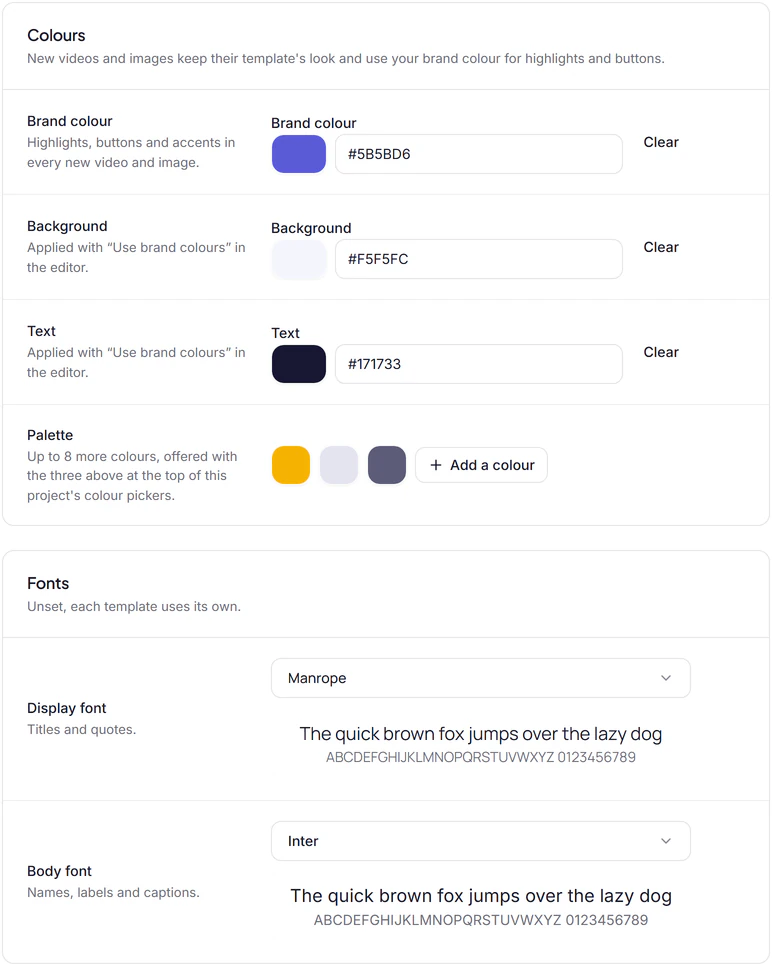
Each project keeps one Brand Kit in its settings: your colours, a palette of up to 8 more, two fonts, the end card your videos close on and up to 12 b-roll shots. One project is one brand, so every client keeps its own.
Driftlane's Brand Kit in Project Settings: a made up project, the real page.
In the kitWhere it goes
Brand colourHighlights, buttons and accents
Every new image and video
The “Your brand” style of your share pages
The top bar of your Monthly report
The first swatch in the project's colour pickers
Background and textYour page's own colours
“Use brand colours” in the image and video editors
The project's colour pickers
PaletteUp to 8 more colours
The project's colour pickers, after the three above
Display and body fontTitles and quotes; names, labels and captions
Every new image and video
End cardHeadline, subline, button label, link and tagline
What every new video closes on, with your project logo
B-rollUp to 12 product and place shots
The Product Cutaway video, after the customer's own photos
It never moves what's already live.
Widgets, walls and forms keep the design you gave each one, and a saved video or image opens as it was saved. Change the kit and only what you make next starts from the new one.
Brand Kit, on Pro, Premium and Business
Your exact colours, one click away
Open a colour in the project's widget, wall, form or share page builder, or in the image and video editors, and your kit's colours are the first row. This is the builder's own picker, with Driftlane's kit behind it.
Design · Global Colors
0 of 2 on brand
Open a colour. Your Brand Kit's colours are the first row.
DriftlaneProductPricingCustomersStart free
The widget starts in a new widget's own colours. Pick Driftlane's and watch it settle in.
Your customers wrote the words. The only brand around them should be yours.Yourcustomerswrotethewords.Theonlybrandaroundthemshouldbeyours.
In your brand wherever a customer meets you
Each surface keeps its own design, set in its own builder, so a wall can be bolder than the widget on your pricing page. These are the settings, by the names you'll find them under.
Widgets
Widget builder · Design tab
The whole widget first, then any single part of a card. On Free, pick one of 6 accent colours.
Pick any font in the catalogue on every plan, upload your own, or let a widget take your page's font with “Your website's font”. Every font comes from our own servers, so your visitors' browsers never call Google Fonts.
Brightside Bakery's widget, in the font you pick. Twelve of each group are shown here; the Fonts page has all 324.
On Business, widgets and Walls of Love take your own CSS. The Snippets menu lists only what the widget's style draws, and your rules win over the widget's own. Try it on Fernwick Coffee's widget.
Fernwick CoffeeMenuCafésBeansFind your café
Kept apart from your page
The widget draws inside a Shadow DOM: your page's CSS rules can't reach into it, and its styles never touch your page. Custom CSS is how you reach in, on purpose.
Snippets that match the style
Card, quote, stars, name, arrows: the menu offers the parts this widget's style draws, so a rule never names something that isn't there.
JavaScript too
Business also runs your own JavaScript on widgets and on wall embeds, checked when you leave the box, for tracking or a small tweak.
Custom CSS and JavaScript, on Business. Here it runs in your browser, on the builder's preview.
Take our name off, and know where it stays
No fine print. Here is every place a customer of yours could read ReTestimonial, and what takes it off.
Rather keep the badge? Connect your partner key on the Powered By settings page, and earn 30% for 12 months when a customer you refer subscribes.
Widgets“Powered by ReTestimonial” under the widgetSwitch it off on each widget, from Pro
Walls of LoveA badge on the page and the embedOne switch for both, from Pro
Forms“Powered by ReTestimonial” under the formThe Branding switch in Design, from Pro
Share pages“Collect testimonials with ReTestimonial”Hidden from Pro, unless you turn it on
Images and videosA small watermarkGone from Pro
Email footer“Powered by ReTestimonial”Its own switch, on Business
Email sender“Your project via ReTestimonial”·Stays: emails are sent through us
On a paid plan, a widget or wall shows “Collect testimonials with ReTestimonial” until you switch it off. Your dashboard, the share pages' address and the video player are ours too.
Your address, and a brand for every client
Forms and walls on your own subdomain
From Pro
reviews.driftlane.app
reviews.driftlane.app/love/wall-of-love
Point a subdomain at us and a project's forms and Wall of Love live there, with the certificate handled. One a project, and your logo becomes the browser tab's icon. Widgets and share pages keep their own addresses.
A kit belongs to a project, so opening a client's project puts that client's colours first in its colour pickers. Owners and Admins edit it, and the client's Monthly report prints with their logo and colour.
One brand colour, a background and a text colour, a palette of up to 8 more colours, a display and a body font, the words of your videos' end card, and up to 12 b-roll images. Each project has its own, so one project is one brand.
Does the Brand Kit restyle my widgets and Walls of Love?
No, and that is on purpose. Each widget, wall and form keeps the design you gave it in its builder, so changing the kit never moves one that is already live. What the kit does is put your colours first in the builders' colour pickers, so the exact colour is one click away. It applies by itself to new images and videos, to the share pages' “Your brand” style and to the Monthly report's top bar.
Which plan do I need?
On Free you choose any of the 324 hosted fonts, a theme, corners and spacing, one of 6 accent colours for widgets, and your own colours on forms; the badge stays. Pro, at $29 a month per active project, adds your own colours everywhere, the Brand Kit, your own font files, no badge and no watermark, your logo and end card on videos, and your own subdomain. Premium adds your own card layout. Business adds custom CSS and JavaScript on widgets and walls, and takes the “Powered by” line off your emails.
Can I use my brand's own font?
Yes. Pick from 324 hosted fonts on every plan, or upload your own (WOFF2, WOFF, TTF or OTF, up to 5 MB each) from Pro. A widget can also take the font of the page it sits on: choose “Your website's font”.
Do the fonts load from Google?
No. Every font in the catalogue is served from our own servers, so a visitor's browser never asks Google Fonts for anything when it draws your widget, wall or form.
Is it white-label?
Where your customers look, nearly. From Pro, widgets, walls, forms and share pages can carry no line of ours, and forms and walls can live on your own subdomain. Emails come from “Your project via ReTestimonial”, and their “Powered by” line comes off on Business. Your dashboard, the share pages' address and the video player stay ours.
Where does my logo appear?
Your project logo heads your forms and the emails your customers get, and your share pages when you choose it. Walls of Love show it when you turn on “Show your logo”, the Monthly report carries it, images and videos use it from Pro, and on your own subdomain it becomes the browser tab's icon. Widgets don't draw your logo: they show your colours and fonts, and each customer's own company logo.
Where does custom CSS work?
On widgets and on Walls of Love, page and embed, on Business. The editor's snippets list only what the widget's style draws, and your rules win over the widget's own. Forms, share pages, emails, images and videos have no custom CSS.
What happens to my branding if I downgrade?
Nothing is deleted. A Brand Kit stays saved and applies again after an upgrade, and your colour choices are kept. While on Free, live widgets and walls show the standard colours in their place, and the badge comes back.
Can each client have its own brand?
Yes. A Brand Kit belongs to a project, so each client project keeps its own colours, fonts, end card and b-roll, and switching projects switches brands. The owner and Admins can edit it.
Testimonials that looklike you built them
Your colours, your fonts, your logo, and no badge of ours. Your customers' words, finally in the frame they deserve.