Your G2 reviews, on the pages where buyers decide.
Import your reviews from G2, keep what customers praise, and show it beside your demo form and pricing with the G2 mark. New reviews come in on a schedule, and nothing goes live until you approve it.
Free for one G2 product and up to 10 reviews. No credit card.
A G2 widget on Ledgerline's demo page
 What finance teams say on G2
One quote from G2's three questions.
G2 asks every reviewer what they like best, what they dislike and what problem the product solves for them. Your site gets the praise and the stars, and the review's headline when you show titles. The criticism stays with your team.
The review on G2
Our month-end close went from five days to two
What do you like best about Ledgerline?
Approvals happen where people already are. Budget owners approve from Slack, and nothing waits in someone's inbox for a week. Every approval and edit is in the audit trail, which our auditors loved.
Becomes the quote on your site
What do you dislike about Ledgerline?
Setting up the approval rules took longer than we expected for our three entities.
Stays in your dashboard
What problems is Ledgerline solving and how is that benefiting you?
A faster close and an audit with no follow-up questions about AP.
Used only when the first answer is empty
On your site
In your dashboard
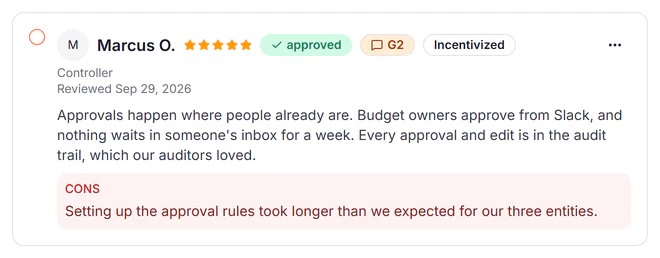
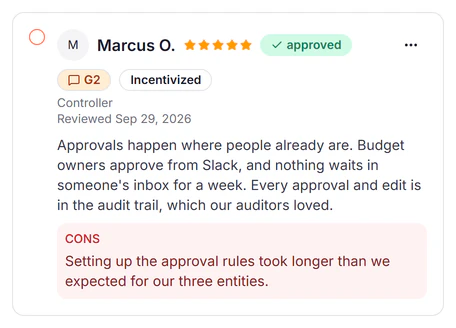
- Each review keeps its link to G2. Switch on review links and a buyer can open the review there.
- A reviewer who keeps their name private on G2 comes in as Anonymous. Without a photo, a card shows the reviewer's initials.
- G2's Incentivized label shows on the review in your dashboard, so you choose what to publish.
Connect your product, or paste any product's address.
Connect your own G2 product with an API token on every plan. On Business, import any product from its G2 address, no token needed.
Connect your product
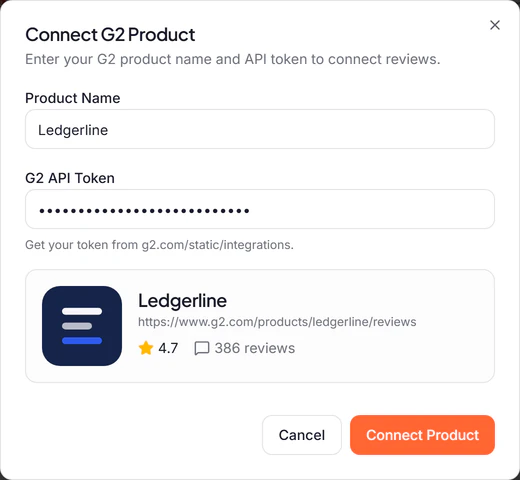
- In G2, open My G2 and create a token on the API Tokens tab.
- Paste it with your product's name, as G2 lists it.
- Check the preview, then connect. The token is stored encrypted.
Connect one product on the free plan, 3 on Pro, 10 on Premium and as many as you need on Business.
Choose what comes in
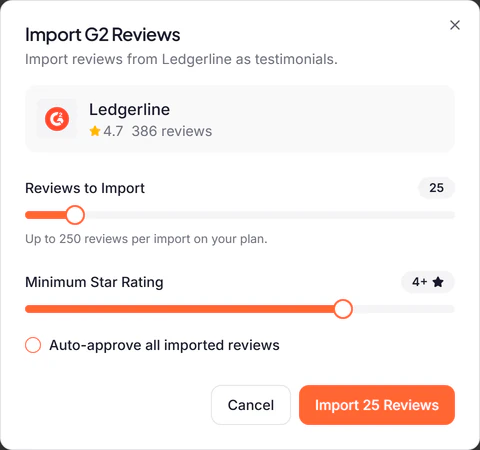
Import up to 25 reviews at a time, or 250 on Business. From Pro, leave out anything below the stars you choose. Reviews wait in Pending until you approve them, unless you approve them as they arrive.
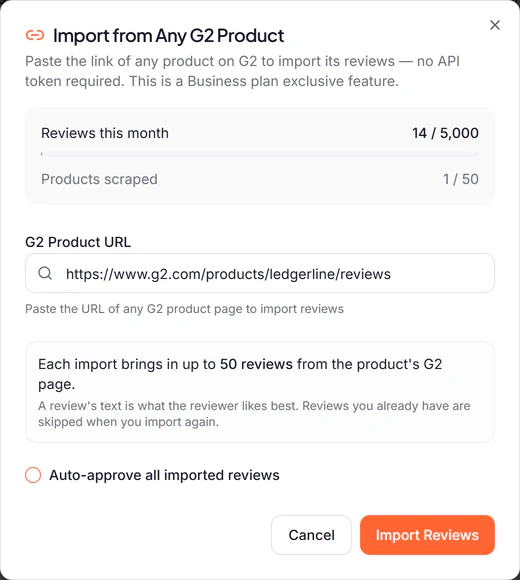
Import any product from its address Business
Paste a product's G2 address and import its reviews without a token: for agencies with clients on G2, or a product your company lists but doesn't administer. Each import brings up to 50 reviews, with the reviewer's job title and photo when G2 shows them. Your workspace can import 5,000 reviews a month from up to 50 new products.
New G2 reviews arrive without anyone checking.
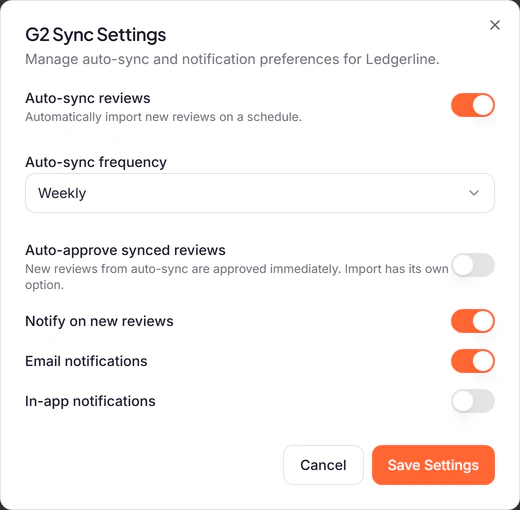
Switch on auto-sync and a connected product is checked for new reviews once a month on Pro and Premium, and every week on Business. On the free plan, press Sync once a month.
| Free | Sync once a month |
|---|---|
| Pro | Monthly, plus Sync twice |
| Premium | Monthly, plus Sync four times |
| Business | Weekly, plus Sync any time |
- Where they land
- In Pending, or straight in Approved if you switch on auto-approve for synced reviews.
- Who hears about it
- The workspace owner gets an email when new reviews arrive. In-app notifications are one switch away.
- Every rating comes in
- Syncs bring new reviews at every star rating. Approve them yourself, or set your widget to show 4 stars and up.
- Sync now
- Check a product for new reviews whenever you need: once a month on Free, twice a month on Pro, four times a month on Premium and as often as you like on Business.
- Your own tools
- A webhook can send each new review to an address you choose once it's imported, with the endpoint's review sync events turned on. Premium and Business
- Auto-sync
- From Pro. The first run comes one interval after you switch it on; press Sync if you want new reviews today.
Visitors who come from G2 see your G2 reviews.
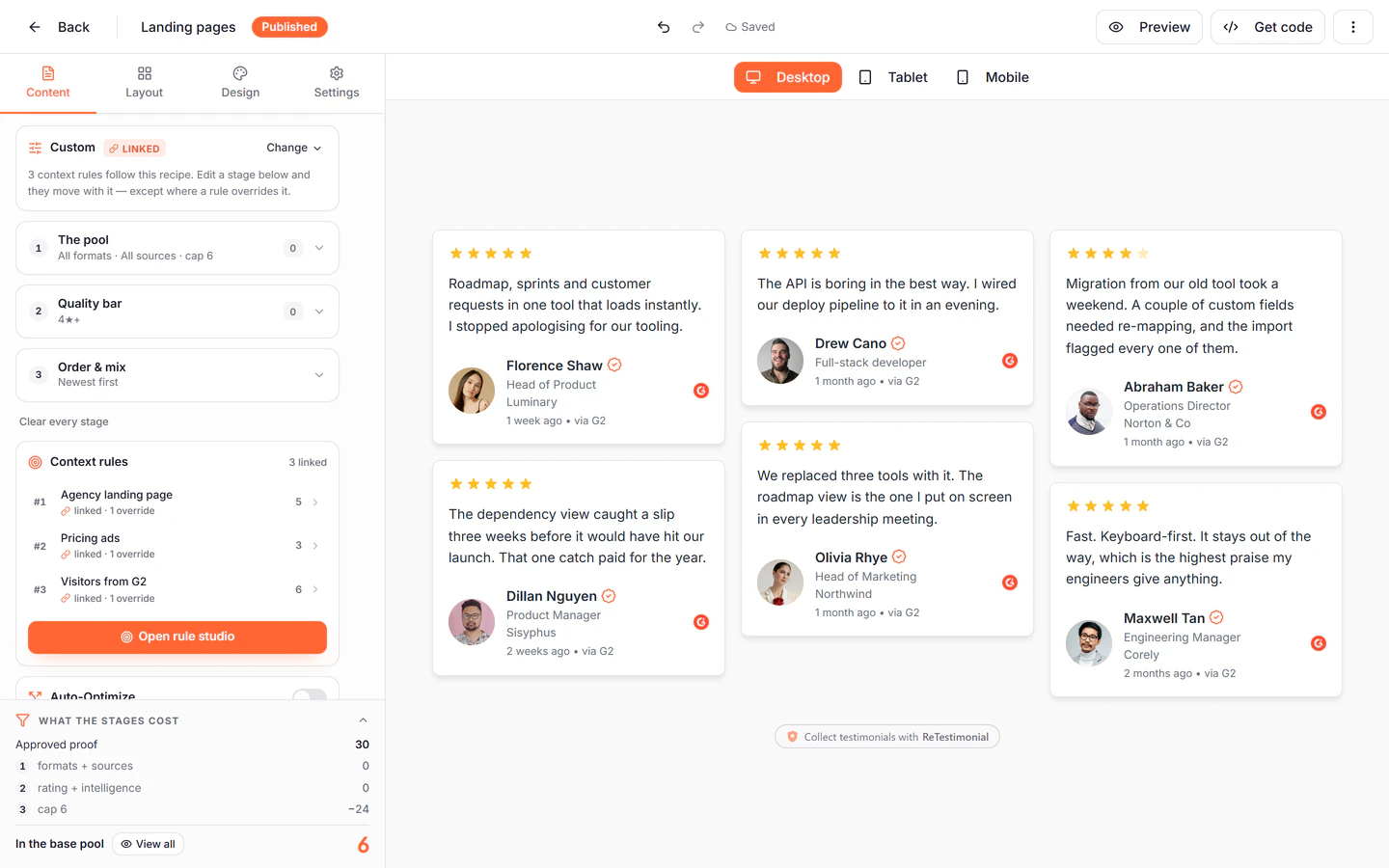
A buyer who clicks through from your G2 profile has just read reviews there. With Proof Match, the same widget can show them your G2 reviews, while visitors from your ads or your pricing page see the reviews that suit them. Premium and up
- A rule per audience
- Match a visitor by the site they came from, the page they're on or the campaign in the link.
- One snippet
- The rules live in the widget, so the code on your site never changes.
Pick a look. It's the real widget.
Each style below is drawn by the same code that runs on your site, with Ledgerline's approved G2 reviews. Choose from 64 styles and match your colours.
Classic Carousel
These colours are free on every plan. Any other colour, and removing the ReTestimonial badge, come with Pro. A widget goes on Webflow, WordPress, Framer, Squarespace, Wix, Shopify or any HTML page. See every widget style
G2 is one place buyers check.
Your G2 reviews share one inbox with reviews from  Capterra,
 Google,
 Product Hunt,
 App Store and one more site, answers to your own forms, video testimonials, and posts from
 X,
 LinkedIn,
 Instagram and
 TikTok. One widget can show them together, and any of them can become an image or a short video for social media.
The unified inboxCapterra reviewsTestimonial imagesSocial videos
Start free with one G2 product.
| Feature | Free$0 | Pro$29/mo | Premium$49/mo | Business$79/mo |
|---|---|---|---|---|
| G2 products you connect | 1 | 3 | 10 | Unlimited |
| Reviews per import | 25 | 50 | 100 | 250 |
| Sync now, per product a month | 1 | 2 | 4 | Unlimited |
| Auto-sync | – | Monthly | Monthly | Weekly |
| Star filter on import | – | |||
| Import any G2 product from its link | – | – | – | |
| Testimonials in your account | 10 | Unlimited | Unlimited | Unlimited |
| Show G2 reviews to visitors from G2 | – | – | ||
| Remove the ReTestimonial badge | – |
Monthly prices. Limits are per project, and paid plans are priced per active project. Compare every plan
Questions
What do I need from G2?
An API token from your G2 account: sign in to G2, open My G2 and create one on the API Tokens tab, then paste it with your product's name. If your G2 account has no API access, G2 asks you to talk to your account executive. On Business you can also import from a product's G2 address, with no token.
Which part of a G2 review shows on my site?
G2 asks every reviewer what they like best, what they dislike and what problems the product solves for them. The testimonial is the answer to what they like best, with the stars and the reviewer's name. It keeps the review's headline and its link to G2, which a widget shows when you switch on titles and review links. What they dislike stays in your dashboard, beside the review.
Do reviews show up on my site straight away?
No. Imported reviews wait in Pending until you approve them, unless you switch on auto-approve when you import, or for synced reviews in the product's sync settings.
Can I keep low ratings off my site?
Yes. From Pro, import only reviews at or above the stars you pick. Sync and auto-sync bring every rating, so approve them yourself or set your widget to show 4 stars and up.
How do new reviews get in?
Press Sync on a product (once a month on Free, twice a month on Pro, four times a month on Premium and as often as you like on Business), or switch on auto-sync: monthly on Pro and Premium, weekly on Business. A review is never imported twice, even if you disconnect and reconnect the product.
Why do some reviewers show as Anonymous?
G2 lets reviewers keep their name private, and those reviews come in as Anonymous. You can edit a testimonial's name and add a photo or company yourself. G2 doesn't share reviewers' companies, and only an import from a product's G2 address brings a reviewer's photo, when G2 shows one.
What does the Incentivized label mean?
G2 marks a review as incentivized when the reviewer was offered something in return for writing it. The label shows on the review in your dashboard, so you can decide which reviews to publish and how.
Can I import reviews of a product I don't run on G2?
On Business, paste any product's G2 address: an agency can import a client's reviews without the client's token. Each import brings up to 50 reviews, and a workspace can import 5,000 a month from up to 50 new products. Only publish reviews you have the right to use.
What if a review is edited or deleted on G2?
Your imported copy stays as it was: ReTestimonial doesn't follow later changes on G2. You can edit, archive or delete the copy yourself.
What does the free plan include?
One G2 product per project, imports of 25 reviews at a time, one Sync a month, and room for 10 testimonials in your account. Widgets on the free plan show a small ReTestimonial badge.
What happens to my token?
It's stored encrypted and used only to read your product and its reviews. To change it, disconnect the product and connect it again with the new token; the reviews you imported stay.
Put the reviews you earned on G2 to work.
Free for one G2 product and up to 10 reviews. No credit card.
G2 is a trademark of G2.com, Inc. ReTestimonial is not affiliated with or endorsed by G2.