Outbound webhooks
Approve a testimonial. Every tool you connect hears about it.
Each time a customer submits a testimonial, or your team approves, edits, archives or deletes one, ReTestimonial sends a signed request to the address you choose: your own server, Zapier, Make or n8n, or a Slack, Discord, Google Chat or Microsoft Teams channel. The good news reaches your CRM, your team and your website without anyone copying it over.
On Premium ($49 a month) and Business ($79 a month), per active project: 1 endpoint per project on Premium, 5 on Business, plus one for each form.
HMAC-SHA256 signature 4 tries over 71 minutes every try logged Replay 500 at a time

Lily-Rose Chedjou
Community Lead, Kindred Circle
We run every community event out of Driftlane now. Volunteers see their tasks on their phones, and nobody asks me where the run sheet is.
POST /hooks/retestimonialcrm.driftlane.example
X-ReTestimonial-Event: testimonial.approved
X-Signature: t=1791285604,v1=e4161567…
Waiting for an event
# customer-wins
ReTestimonial app
Testimonial approved ★★★★★
We run every community event out of Driftlane now. Volunteers see their tasks on their phones, and nobody asks me where the run sheet is.
Lily-Rose Chedjou · Community Lead, Kindred Circle · Driftlane
ReTestimonial sends the signed request. What happens next is your code, your automation tool, or a chat channel's own message.
Overview · 1:54
Watch one approval reach the team.
Follow an approval from a signed webhook to a team notification, then see how the delivery log, retries and replay keep you in control.
8 chapters · Captions · Full transcript
Read the transcript
Customer proof. Connected.
A great customer story just got approved. Now put it in front of the team who can use it.
Choose what starts your workflow
With ReTestimonial’s outbound webhooks, testimonial events can start your next workflow. Open Developer settings, add your endpoint, and choose the events you need. Here, we’ll send approved testimonials to a team notification workflow.
Make the connection
Create the endpoint, securely save its signing secret, and configure your receiver to verify incoming requests. Send a test to check the connection.
An approval becomes an action
When Sienna’s testimonial is approved, ReTestimonial queues the event and sends a signed request. Your configured workflow can turn those details into a useful team notification, with the customer’s story ready to read.
See what reached the receiver
Open the delivery log to inspect the event, payload, and response. Signed requests help your receiver verify the source, while a stable delivery ID supports duplicate protection.
Give delivery another chance
If the receiver is unavailable, automatic retries give it another chance. ReTestimonial makes up to four attempts, with increasing delays, and keeps the result visible in your delivery log.
Recover. Pause. Resume.
After fixing the receiver, replay the failed delivery from the dashboard. You can also pause deliveries while you work. Subscribed events keep queuing, ready to send when you activate the endpoint again.
Put customer proof into motion.
Put your customer proof into motion. Start free with ReTestimonial. Connect your workflow with Outbound Webhooks on Premium or Business.
Where the good news goes next.
One request, wherever your team works. Each recipe names the events it starts from and the fields it uses.
Celebrate it in the team channel
testimonial.approved
A Slack, Discord, Google Chat or Microsoft Teams message, four stars and up
- rating
- ★★★★★
- content
- the quote
- authorName
- who said it
- link
- your inbox
Choose the chat tool under Send as and paste the channel's incoming-webhook address. No automation tool in between.
Flag advocates in your CRM
testimonial.created · testimonial.approved
Your code, or Zapier, Make or n8n
- authorEmail
- find the contact
- content
- a note on it
- customFields[].label
- a property
- status
- advocate or not
Your custom fields arrive with their labels and a value ready to print. Custom fields
Keep your website or sheet in step
approved · updated · archived · deleted
Your code, or an automation tool
- id
- one row each
- updatedAt
- skip an older copy
- isArchived
- take it down
- deleted
- remove the row
A CMS collection or a spreadsheet gets a row per approved testimonial and loses it when the testimonial goes.
Send one form's answers to one place
testimonial.submitted
The form's own webhook
- form
- which form
- submission.responses
- every answer
- completionTimeSeconds
- how long it took
- rating
- the stars
One per form, outside the plan's endpoint limit, set up in the form builder. Forms
There's no built-in CRM connection: a webhook to your own code or an automation tool is how you connect one.
See exactly what your endpoint receives.
These 7 requests were built by the code that sends them and signed with a sample secret. Check the signature here, change one value and check again, or send the request to your own address.
Pick an event
A new testimonial arrives, from any source.
POST /hooks/retestimonial
Host: crm.driftlane.example
Content-Type: application/json
User-Agent: ReTestimonial-ProjectWebhooks/1.0
X-Signature: t=1791277204,v1=a7ecc9dd3d5b4e158b08fc9e87b7ce49bb6b94fd7e90a2fa71699a0d0ec17199
Idempotency-Key: Lq3Vd8Kt1Xn6Hb4Wz9Ra2
X-ReTestimonial-Event: testimonial.created
X-ReTestimonial-Delivery: Lq3Vd8Kt1Xn6Hb4Wz9Ra2
{
"id": "Lq3Vd8Kt1Xn6Hb4Wz9Ra2",
"event": "testimonial.created",
"eventVersion": "2026-07-16",
"timestamp": "2026-10-06T09:00:00.000Z",
"mutationGroupId": "submit:Tn5Rk1Wq8Zc3Hv7Lp2Jx6",
"sourceRaw": "hosted",
"sourceCategory": "form",
"data": {
"testimonial": {
"id": "Tn5Rk1Wq8Zc3Hv7Lp2Jx6",
"projectId": "Dr4Lk9Vf2Hq7Sm0Ye5Jw1",
"type": "TEXT",
"status": "PENDING",
"content": "We run every community event out of Driftlane now. Volunteers see their tasks on their phones, and nobody asks me where the run sheet is.",
"rating": 5,
"authorName": "Lily-Rose Chedjou",
"authorEmail": "lily-rose@kindredcircle.example",
"authorTitle": "Community Lead",
"authorCompany": "Kindred Circle",
"authorAvatar": "https://assets.retestimonial.com/app-statics/demo-avatars/v1/Lily-Rose%20Chedjou.webp",
"socialProfiles": [],
"customFieldValues": {
"Vb7kQ2mXp9LwR4tN8sYzA": "11–50",
"c3HfJ6uE1rTq0WnB5vKdM": {
"country": "CA",
"region": "Ontario"
}
},
"customFields": [
{
"id": "Vb7kQ2mXp9LwR4tN8sYzA",
"label": "Company size",
"type": "dropdown",
"value": "11–50",
"displayValue": "11–50"
},
{
"id": "c3HfJ6uE1rTq0WnB5vKdM",
"label": "Country",
"type": "country",
"value": {
"country": "CA",
"region": "Ontario"
},
"displayValue": "Ontario, Canada"
}
],
"tags": [
"onboarding"
],
"isArchived": false,
"isSpam": false,
"sourceRaw": "hosted",
"sourceMetadata": null,
"videoThumbnail": null,
"muxPlaybackId": null,
"videoDuration": null,
"createdAt": "2026-10-06T09:00:00.000Z",
"updatedAt": "2026-10-06T09:00:00.000Z"
},
"project": {
"id": "Dr4Lk9Vf2Hq7Sm0Ye5Jw1",
"name": "Driftlane",
"slug": "driftlane"
}
}
}
An HMAC-SHA256 of t, a full stop and the raw body, keyed with this sample's secret, whsec_4f1c9a7e2b6d80534f1c9a7e2b6d80534f1c9a7e2b6d80534f1c9a7e2b6d8053, compared with v1.
The envelope
- id
- The delivery's id: the same on every attempt, retry and replay.
- event
- Which of the seven events this is.
- eventVersion
- The format's version, a date: 2026-07-16.
- timestamp
- When the event happened, in UTC.
- mutationGroupId
- Shared by the events one change made, such as a form's created and submitted.
- sourceRaw
- Where the testimonial came from, as stored: a form, Google, a file import…
- sourceCategory
- That source, grouped: form, manual, review_platform, import and the rest.
- data
- The testimonial and the project; a form's answers on submitted; only an id on deleted.
In every testimonial's request
- The words
- The testimonial as written, its stars, and whether it's text or a video. content, rating, type
- The person
- Name, email, role and company, their photo as an address you can fetch, their social profiles. authorName, authorEmail, authorTitle, authorCompany, authorAvatar, socialProfiles
- Your custom fields
- Each answer with its field's label and a value ready to print. customFields
- Where it stands
- Pending or approved, archived or in Spam, and its tags. status, isArchived, isSpam, tags
- Where it came from
- The source as stored, with what that source added. sourceRaw, sourceMetadata
- The video
- For a video: its playback id, a thumbnail address and its length. muxPlaybackId, videoThumbnail, videoDuration
- When
- When it arrived and last changed, so you can skip an older copy. createdAt, updatedAt
The testimonial is made up, about Driftlane, a demo product. A real request is sent as compact JSON, and the signature covers it exactly as sent.
Live in three steps.
In your project's Developer settings. The workspace owner and the project's Admins can set webhooks up.
Add an endpoint
Name it, choose what it gets (the signed JSON, or a chat tool's message), paste the address, tick the events and, if you like, a minimum rating or text or video only. Each event says when it's sent.
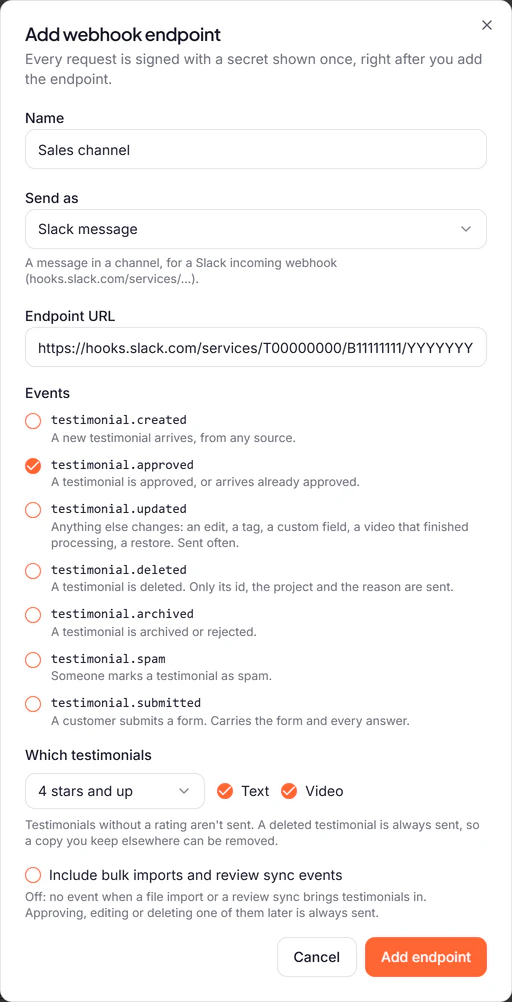
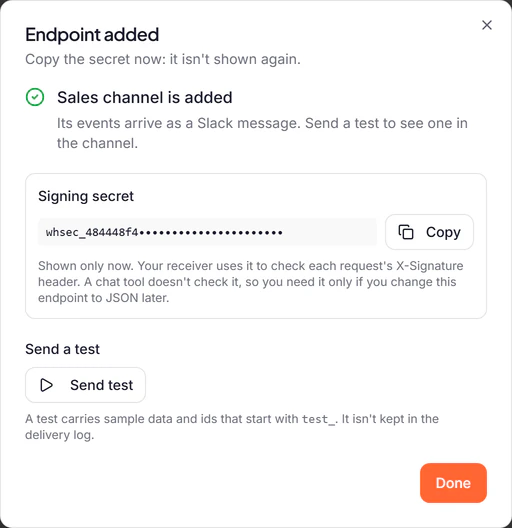
Copy the signing secret
It's shown once, right there in the dialog. Your receiver uses it to check every request. Regenerate it any time.
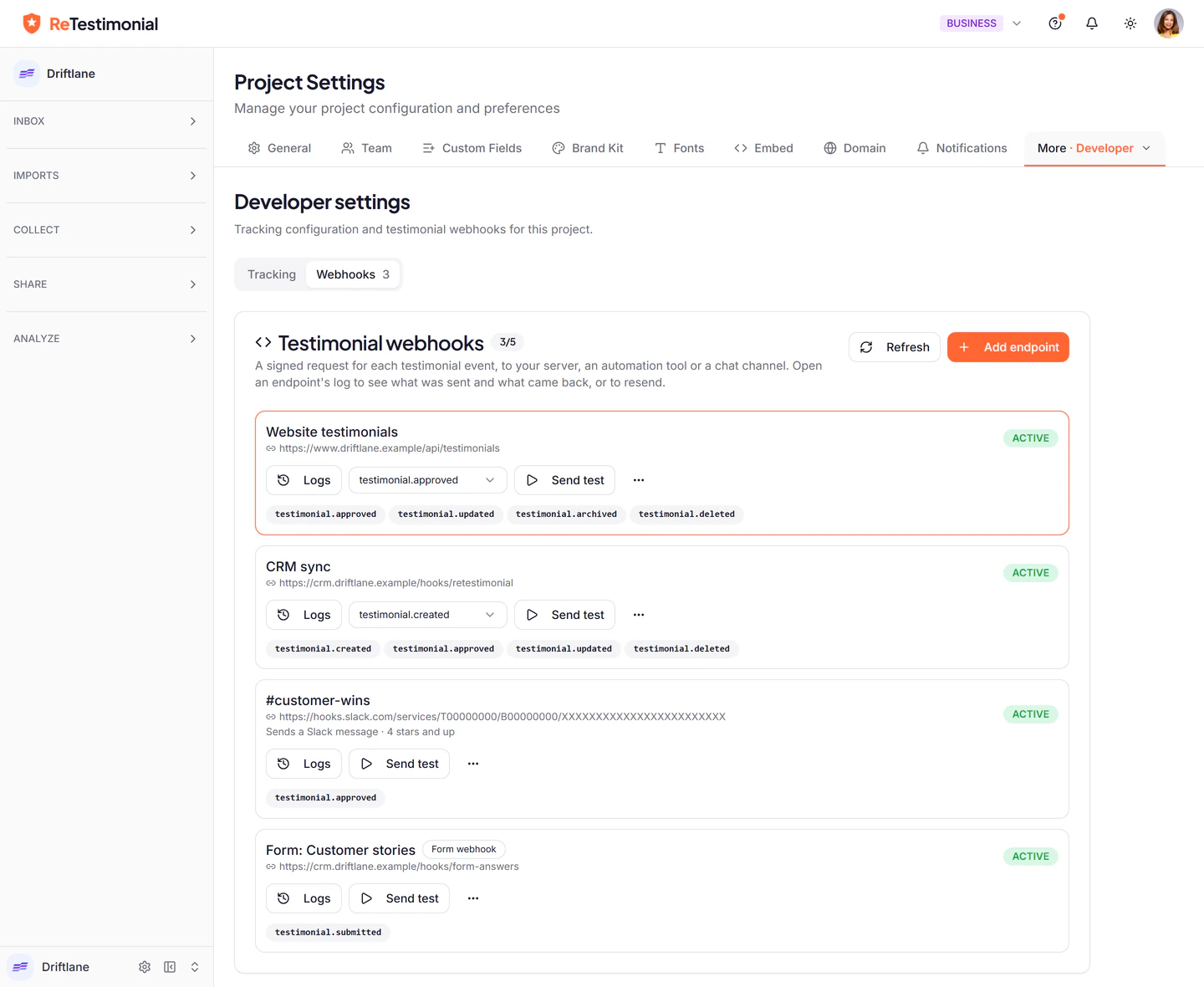
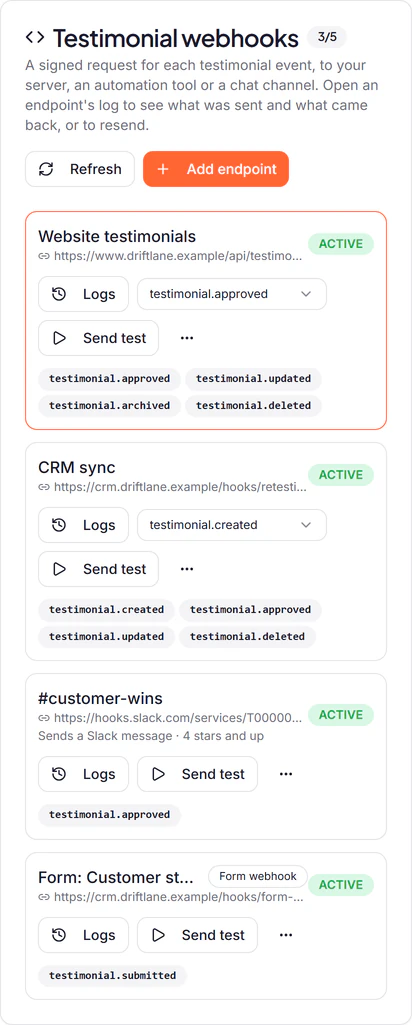
Send a test
Pick an event and press Send test: a signed request with sample data goes out at once and you see your endpoint's answer. Its ids start with
test_, so your receiver can skip it.
No code
Create a webhook trigger in Zapier, Make or n8n, paste its address, send a test, then map the fields. Or send the sample above to the trigger before you sign up.
Your own code
Check the signature, answer within 10 seconds, do the work after. Receiver samples
Built for the hour your receiver is down.
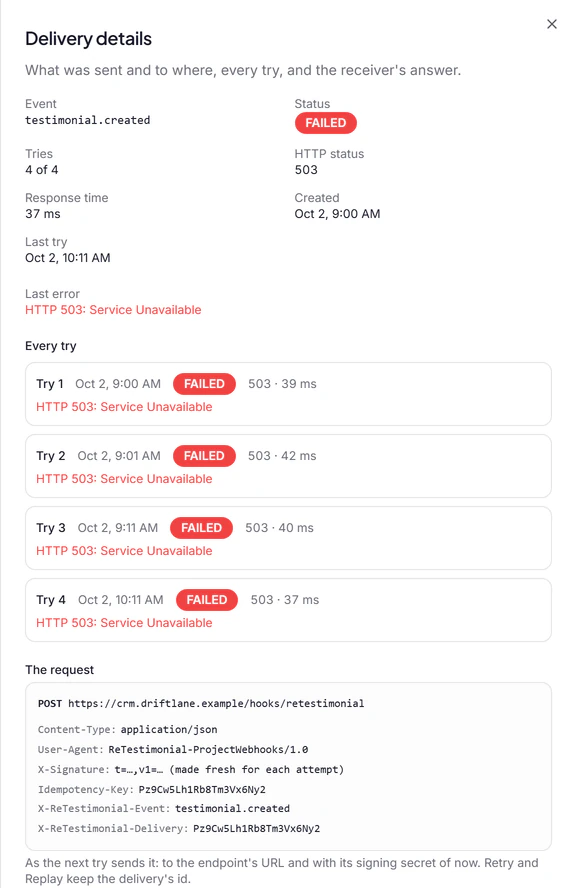
A failed delivery is tried again 1 minute, 10 minutes and 1 hour after each failure. If all 4 tries fail, it waits in the log with a Retry button, and Replay resends up to 500 at once, each with its original id.
- First try09:00try 1
- +1 min09:01try 2
- +11 min09:11try 3
- +1 h 11 min10:11try 4
Two failures, then the third try, 11 minutes in, gets through. Nobody had to do anything.
- A failure is anything but a 2xx answer within 10 seconds: another status, no answer, a refused connection or a redirect.
- 15 failures in a row turn the endpoint off and cancel what waited. The workspace owner gets an email, and the owner and Admins a notice in the app.
- Pause keeps queuing: everything goes out when you turn it back on.
- A new address or secret cancels what waited; Replay sends it to the new one, under the same id.
- A plan downgrade suspends endpoints and keeps their backlog until you upgrade.
- At least once, maybe out of order: skip an
idyou've handled, and useupdatedAtto ignore an older copy.
Your next testimonial can reach your team the minute it's approved.
Start free — no cardEvery delivery and every try, on the record.
Each endpoint's log shows every delivery with its tries, its answer and how long your endpoint took. Open one to see the request, each try, the payload and your endpoint's own reply, each with Copy.
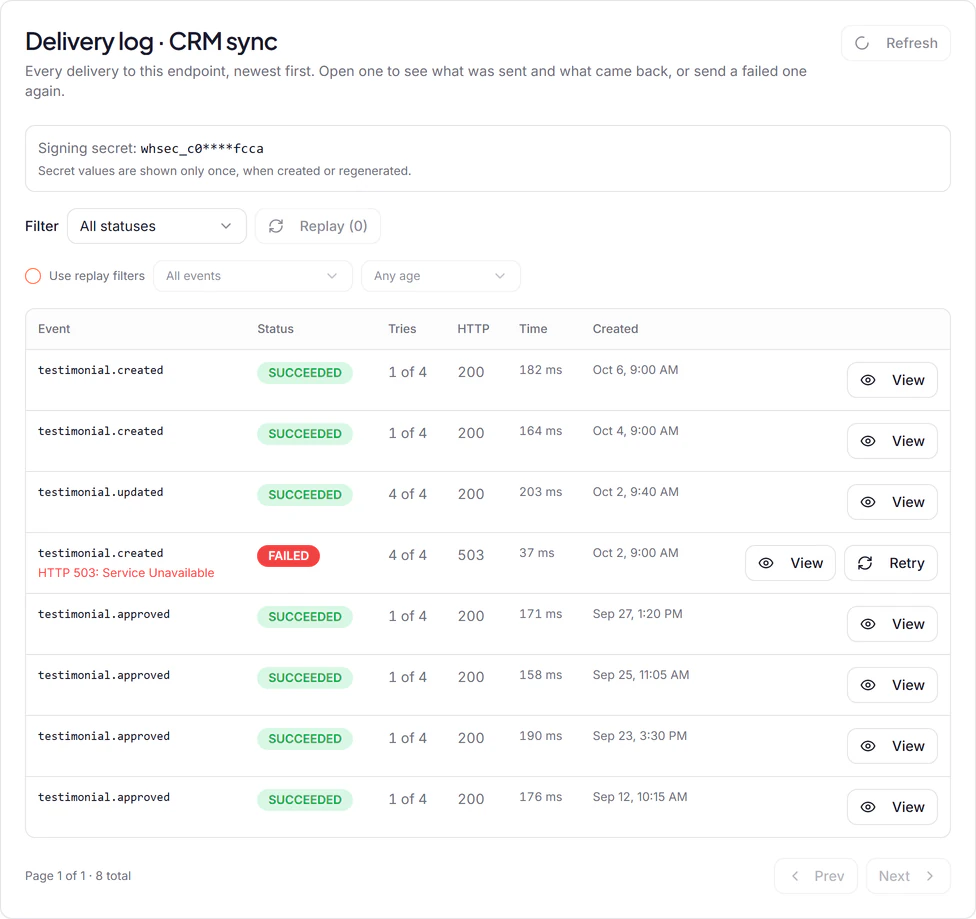
Successful deliveries are kept 30 days, failed and canceled ones 90. Deleting a testimonial removes its earlier deliveries from the log; only the deletion stays.
Check every request in your receiver.
Recompute the signature over the raw body, compare in constant time, and turn away anything sent more than about 5 minutes ago. Each sample here is run against the request above.
| Content-Type | application/json |
|---|---|
| User-Agent | ReTestimonial-ProjectWebhooks/1.0 |
| X-Signature | t=<when this attempt was sent>,v1=<HMAC-SHA256> |
| Idempotency-Key | The delivery's id, the same on every attempt |
| X-ReTestimonial-Event | The event, such as testimonial.approved |
| X-ReTestimonial-Delivery | The delivery's id again |
The full reference: Webhook signatures, headers and payloads.
const crypto = require("node:crypto");
const express = require("express");

const app = express();
const SECRET = process.env.RETESTIMONIAL_WEBHOOK_SECRET; // the whole whsec_... value
const TOLERANCE_SECONDS = 5 * 60;

// express.raw keeps the body as bytes, which is what the signature covers.
app.post("/webhooks/retestimonial", express.raw({ type: "application/json" }), (req, res) => {
  const parts = Object.fromEntries(
    (req.get("X-Signature") || "").split(",").map((part) => {
      const index = part.indexOf("=");
      return [part.slice(0, index).trim(), part.slice(index + 1).trim()];
    })
  );

  const expected = crypto
    .createHmac("sha256", SECRET)
    .update(`${parts.t}.`)
    .update(req.body)
    .digest("hex");

  const received = Buffer.from(parts.v1 || "", "utf8");
  const wanted = Buffer.from(expected, "utf8");
  const signatureOk = received.length === wanted.length && crypto.timingSafeEqual(received, wanted);

  const age = Math.abs(Date.now() / 1000 - Number(parts.t));
  const fresh = Number.isFinite(age) && age <= TOLERANCE_SECONDS;

  if (!signatureOk || !fresh) {
    return res.status(401).send("Invalid signature");
  }

  const event = JSON.parse(req.body.toString("utf8"));
  // Skip event.id if you've handled it already, then process the event.
  res.sendStatus(200);
});
Safe to point at production
- Requests go only to HTTPS addresses on the public internet; private networks and internal names are refused.
- The address is checked again when each request goes, and redirects aren't followed.
- One secret per endpoint, shown once. Regenerate it whenever someone who knew it leaves.
- Your endpoint's reply is kept short: its headers without cookies or credentials, and the start of its body.
- Only the workspace owner and the project's Admins can add, change or delete an endpoint.
- A chat message never carries an email address, form answers or custom fields, and can't mention anyone.
On Premium and Business.
Prices are per active project, per month.
| What each plan includes | Free$0 | Pro$29 | Premium$49 | Business$79 |
|---|---|---|---|---|
| Project endpoints per project | – | – | 1 | 5 |
| A webhook of its own for each form | – | – | ||
| Chat messages to Slack, Discord, Google Chat and Microsoft Teams | – | – | ||
| Signed requests, retries, the delivery log and replay | – | – | ||
| Choose a plan | Choose Premium | Choose Business |
Questions
Setting it up step by step: Set up a project webhook.
Is there a Zapier app?
No app to install, and none needed: Zapier, Make and n8n each have a webhook trigger that takes the request. Paste the address it gives you as the endpoint URL and send a test, and the tool has every field to map. Your automation tool's own plan decides whether it accepts webhooks.
Can it post straight to Slack, Discord, Google Chat or Microsoft Teams?
Yes. Choose the tool under Send as and paste the channel's incoming-webhook address: each event arrives as a readable message with the stars, the testimonial's words (up to 600 characters), who wrote it and a link to your inbox. The author's email, form answers and custom fields stay out of the channel, and nothing in a testimonial can mention anyone.
Can it update HubSpot, Salesforce or another CRM?
Through your own code or an automation tool: there's no built-in CRM connection. Each request carries the author's name and email, so your workflow can find the contact and add a note or a property.
How fast does an event arrive?
Usually within a minute. A large file import or review sync, with Include bulk imports and review sync events on, takes hours to go out in full.
What happens when my server is down?
A delivery that doesn't get a 2xx answer within 10 seconds is tried again 1 minute, 10 minutes, 1 hour after each failure, 4 attempts in all. Then it's marked failed and waits in the log for Retry or Replay. After 15 failed attempts in a row the endpoint turns itself off and the workspace owner gets an email.
Can I send only some testimonials?
Yes. Each endpoint picks its events and can set a minimum rating, or take only text or only video testimonials. A deletion is always sent, so a copy you keep elsewhere can be removed.
Will an import flood my endpoint?
Not unless you ask for it. A new endpoint isn't told when a file import or a review sync brings testimonials in; tick Include bulk imports and review sync events if you want those too. What your team does with an imported testimonial afterwards is always sent.
How do I know a request came from ReTestimonial?
Each request carries an X-Signature header: an HMAC-SHA256 of the time it was sent and the raw body, keyed with the endpoint's signing secret, which is shown once when you add the endpoint. Recompute it, compare in constant time, and reject requests sent more than about 5 minutes ago. Requests go only to public HTTPS addresses, and redirects aren't followed.
Can the same event arrive twice?
Yes: a retry or a replay sends a delivery again, and deliveries can arrive out of order. Each delivery keeps the same id on every attempt, also sent as Idempotency-Key, so skip ids you've handled and use the testimonial's updatedAt to ignore an older copy.
Can I test before going live?
Send test sends a signed request with sample data from the endpoint's own card, with ids that start with test_. Before you sign up, this page can send the sample request to your own address, signed with the sample secret printed here.
Which plans include webhooks?
Premium and Business: 1 endpoint per project on Premium, 5 on Business. Each form can also have a webhook of its own, which doesn't count toward that limit. The workspace owner and the project's Admins set them up.
Let every testimonial reach the people who can use it.
Signed, retried and logged, on Premium and Business.