Your Google reviews, working on your website.
Connect your Google listing, choose the reviews worth showing, and add them to any site with a short snippet of code. Keep them current with a click, or let new ones sync on a schedule.
Free for one location and up to 10 reviews. No credit card.
From Google to your site in four steps.
No Google sign-in, and nothing to set up on Google's side. You connect the listing your customers already see.
Find your listing
Search by name or paste a Google Maps link. Before you connect, you see the listing's rating, review count and two recent reviews, so you pick the right branch.
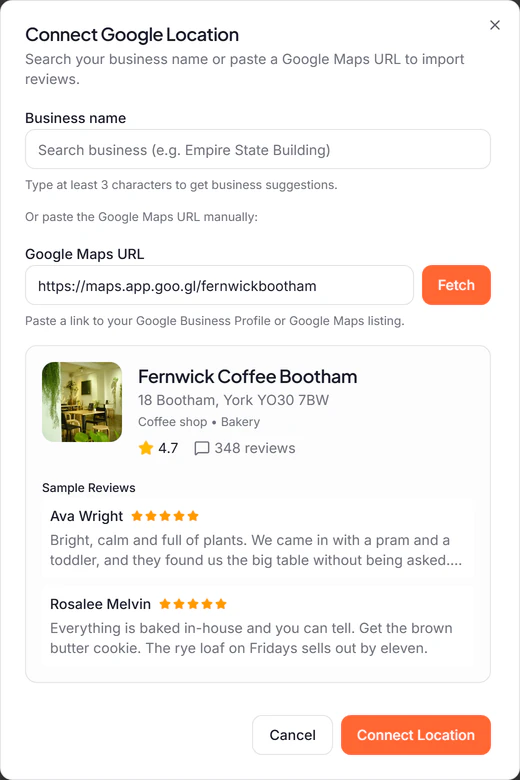
Connecting a listing: its preview, before anything is imported. Choose what comes in
Import up to 25 reviews at a time, or 250 on Business. From Pro, leave out anything below the stars you choose.
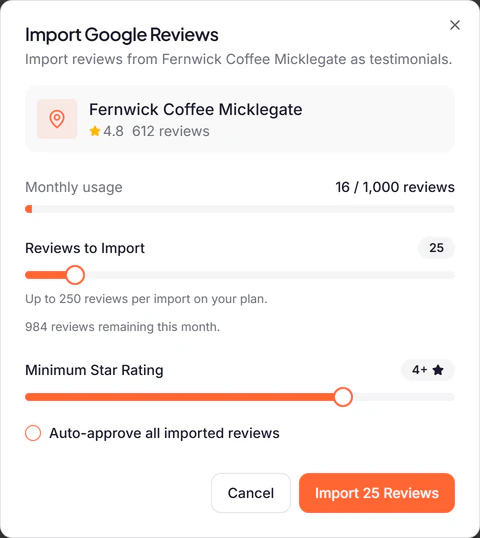
The import: how many reviews, the lowest star rating, and whether to approve them as they arrive. Approve the ones you want
Imported reviews wait in Pending, marked with the location they came from. Approve them one at a time or all at once, or switch on auto-approve and skip this step.
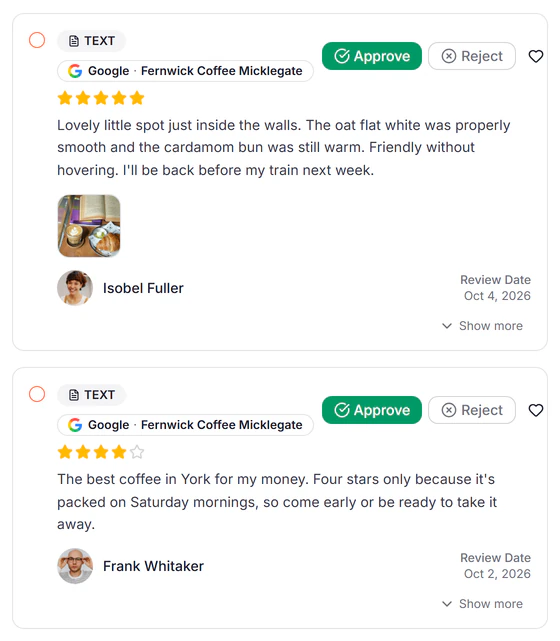
Google reviews in Pending, each marked with the location it came from. Add them to your site
Pick a widget style (31 on Free, all 64 from Pro), match your colours, and paste its snippet into Webflow, WordPress, Framer, Squarespace, Wix, Shopify or any HTML page.
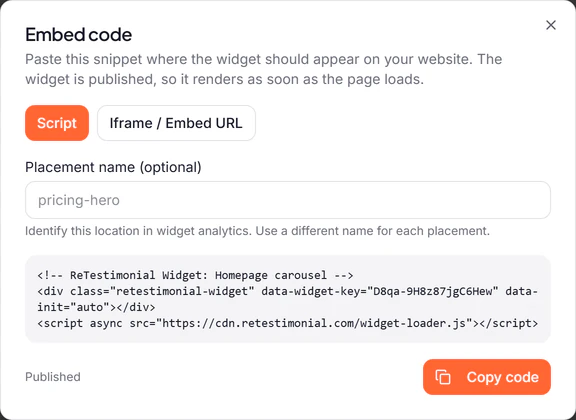
A widget's embed code: the same snippet for every site builder.
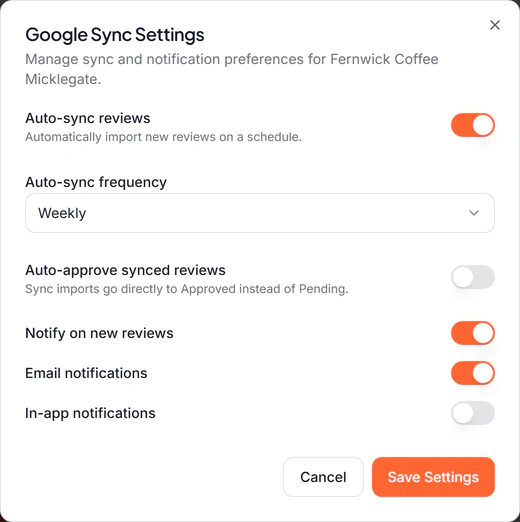
New reviews arrive without you checking Google.
Switch on auto-sync and new reviews are looked for once a month on Pro and Premium, and every week on Business. On the free plan, press Sync once a month.
| Free | Sync once a month |
|---|---|
| Pro | Monthly, plus Sync twice |
| Premium | Monthly, plus Sync four times |
| Business | Weekly, plus Sync any time |
- Where they land
- In Pending, or straight in Approved if you switch on auto-approve for synced reviews.
- Who hears about it
- The workspace owner gets an email when new reviews arrive. In-app notifications are one switch away.
- Every rating comes in
- A sync brings up to 50 new reviews at every star rating. To keep low ones off your site, approve them yourself, or set your widget to show 4 stars and up.
- Sync now
- Check for new reviews whenever you like: once a month on Free, twice a month on Pro, 4 times a month on Premium and as often as you like on Business.
- Your own tools
- A webhook can send each new review to an address you choose once it's imported, with the endpoint's review sync events turned on. Premium and Business
- Auto-sync
- From Pro. The first run comes one interval after you switch it on; press Sync if you want new reviews today.
The whole review, not just the words.
Each review keeps the reviewer's name and photo, the stars, the date and up to 10 of its photos, and its link to Google: switch on review links and the reviewer's name opens the review there.
On your site
In your dashboard
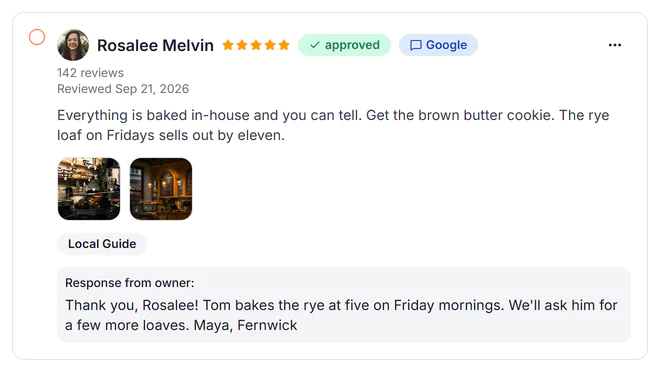
- Photos are copied when a review is imported, so your widget doesn't depend on Google's image links.
- A review that is only a star rating is skipped: there's nothing to show.
- Each review is imported once. Run Import again and it carries on where it stopped.
Pick a look. It's the real widget.
Each style below is drawn by the same code that runs on your site, with Fernwick's approved reviews. Switch styles and colours, then try it with your own reviews.
These colours are free on every plan. Any other colour, and removing the ReTestimonial badge, come with Pro. See every widget style
One project for every location.
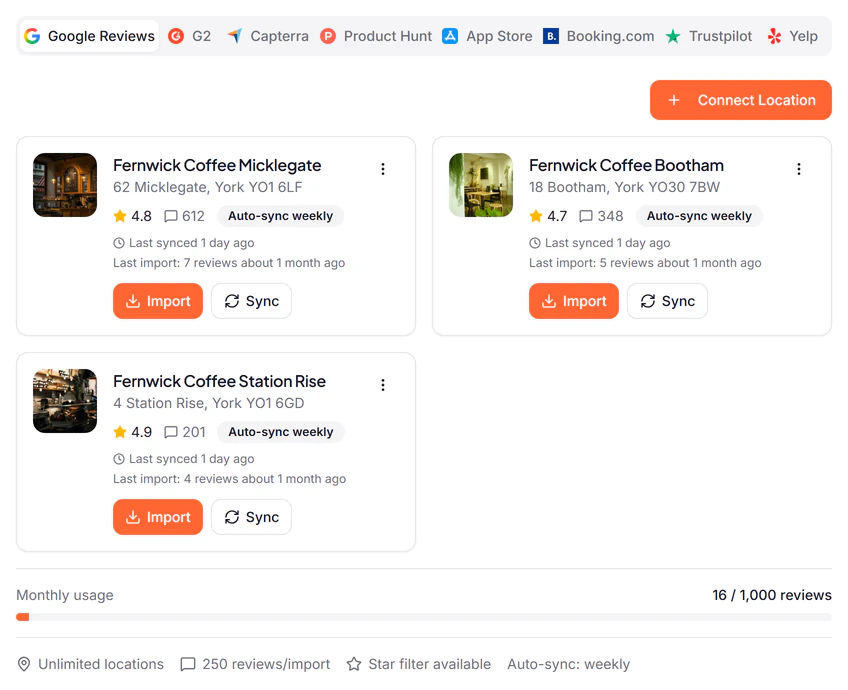
Connect 3 on Pro, 10 on Premium and as many as you need on Business. Each review remembers where it came from.
- A widget per branch
- Set a widget to one location and it fills itself as that branch's new reviews are approved.
- Find them fast
- Filter your inbox to one location.
- For agencies
- Give each client a project of their own, with their own locations, widgets and allowances.
Google is one place customers praise you.
Your  Google reviews share one inbox with answers to your own forms, video testimonials, reviews from
 G2 and four more review sites, and posts from
 X,
 LinkedIn,
 Instagram and
 TikTok. One widget can show them together.
Start free with one location.
| Feature | Free$0 | Pro$29/mo | Premium$49/mo | Business$79/mo |
|---|---|---|---|---|
| Google locations | 1 | 3 | 10 | Unlimited |
| Reviews per import | 25 | 50 | 100 | 250 |
| Reviews imported a month | 25 | 100 | 300 | 1,000 |
| Sync now, a month | 1 | 2 | 4 | Unlimited |
| Auto-sync | – | Monthly | Monthly | Weekly |
| Star filter on import | – | |||
| Testimonials in your account | 10 | Unlimited | Unlimited | Unlimited |
| Reviews on one widget | 10 | 50 | Unlimited | Unlimited |
| Remove the ReTestimonial badge | – | |||
| Webhook for each new review (review sync events on) | – | – |
Monthly prices. Limits are per project, and paid plans are priced per active project. Compare every plan
Questions
Do I need to sign in to Google or own the listing?
No sign-in. ReTestimonial reads the listing's public page, the same one your customers see. Connect listings you have the right to use: your own business, or a client's with their permission.
Which reviews are imported?
Reviews with words and reviews with photos, newest first, each with up to 10 of its photos. Reviews that are only a star rating are skipped, because there's nothing to show. A review is never imported twice, even if you disconnect and reconnect the location.
Can I keep low ratings off my site?
Yes. From Pro, import only reviews at or above the stars you pick. On any plan, approve reviews yourself, or set a widget to show 4 stars and up.
How do new reviews get in?
Press Sync, or switch on auto-sync: monthly on Pro and Premium, weekly on Business. Each sync brings up to 50 new reviews. They wait in Pending unless you've chosen to approve synced reviews automatically.
What if a review is edited or deleted on Google?
Your imported copy stays as it was: ReTestimonial doesn't follow later changes on Google. You can edit, archive or delete the copy yourself.
Does the widget show my overall Google rating?
A rating badge or review summary shows the average of the reviews in that widget, so the number always matches reviews your visitors can read.
I have thousands of reviews. Can I import them all?
Imports work back from the newest review and can reach a location's newest 1,000, within your plan's monthly allowance (1,000 a month per project on Business).
What does the free plan include?
One location per project, imports of 25 reviews at a time and 25 a month, one Sync a month, and room for 10 testimonials in your account. Widgets on the free plan show a small ReTestimonial badge.
Can visitors leave a Google review from my site?
Yes. A badge's review panel can show a Write a review button with a link you choose, such as your Google listing's review link.
What happens if I disconnect a location?
The reviews you imported stay. Choose Disconnect & Delete Reviews instead to remove them, with their photos.
Do imported reviews count toward my plan?
Yes. Each one is a text testimonial, and its place in the month's allowance is used once it's imported, even if you delete it later.
See your own Google reviews in a widget.
Search your business, pick a style and watch your newest reviews fill it. You only need an account when you want the code.
Google is a trademark of Google LLC. ReTestimonial is not affiliated with or endorsed by Google.