Every testimonial, with the details buyers look for.
Ask for company size, country, plan or anything else when you collect a testimonial. The answer stays with it, ready to show beside the words on your widgets, your Wall of Love and its share page.
Custom fields start on Pro: 2 fields per project on Pro, 5 on Premium and Business.
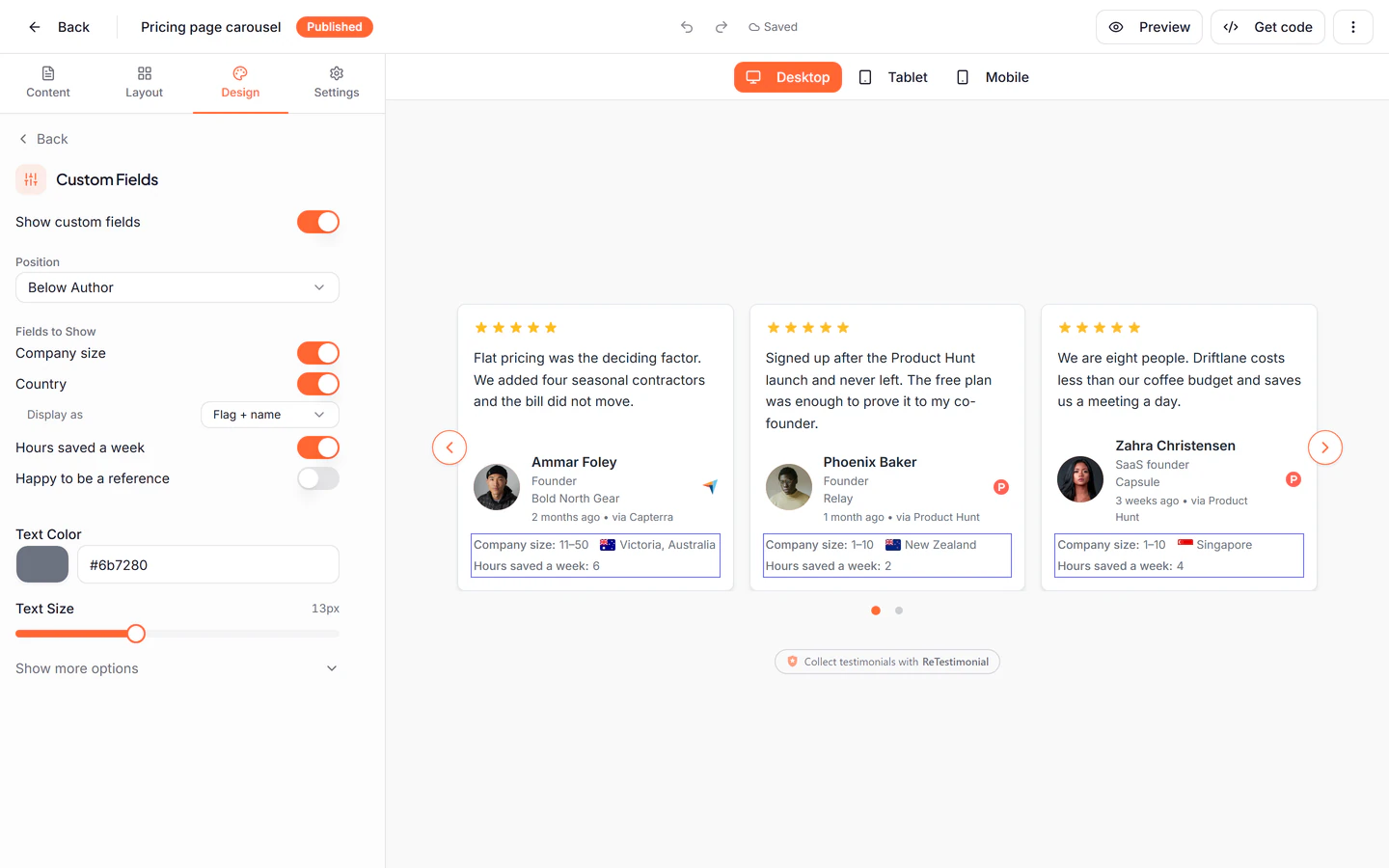
The widget builder's own preview, showing a demo project's reviews and their answers. Every review in it is made up.
Step 1 of 4: Ask
Eight field types, each with the right input.
A field is a question you add once to the project. Choose the kind of answer and the form shows the input that fits it, then checks what comes back.
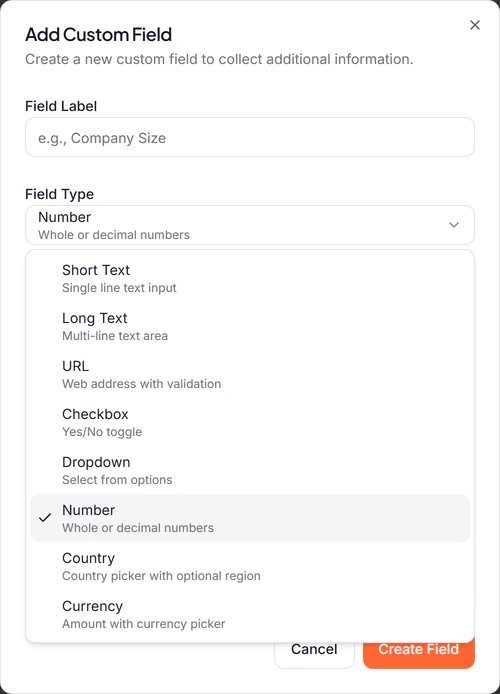
| Type | A customer gives | You set |
|---|---|---|
| Short Text | A line of text | Required or optional |
| Long Text | A few sentences | Required or optional |
| URL | A web address | Accepted only as an http or https address |
| Checkbox | Yes or no | Can stay off the cards when it is not ticked |
| Dropdown | One option from your list | Up to 20 options; nothing else is accepted |
| Number | A whole or decimal number | Your minimum and maximum; decimals (up to 6 places) and negatives only if you allow them |
| Country | One of 249 countries, with a region if you ask | A list of regions for the US, Canada, Australia, the UK and India; free text for the rest |
| Currency | An amount in one of 154 currencies | A default currency, or a shortlist of up to 20 |
Every type can be required, and can show its label on the cards or leave it off. A field's type is fixed once it is created; its label and settings are not.
Ask it on any form, or fill it in yourself.
Switch a field on for a form's About You or About Company page, and customers answer it as part of leaving a testimonial. Each form chooses its own fields.
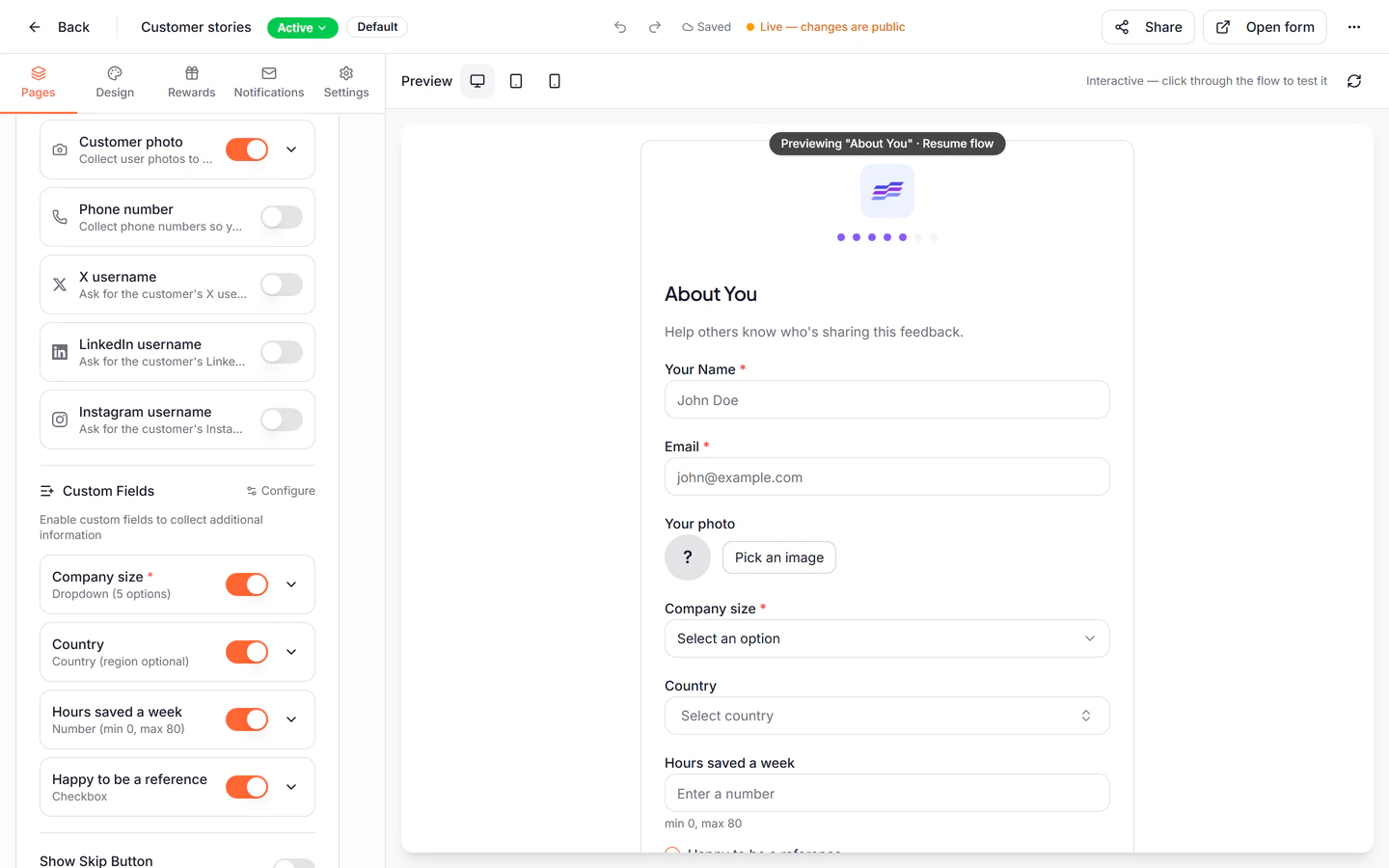
- On forms
- Per form, change a field's label and placeholder, or make it required. The form checks each answer before it moves on, and again when it is sent.
- From the dashboard
- Your team fills the fields in when adding a text or video testimonial, and corrects them in the edit dialog.
- From a file
- An import maps a column to each field, or starts from a template with a column per field. Countries go in by name or code, amounts with their currency symbol. About imports
Step 2 of 4: Keep
Every answer stays with its testimonial.
In the inbox
Open a testimonial to read its answers, beside the words they belong to. A wrong answer is fixed in the edit dialog, the same way as the testimonial itself.
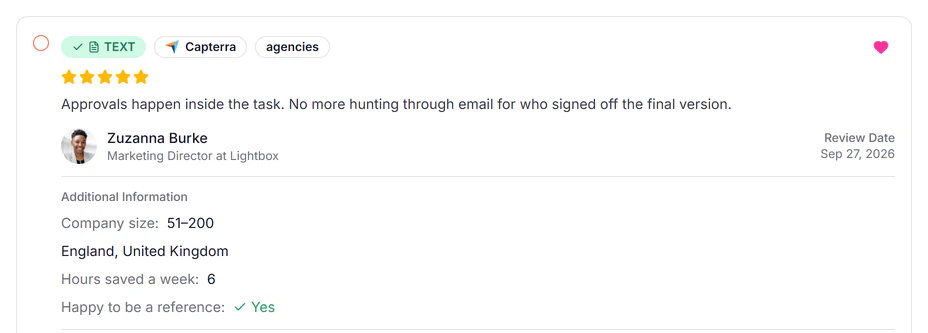
In one place
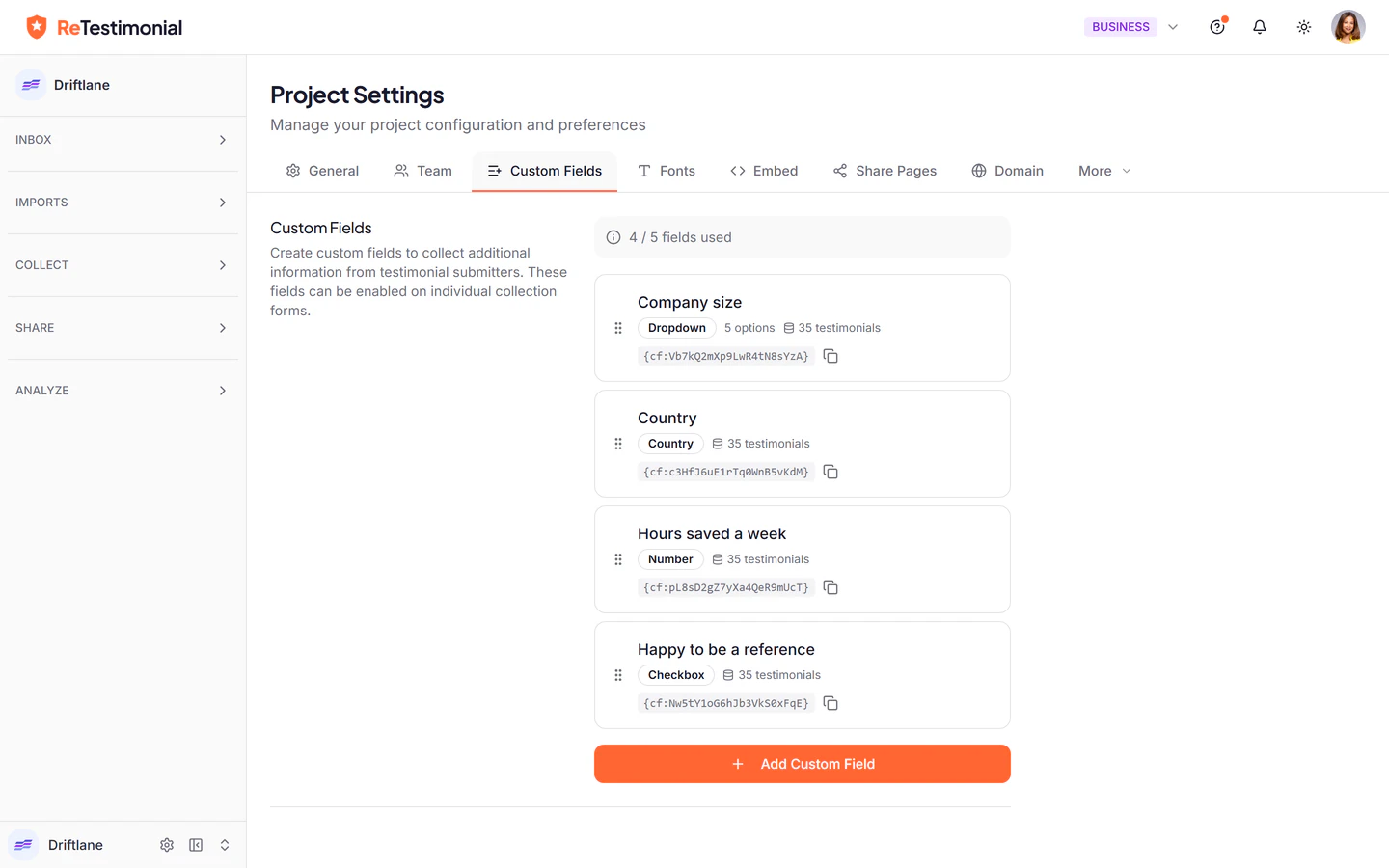
The settings page lists the project's fields; drag them into the order you want. It shows how many testimonials hold an answer before you delete one, because deleting a field deletes its answers and takes it off every form.
Step 3 of 4: Show
Put the details next to the words.
The settings you tried at the top of this page, in the widget builder. A widget shows no fields until you switch them on, and then only the ones you pick.
- Widgets
- Choose the fields, their position (below the title, below the author or in the footer), how a country reads, and the text's color, size and font. Most carousel, slider, list and avatar styles, and the masonry grid, can show them; video widgets cannot.
- Wall of Love
- Answers show below the author on every wall card, and each wall can move them, choose which fields appear, or hide them.
- Share pages
- Each testimonial's share page lists its answers, with one switch for the whole project when your fields hold internal details. A country can read as its name, its flag or both.
- One field, anywhere on the card
- The card layout editor can place a single field on its own, like the company size above the quote. Premium and up
Show who is behind every testimonial.
Start free — no cardStep 4 of 4: Use
Take the answers beyond the page.
testimonials.csv
| Author Name | Company size | Country | Hours saved a week |
|---|---|---|---|
| Zuzanna Burke | 51–200 | England, United Kingdom | 6 |
| Nala Goins | 201–1,000 | California, United States | 8 |
| Kari Rasmussen | 11–50 | Denmark | 4 |
The export's Author Name column, then a column for each field, named after it.
- CSV export
- Every field is a column of the inbox's export, named after its label, with the answers written the way they read on a card.
- Webhooks
- Each testimonial event carries every field's label and value. Premium and Business
- Emails
- Your form emails can include the answers, all of them or one field at a time.
- Proof AI
- Reads the answers along with the words when it analyses a testimonial. Premium and Business
- Translations
- Short and long text answers are translated with the testimonial. Business
What each plan includes.
| Feature | Free$0 | Pro$29/mo | Premium$49/mo | Business$79/mo |
|---|---|---|---|---|
| Custom fields per project | – | 2 | 5 | 5 |
| Asked on forms, imports and the dashboard | – | |||
| Shown on widgets, the Wall of Love and share pages | – | |||
| A column for each field in the CSV export | – | |||
| One field placed anywhere on a widget card | – | – | ||
| Sent with testimonial webhooks | – | – | ||
| Read by Proof AI | – | – | ||
| Text answers translated | – | – | – |
Monthly prices, per active project. See every plan
Questions
Which plans include custom fields?
Custom fields start on Pro: 2 fields per project on Pro, 5 on Premium and Business. The free plan has none. A field belongs to the project: any of its forms can ask it, and the answers show in the inbox, on widgets, on the Wall of Love and on share pages.
What kinds of fields can I add?
8 kinds: Short Text, Long Text, URL, Checkbox, Dropdown, Number, Country, Currency. Each one gets the input that fits it, so a country comes from a list of 249, an amount carries its currency, and a number stays a number.
Where do customers fill them in?
On your forms' About You and About Company pages. For each form you choose which fields it asks, and you can change a field's label and placeholder there, or make it required for that form. Your team can also fill them in when adding or editing a testimonial, and an import can bring them in from a file.
Can I keep a field off my widgets?
Yes. A widget shows no custom fields until you switch them on, and then you pick which ones it shows. Share pages have one switch for the whole project, for fields that hold internal details.
Can I import answers I already have?
Yes. Map a column of your CSV, Excel or JSON file to each field, or download a template with a column per field. Countries can be written as names or codes and amounts with their currency symbol. A value that does not fit is skipped with a warning, and a required field that is empty warns instead of stopping the import.
Can I change a field later?
You can rename it and change its settings at any time. Its type is fixed once it is created. Deleting a field deletes its answers and takes it off every form, and the settings page tells you how many testimonials hold one before you confirm.
Do the answers reach my other tools?
Every field is a column in the inbox's CSV export, named after it. On Premium and Business, testimonial webhooks carry each field's label and value. Form emails can include the answers too.
Give every quote its context.
Create your account for free, and add custom fields on Pro or above, from $29 a month.