Testimonial software for SaaS
Turn every new customer into proof for the next one.
Ask each customer for a testimonial after they pay. Bring in the G2 and Capterra reviews buyers already read. Show each visitor the proof that fits the page they're on, and see which testimonials were on screen before a trial started.
Free plan, no card. Paid plans are priced per active project.
Same widget. Different proof for every visitor.
Pick a visitor: Driftlane's site shows each one the reviews that fit.
Who's visiting?
Simple, flat pricing
- Starter$0Up to 3 people
- Team$39/mo flatUnlimited people
- Company$129/mo flatSSO and audit log
Pricing pageThe page address matches /pricing*, so it shows reviews tagged pricing.
We are eight people. Driftlane costs less than our coffee budget and saves us a meeting a day.
 Zahra ChristensenSaaS founder at Capsule · via Product Hunt
Signed up after the Product Hunt launch and never left. The free plan was enough to prove it to my co-founder.
 Phoenix BakerFounder at Relay · via Product Hunt
Flat pricing was the deciding factor. We added four seasonal contractors and the bill did not move.
 Ammar FoleyFounder at Bold North Gear · via Capterra
Proof Match, on Premium and up: up to 20 rules by page, referring site, campaign or page tag, decided before the widget draws. Driftlane is a made-up company; this runs ReTestimonial's own matching over its reviews. How Proof Match works
Ask the day they pay.
Connect Stripe once. Each new customer gets three short emails that link to your form, sent when you choose and stopped the moment they answer.
Smart Invites Premium+
1 Stripe sends
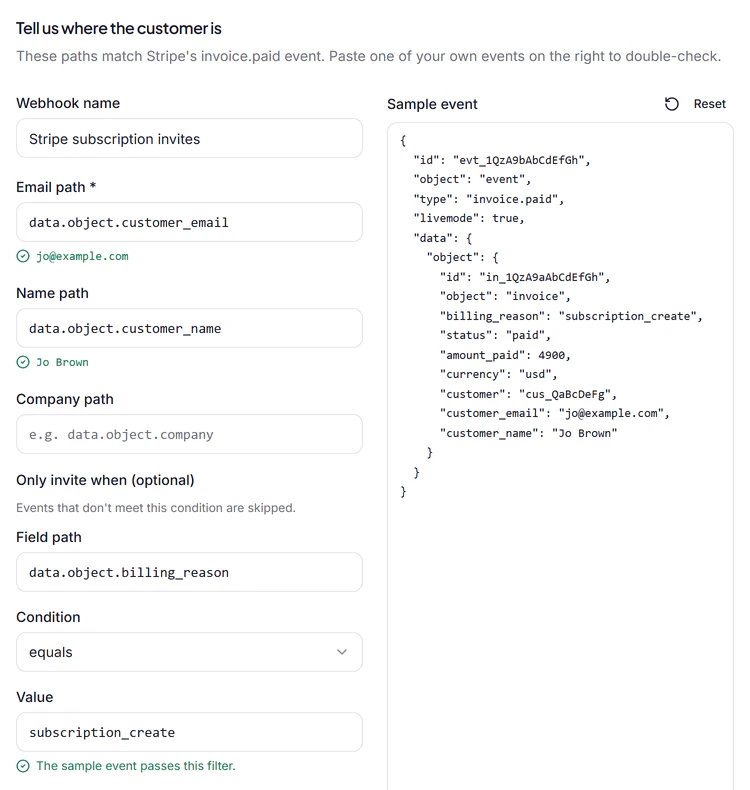
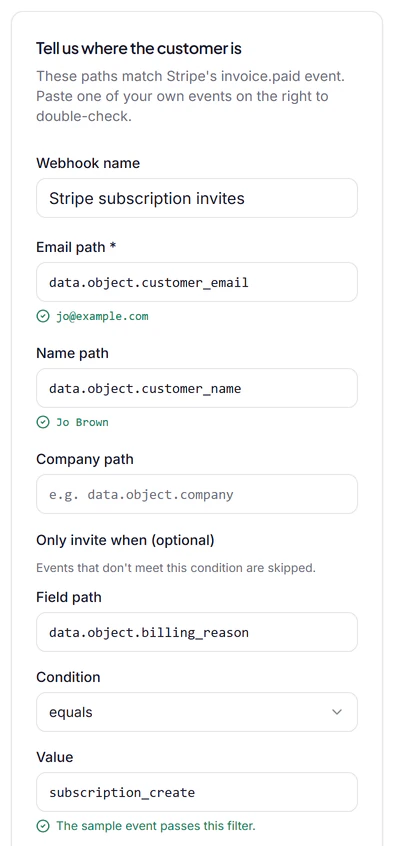
invoice.paid{ "id": "evt_1QzA9bAbCdEfGh", "object": "event", "type": "invoice.paid", "livemode": true, "data": { "object": { "id": "in_1QzA9aAbCdEfGh", "object": "invoice", "billing_reason": "subscription_create", "status": "paid", "amount_paid": 4900, "currency": "usd", "customer": "cus_QaBcDeFg", "customer_email": "jo@example.com", "customer_name": "Jo Brown" } } }
2 ReTestimonial reads it
data.object.customer_emailjo@example.com- Name
data.object.customer_nameJo Brown- Only when
billing_reason = subscription_createA renewal is skipped
3 Three emails, then it stops
- First emailAfter the wait you set, up to a year
- A reminder3 days later
- One last ask7 days after the first
- They answerEvery email still to come is cancelled
4 Jo gets your request
How was your experience with Driftlane?

Driftlane via ReTestimonial <invites@campaigns.retestimonial.com>
The first Smart Invite email, with the default words. Subject: How was your experience with Driftlane?.
Driftlane Hi Jo, Thank you for choosing Driftlane. Would you share a few words about your experience? It helps us improve, and it helps other people decide. It takes about a minute. Share my experience: https://retestimonial.com/form/driftlane/customer-stories Driftlane sent you this request through ReTestimonial. Unsubscribe: https://retestimonial.com/api/invites/unsubscribe/sample Powered by ReTestimonial: https://retestimonial.com
- Your billing tool, or anything that can POST JSON
- Presets for Stripe, Stripe subscriptions, Paddle and Lemon Squeezy fill in the mapping and show you where to paste the address. Stripe's signature is checked, test-mode events are skipped, and an event sent twice invites once.
- Subscriptions, however they start
- Stripe subscriptions listens for
invoice.paidand asks each new subscription once, from Checkout, your API or the Dashboard. It waits 14 days before the first email, so a trial has time to use your product; change it to suit yours. - Nobody is asked twice
- A 90-day cooldown, a do-not-email list for unsubscribes and bounces, and opens and clicks recorded for each email.
- Your words, your reply-to
- Edit every email. Replies go to you. The form link uses your own subdomain from Pro, and a thank-you coupon or link can follow approval from Pro, never tied to the rating.
- Your customers so far
- Upload a CSV or add them by hand. 500 people a month per project on Premium, 1,000 people a month per project on Business. On Business, routing rules send each customer to the form that fits their plan.
See who wrote back
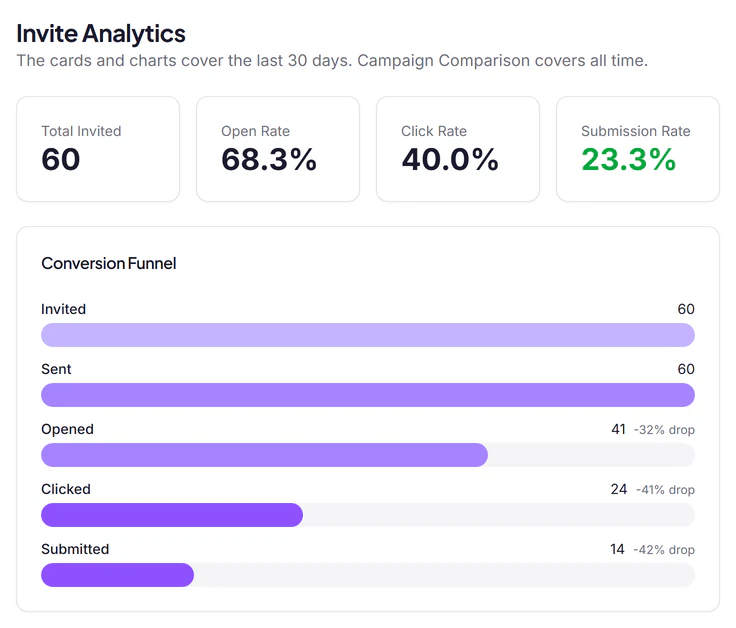
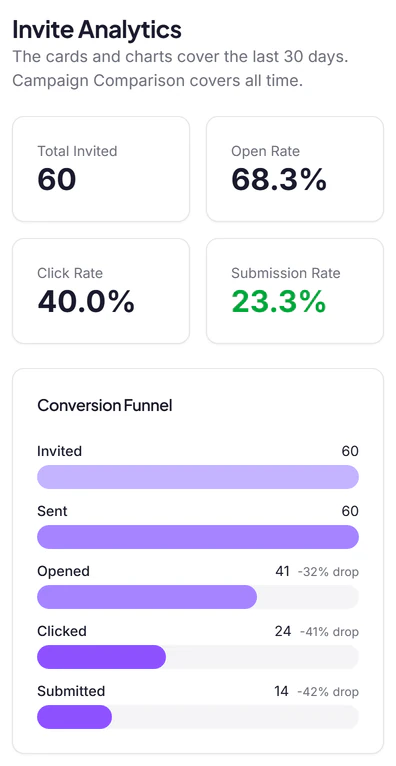
Invite Analytics shows each month's invites and how many were opened, clicked and answered, with every campaign side by side. A customer who answers gets no more reminders.
Win the comparison you don't control.
Buyers read your G2 and Capterra pages before they read your homepage. Bring those reviews into the same inbox as the testimonials you collect, approve the ones to show, and put them on your own pages.
 G2Every plan, with your G2 API token. Syncs itself monthly from Pro, weekly on Business.
 CapterraOn Business, synced monthly.
 Product HuntOn Business, synced monthly.
 App StoreOn Business, synced monthly.
 XPosts by link, from Premium.
 LinkedInPosts by link, from Premium.
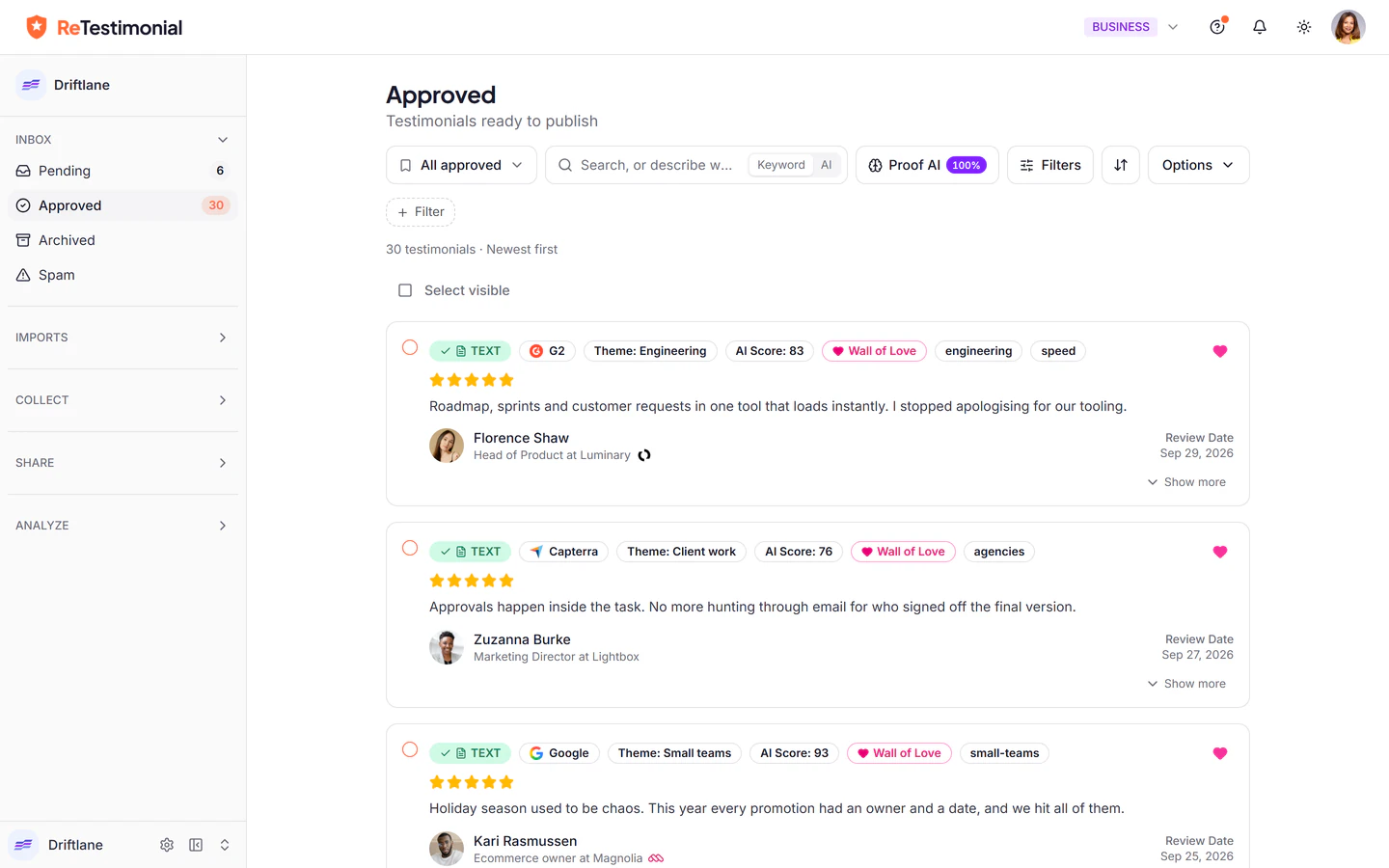
Know what each one is proof of Premium+
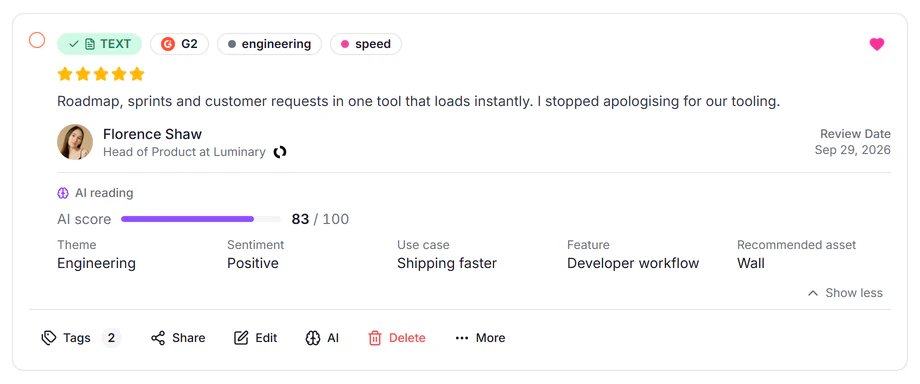
The AI reads every testimonial for its theme, its use case, who's speaking and the objection it answers, and scores how strong it is as proof. Then you can ask for “five-star reviews from engineering leads” in plain words, and feed a widget only the strongest.
Tags, filters and saved views are on every plan.
Coming from Senja or Testimonial.to? Bring your testimonials with a file
Put proof where SaaS buyers hesitate.
The same reviews, in the right shape for each page: next to the plan they're choosing, on the page that compares you, inside your app at the upgrade screen.
Pricing page
Under the plans, where the price is weighed. Reviews about value and pricing answer the doubt in place.
Demo content: Driftlane is a made-up company.
A share page gives one testimonial its own link for a sales thread or a renewal email, on every plan. The widget code is one <div> and one script; the loader is <14KB and loads after your page.
See which proof came before the sale.
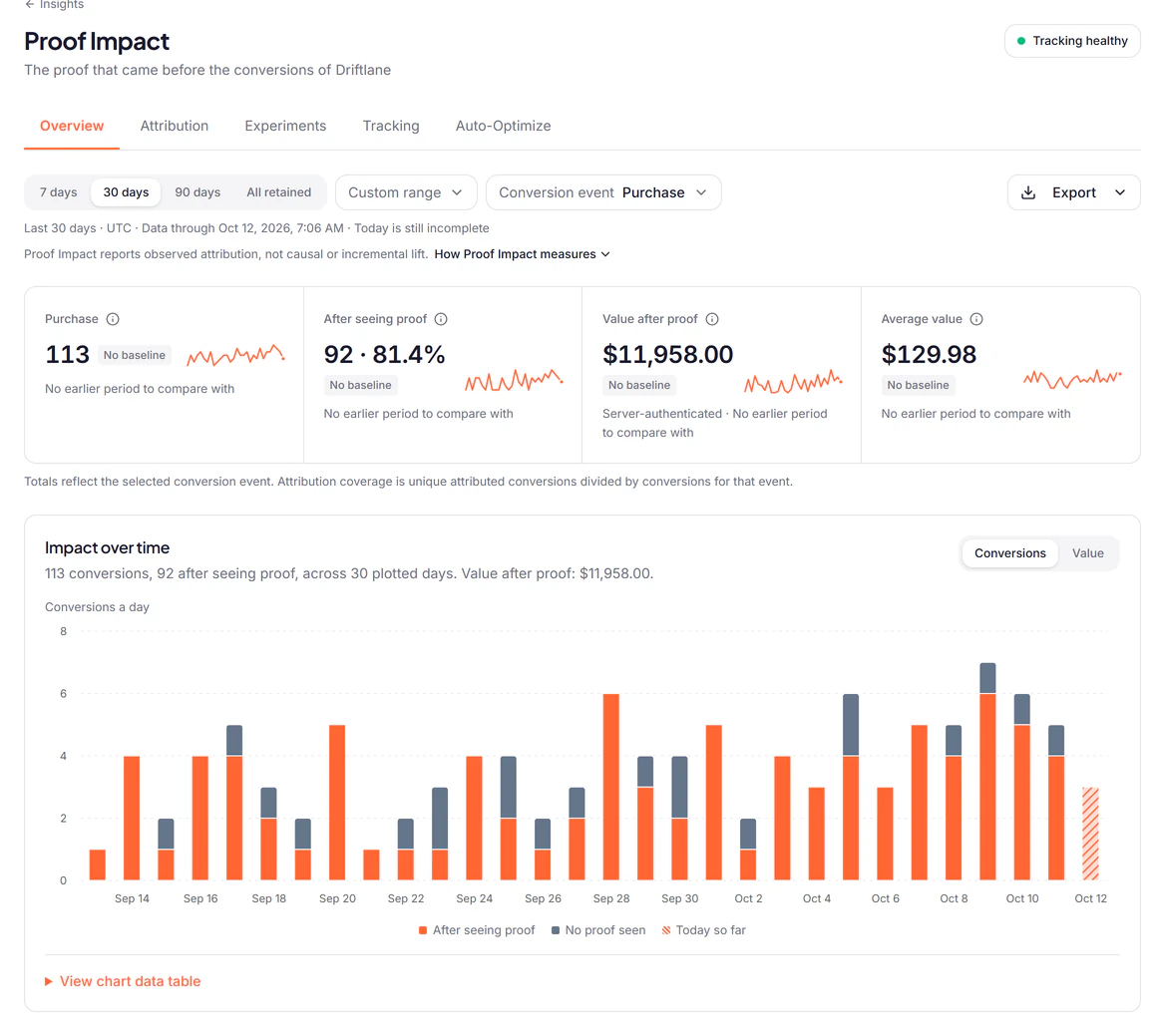
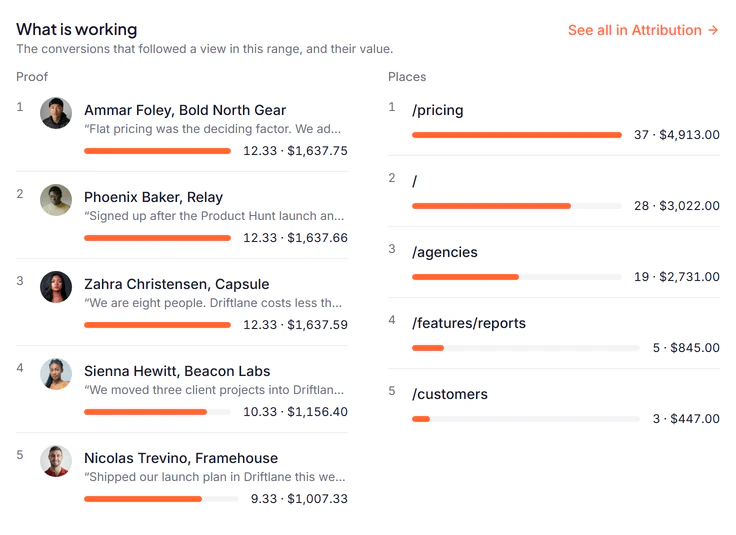
Send ReTestimonial your sign-ups, trials and new subscriptions, from the browser or from your server. Proof Impact adds an observational ledger: for each conversion, the testimonials, widgets and pages the visitor saw first, and the value you sent with it.
Proof Impact Premium+
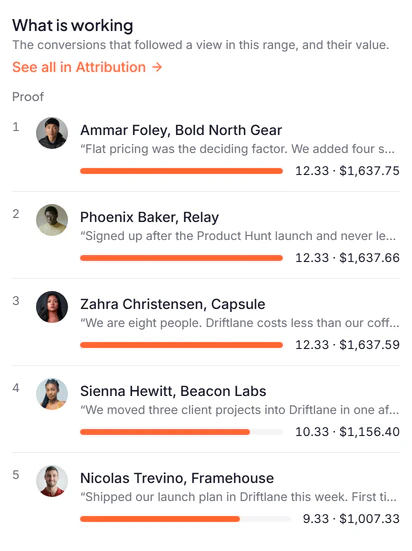
- Per-placement attribution
- By testimonial, by widget, by page and by Proof Match rule. Last-touch, First-touch and Fractional credit, over a window you set from 4 hours–30 days, for each event.
- The events SaaS teams send
customer_signup,trial_startedandsubscription_started, from a line of script on your site or a signed call from your server, with the value in your own currency.- What it is, and what it isn't
- It shows what came before a conversion, not what caused it. On Business, an experiment holds the widget back from some visitors to measure the difference, and Auto-Optimize keeps the rule that wins.
Find the pages with nothing to say Premium+
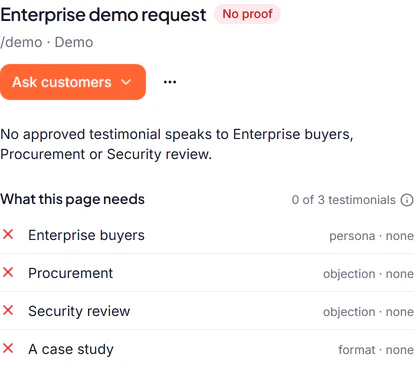
Name up to 25 pages that matter and the questions each one answers. Proof Gaps shows which have no testimonial for that question, checks again each week, and writes the request for you to send.
Hand sales the whole story.
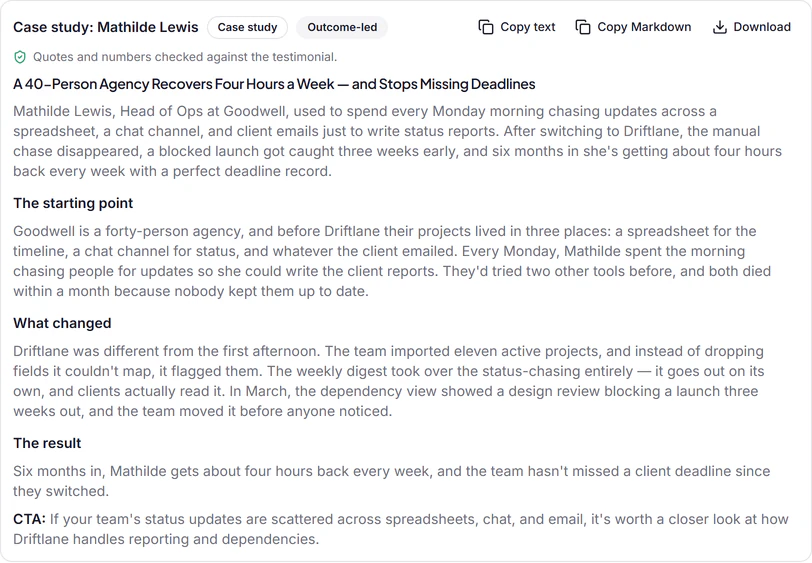
One good review is a case study, a link for a deal thread and a clip for launch week.
A case study from one review Premium+
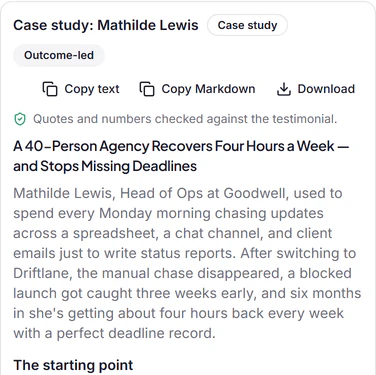
Pick a long testimonial and one of 4 story shapes; the AI drafts the case study in your customer's own words, for 2 credits. Copy it as text or Markdown. AI case studies
A link for the deal thread
A share page gives one testimonial, or a video, its own address with a preview picture, on every plan. Paste it into an email, a proposal or a renewal call.
Clips for launch week
Turn a review into a quote image or a short social video. Spoken captions start on Pro. Social videos
However you sell.
Start with the part of the loop your next customer needs most.
Self-serve
Trials and a pricing page do the selling.
- Ask every new subscriber from Stripe
- Import your G2 reviews
- Match proof to each pricing-page visitor
- Watch
trial_startedin Proof Impact
Starts on Premium
Sales-led
A buying committee reads everything.
- Bring in G2 and Capterra
- Let the AI sort proof by use case and persona
- Send reps case studies and share links
- Put a Wall of Love on your subdomain
Starts on Business
Just launched
A handful of fans and a launch day.
- Put the form link in your onboarding email
- Import your early praise from a file
- Add one carousel to your homepage
Starts on Free
Nothing goes live until you say so.
For whoever signs off on a new script, a new sender or a new data flow.
- Approval first
- Every testimonial and every import waits as Pending unless you switch auto-approve on.
- Only the people you name
- Invites go to the customers your billing tool or your file sends; the do-not-email list and the cooldown are checked before each one, and rewards never depend on the rating.
- Visitors' choices respected
- The campaign and the referring site are read only when tracking is allowed: after consent if you ask for it, and never with Global Privacy Control or Do Not Track. Page rules still work.
- A widget that keeps to itself
- It draws in a shadow root: your stylesheet's rules don't restyle it and its rules don't touch your page. Review markup for search is built from your own testimonials only, on Business.
- Roles for the team
- Admin, Member or Viewer on each project, from Premium.
What each plan gives a SaaS team.
| Feature | Free$0 | Pro$29/mo | Premium$49/mo | Business$79/mo |
|---|---|---|---|---|
| Widgets per project | 2 | 10 | 20 | Unlimited |
| Widget types | 4 | 8 | 8 | 8 |
| G2 products | 1 | 3 | 10 | Unlimited |
| G2 sync | By hand | Monthly | Monthly | Weekly |
| Capterra, Product Hunt, App Store | – | – | – | |
| Smart Invites from Stripe and other tools | – | – | ||
| People invited per project a month | – | – | 500 | 1,000 |
| Proof Match | – | – | ||
| AI reading and case studies (credits a month) | – | – | 50 | 150 |
| Proof Impact | – | – | ||
| Experiments and Auto-Optimize | – | – | – | |
| Your own subdomain | – | |||
| Team seats | – | – | 3 | 6 |
Monthly prices, per active project. Every plan: forms, the inbox, tags, share pages, the widget builder and the Wall of Love. See every plan
Questions SaaS teams ask
Can I ask for a testimonial automatically when someone pays in Stripe?
Yes, on Premium and up. The Stripe preset listens for checkout.session.completed (Checkout and Payment Links); the Stripe subscriptions preset listens for invoice.paid and asks each new subscription once, however it was created. Each customer gets three short emails linking to your form, and the reminders stop the moment they answer.
We bill with Paddle, Lemon Squeezy or Chargebee. Does it work?
Paddle and Lemon Squeezy have presets that fill in the mapping for you. Chargebee, or your own backend, works through a custom webhook: any tool that can POST JSON, with the email, name and company read from the paths you choose.
Can I show our G2 and Capterra reviews on our site, and do they update themselves?
G2 imports on every plan with your own G2 API token, and syncs itself monthly from Pro (weekly on Business). Capterra, Product Hunt and the App Store import on Business. Imported reviews arrive as Pending, so nothing shows until you approve it.
Can different pages or visitors see different testimonials?
Yes. With Proof Match, on Premium and up, one widget picks its proof by the page address, the referring site, the campaign or a page tag: up to 20 rules, and the first that matches wins. On any plan you can also put a different widget on each page.
Can I put a widget inside our app?
Yes. A widget added after the page loads mounts by itself, so it works in React, Next.js and other single-page apps. In a frame on another domain, give the widget's code the page's path with data-page-path, so Proof Match can read it.
Will it slow our site down or clash with our CSS?
The loader is <14KB and loads after your page. The widget draws inside a shadow root, so your stylesheet's rules don't restyle it and its rules don't touch your page.
Can it tell us whether testimonials help conversion?
Proof Impact, on Premium and up, shows which testimonials, widgets and pages a visitor saw before signing up, starting a trial or subscribing, and the value you sent with it. It shows what came before, not what caused it. On Business, an experiment holds the widget back from some visitors to measure the difference.
Can I turn a review into a case study for sales?
Yes, on Premium and Business. Pick a long testimonial and one of 4 story shapes, and the AI drafts a case study in your customer's own words, for 2 credits. Copy it as text or Markdown.
Can new testimonials go to our other tools?
On Premium and up, ReTestimonial sends a signed webhook when a testimonial arrives, is approved, changes or is removed, to your own endpoint or an automation tool.
Can we move from Senja or Testimonial.to?
Yes. Export your testimonials from either and import the file: their columns are matched for you, and everything lands in your inbox.
Your next customer is reading your last one.
Start free, bring in your reviews, and put the first one on your pricing page today.