Testimonial editor
Fix it once.
It's fixed everywhere.
Trim a video to the moment that sells. Correct the words its captions got wrong. Give a review a headline, a photo and the right job title. Every widget and Wall of Love page picks up the change, and your original video is never touched.
Editing is on every plan, Free included, with 10 text and 2 video testimonials. No credit card.
Edit Testimonial
TranslationsWhat a visitor of your site sees.
0 of 4 fixed
- Fix the spelling of the name
- Add their role and company
- Give it a headline
- Highlight the line that sells
Driftlane is our made-up demo project, and its reviewers' faces are stock photos. The video is sample footage of a real person, not a review.
Cut the warm‑up. Keep the line.
Customers take a few seconds to find their words. Drag two handles and your widgets, walls and share page play only the part you keep. The original stays, so you can widen the cut any time.
- Preview first
- Preview Trimmed plays only the kept part, and the window says how long it is.
- Nothing re-uploaded
- The cut is saved as a start and an end. The file and its links stay the same.
- Change your mind
- Move the handles again, or click Use full video to play the whole recording.
Trim videoYour original video will be saved.
- Widgets
- Wall of Love pages
- The share page and video embed
- Social videos, as the starting clip
- Testimonial images, as the video's poster
Edit Transcript
00:14 → 00:19We were a team of 8eight, and by FrFriday everyone had moved in.
may be misheardSave all transcripts
Captions that spell your product right.
Every video hosted with us gets an English transcript, and it becomes the captions. Click any word to fix it. The words most likely misheard are marked, so you check a handful, not the whole thing.
- Click, type, Enter
- Each word is its own piece. Enter keeps the change, Esc leaves the word as it was.
- Start over any time
- Regenerate transcript brings back the transcript as it came, from the recording itself.
- Captions everywhere it plays
- Widgets, Wall of Love pages, the share page and the video embed show your words. Social videos start from them too.
Transcripts on Pro, Premium and Business.
Everything around the words is a field.
Fix a name, add a headline, swap a blurry photo, put the stars right. One window, one Apply.
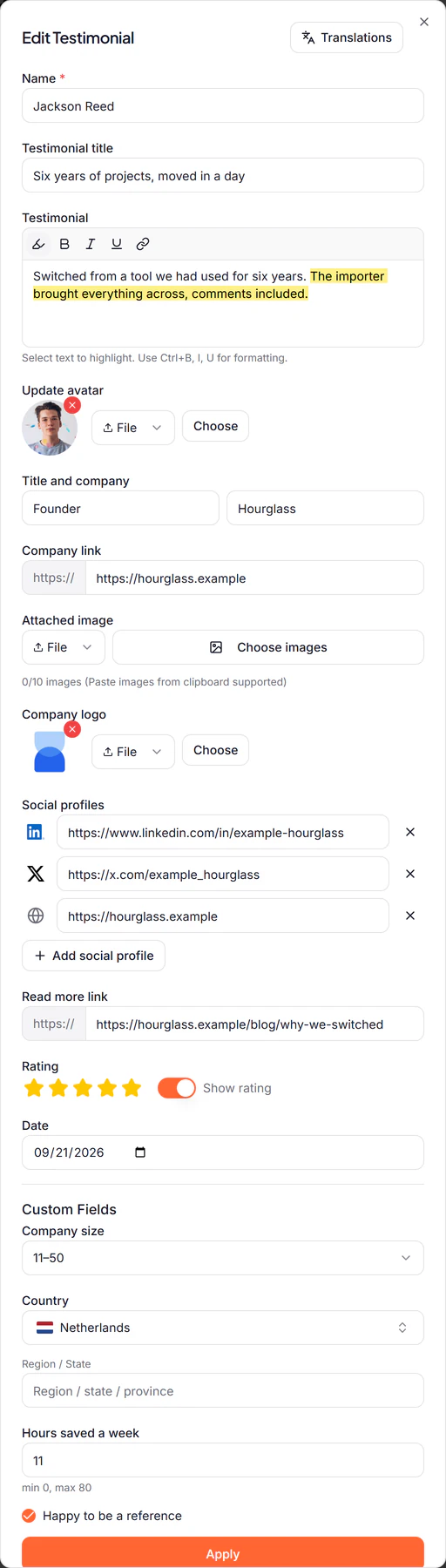
- Name
- Required. Fix a misspelling, or the capital letters an import got wrong.
- Testimonial title
- A short headline widgets can show above the words.
- Testimonial
- The words, with Highlight, Bold, Italic, Underline and Link.
- Update avatar
- Upload, paste or link a photo.
- Title and company
- Their role and where they work, as they'd write it.
- Company link
- The company's site.
- Attached image
- Up to 10: results, screenshots, the dashboard they're proud of.
- Company logo
- Kept whole, however wide the wordmark.
- Social profiles
- 20 kinds, from LinkedIn and X to G2 and Product Hunt, up to 10 on one testimonial.
- Read more link
- To the full review or a case study.
- Rating
- Put the stars right, or keep them and hide them with Show rating.
- Date
- The day it was said, so an import keeps its real date.
- Custom FieldsPro, Premium and Business
- Plan, seats, industry: any field your project has.
For a video, the same window adds Thumbnail: Start, 1s, Middle, 3/4, or Custom to upload your own image.
Every place that shows it follows.
Widgets, walls and pages read the same testimonial, so one edit is all it takes. No new embed code.
- WidgetsThe words, the details, the trim and your corrected captions.
- Wall of Love pagesThe same, on the hosted page and the embed.
- The share pageIts own page for the testimonial, with the video's captions.
- The video embedThe trimmed video, with your captions.
- Social videosStart from the trimmed clip and the corrected words.
- Testimonial imagesUse the edited words, name and photo.
Within a few minutes. Editing never changes a testimonial's status: a pending one still waits for your approval. On Premium and Business, your project's webhooks hear about every change.
Your best testimonial is one edit away.
Start free — no cardFix the words, not the meaning.
An editor this easy deserves a rule of thumb. Here is ours.
Fix what's broken
Spelling, a misheard product name, a job title that changed. Keep the customer's meaning and their tone.
Show where it came from
Reviews you import from Google, G2 and the others are yours to edit, and a later sync never overwrites your edits. Add a Read more link to the original.
Keep the original
A trimmed video keeps its full recording, and a corrected transcript can always be regenerated from it.
More from the same testimonial.
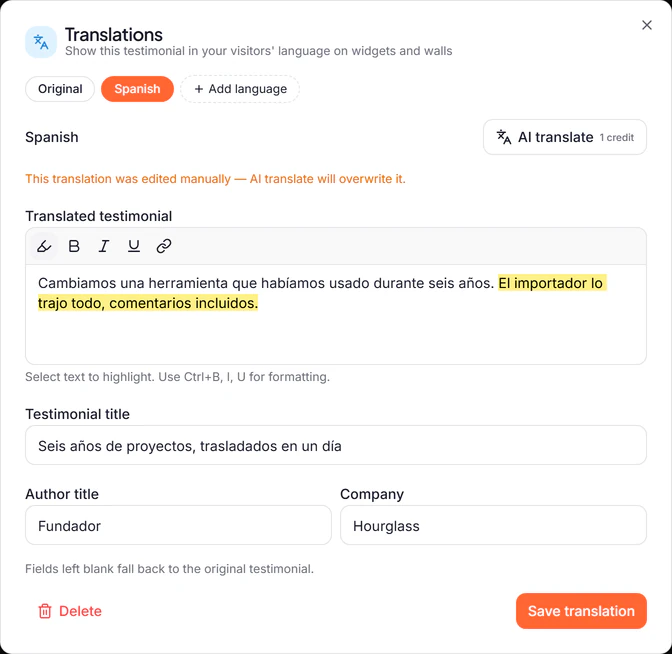
In your visitors' languageBusiness
Keep the testimonial in other languages, and widgets and walls show each visitor theirs. Write it yourself, or click AI translate for a draft (1 credit). The original is never overwritten.
TranslationsShort versionsPremium and Business
Proof Intelligence's Emphasize text writes a one-liner, a short quote, a social caption and a few highlights from a testimonial, beside it. It never changes the testimonial itself.
Proof IntelligenceVideos and images
Social videos start from your trimmed clip and corrected captions. Testimonial images use the edited words, name and photo.
Editing is on every plan.
The owner, Admins and Members edit; Viewers see testimonials without changing them. Teammates are on Premium and Business.
| Feature | Free$0 | Pro$29/mo | Premium$49/mo | Business$79/mo |
|---|---|---|---|---|
| Edit the text, author, photo, logo, links, rating and date | ||||
| Attach up to 10 images | ||||
| Trim a video and pick its thumbnail | ||||
| Transcripts you can correct, used as captions | – | |||
| Change custom field values | – | |||
| Proof Intelligence's short versions (Emphasize text) | – | – | ||
| Webhooks when a testimonial changes | – | – | ||
| Translations, written or AI-drafted | – | – | – | |
| Teammates who edit | – | – |
Monthly prices, per active project. Editing is on every plan, Free included, with 10 text and 2 video testimonials. See every plan
Questions
Up to 10 images and 10 profile links on one testimonial.
Does trimming change my original video?
No. A trim only sets where the video starts and stops playing; the recording itself is kept as it was uploaded. To play the whole video again, open Trim, click Use full video and save.
Where does a trimmed video play trimmed?
On your widgets and Wall of Love pages, on its share page and video embed. A social video starts from the trimmed part, and a testimonial image takes its poster from it. Your inbox keeps playing the whole video, so you can always see what was cut.
Can I fix the captions on a video testimonial?
Yes. Videos hosted with us get an English transcript on Pro, Premium and Business, and it becomes the captions. Click any word in the transcript to correct it; your corrections show on widgets, Wall of Love pages, the share page and the embed.
Which words get highlighted in the transcript?
Words the transcript may have misheard, such as very short words, unusual spellings and words with numbers in them. They're a starting point: you decide what to change.
Can I change a video's thumbnail?
Yes. Pick one of four frames (the start, one second in, the middle or three quarters through), or upload your own JPEG, PNG or WebP image.
Can I edit reviews imported from Google, G2 and other sites?
Yes, in the same window. A later sync from the review site only adds reviews you don't have yet, so it never overwrites your edits. Add a Read more link if you'd like readers to see the original.
When do my widgets show the change?
Within a few minutes, with the same embed code. Editing never changes a testimonial's status: a pending one still waits for your approval.
Can I change or hide the star rating?
Yes. Click a star to change it, or switch Show rating off to keep the stars but hide them on your widgets, walls and share page.
How many images and profile links can a testimonial have?
Up to 10 images and 10 profile links, from 20 kinds such as LinkedIn, X, G2 and Product Hunt.
Who on my team can edit testimonials?
The owner, Admins and Members. Viewers can see testimonials but not change them. Teammates are on Premium and Business.
Is there a history of edits?
No. Each Apply saves the testimonial as it is then. What you can always get back is the source: a trimmed video keeps its full recording, and a corrected transcript can be regenerated from the recording.
Make every testimonial read as well as it sounded.
Editing is on every plan, Free included, with 10 text and 2 video testimonials. No credit card.