Your Yelp reviews, on the page where people book.
Import what diners write about you on Yelp, with the photos they took. Approve the reviews you want to show, and put them beside your menu and your booking button. New reviews come in every month without anyone checking Yelp.
Automatic import is on Business. Saving Yelp reviews one at a time with the Chrome extension is free on every plan.
A Yelp widget on Halden Street Kitchen's reservations page
What diners say on Yelp
The words, the stars and the photos they took.
Each Yelp review comes in whole: the reviewer's name and profile photo, their stars, the date and up to three of the photos they posted with it. Your site shows the review. Your team also sees what Yelp says about the person who wrote it.
On your site
- The reviewer's name and photo, as Yelp shows them
- Their stars, their words and the date
- Up to three of their photos
- A link to the review on Yelp, when you switch on review links
In your dashboard
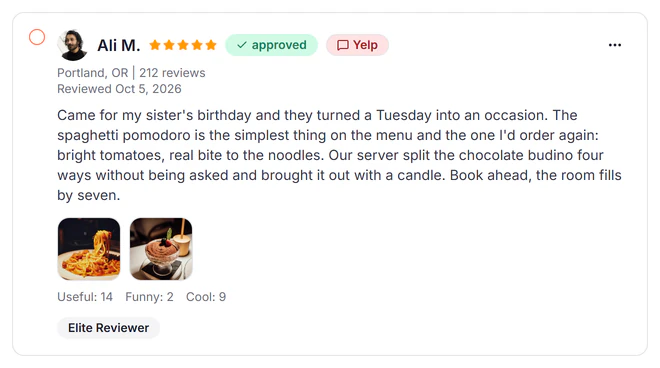

- The reviewer's city and how many reviews they've written
- Yelp's Elite badge
- How many people marked it Useful, Funny or Cool
- Photos are copied when a review is imported, so your widget doesn't depend on Yelp's image links.
- A review with no words is skipped: there's nothing to show.
- A review is never imported twice, even if you disconnect the business and connect it again.
Set it up once.
Paste your business page's address and choose how many reviews to bring in. No Yelp sign-in, no password and nothing to install. Business
Connect your business
Open your business page on Yelp, copy the address from the address bar and paste it in. Connect up to five businesses to a project, one for each location.
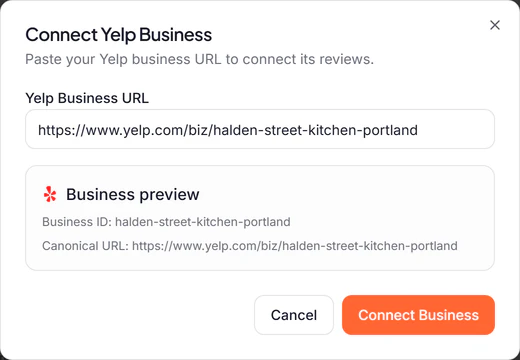
Connecting a business: its Yelp address, and the business ID read from it. Choose how many reviews
Bring in up to 100 reviews at a time, and 1,000 a month per project. Yelp imports run once a day, so allow until tomorrow for them to arrive.
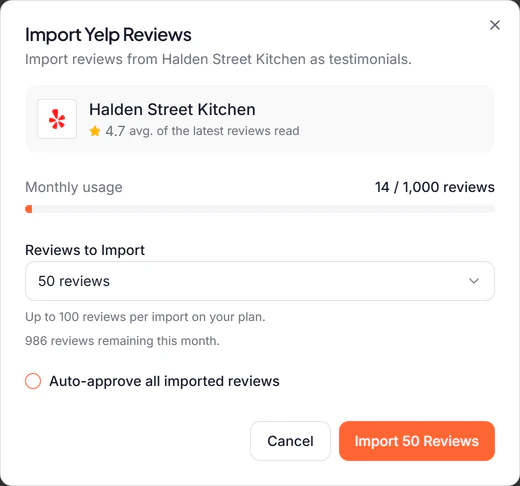
An import: how many reviews, the month's usage, and whether to approve them as they arrive. Approve the ones to show
Imported reviews wait in Pending until you approve them, one at a time or all together. Or tick Auto-approve when you import and skip this step.
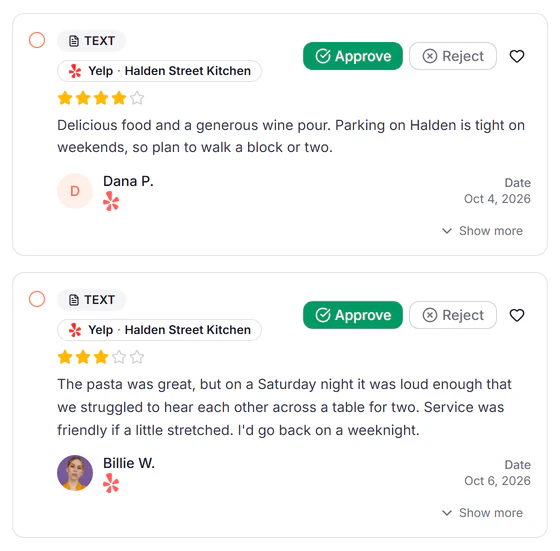
Yelp reviews waiting in Pending, each with Approve and Reject beside it. 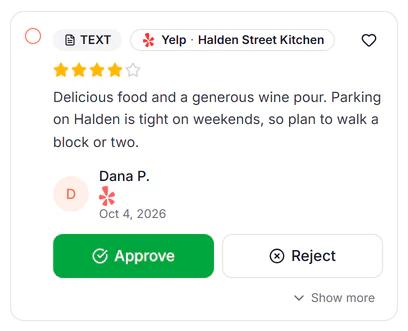
Yelp reviews waiting in Pending, each with Approve and Reject beside it.
Then pick a widget style and paste its code into Webflow, WordPress, Framer, Squarespace, Wix, Shopify or any HTML page. Try the styles
New reviews every month, without anyone checking Yelp.
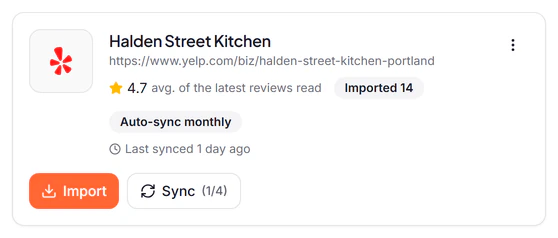
Switch on auto-sync and each connected business is checked every month for reviews written since the newest one you have. After a busy weekend, press Sync.
- Where they land
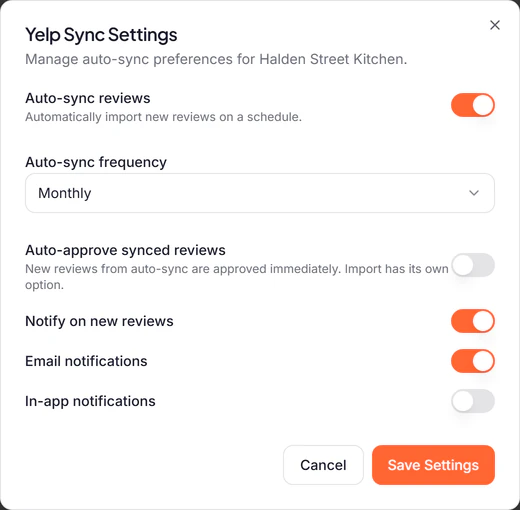
- In Pending, or straight in Approved if you switch on auto-approve for synced reviews.
- Who hears about it
- The workspace owner gets an email when new reviews arrive. In-app notifications are one switch away.
- Every rating comes in
- A sync brings up to 50 new reviews at every star rating. Approve them yourself, or set your widget to show 4 stars and up.
- Sync now
- Check for new reviews whenever you need, up to four times a month per project.
- Every location
- Connect up to five Yelp businesses to one project, each with its own sync settings.
- Your own tools
- A webhook can send each new review to an address you choose once it's imported, with the endpoint's review sync events turned on.
Not on Business? Save reviews one at a time.
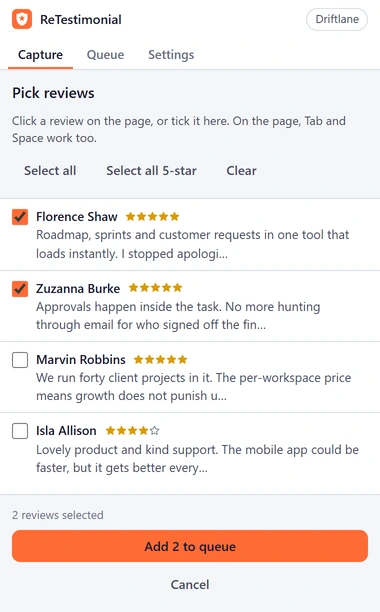
The ReTestimonial Chrome extension reads the reviews on the Yelp page you're looking at. Tick the ones you want and they go to your Pending inbox with the reviewer's name, rating, date and photos. It's free on every plan.
- Install ReTestimonial: Capture Testimonials from the Chrome Web Store.
- Open your business page on Yelp and open the extension's side panel.
- Tick the reviews you want, check them, and save them to a project.
No extension? Add a review by hand, or paste a screenshot of it and let ReTestimonial fill in the form.
Pick a look. It's the real widget.
Each style below is drawn by the same code that runs on your site, with Halden Street Kitchen's approved Yelp reviews and their photos. Choose from 64 styles and match your colours.
Split Panel
Free publishes 31 of the styles, the carousels, grids, badges and video layouts; all 64 come with Pro. These colours are free on every plan. Any other colour, and removing the ReTestimonial badge, come with Pro. See every widget style
Yelp is one place people read about you.
Your  Yelp reviews share one inbox with your
 Google reviews, answers to your own forms and video testimonials, and one widget can show them together. Google reviews come in on every plan, from Free. With Proof Match, a visitor who arrives from Yelp can see your Yelp reviews first. Premium and up
Google reviewsCollection formsProof MatchFor local businesses
Start on any plan. Import automatically on Business.
Every plan
Free to start
- Save Yelp reviews one at a time with the Chrome extension
- Add a review by hand, or from a screenshot of it
- Show them on a Wall of Love page and in 31 widget styles, all 64 from Pro
- Room for 10 testimonials on Free, and more on paid plans
Business
$79 a month per active project
- Five Yelp businesses per project, one for each location
- Up to 100 reviews per import, 1,000 a month per project
- Up to three of each review's photos, copied with it
- Auto-sync every month, plus Sync four times a month per project
- An email when new reviews arrive
Monthly prices. Limits are per project, and paid plans are priced per active project. Compare every plan
Questions
What do I need from Yelp?
Only the address of your business page, such as yelp.com/biz/your-business-city. There's no Yelp account to connect and nothing to install. Addresses from www.yelp.com and m.yelp.com work; Yelp's sites for other countries aren't accepted.
Which reviews come in?
Reviews with words, at every star rating, each with the reviewer's name and photo, the date and up to 3 of the review's photos. A review with no words is skipped, and a review is never imported twice into the same project, even if you disconnect and reconnect the business.
How soon do imported reviews appear?
Yelp imports join a queue that runs once a day, so allow until the next day. Until then the business's card says the import is queued.
Do reviews go on my site straight away?
No. They wait in Pending until you approve them, unless you tick Auto-approve when you import, or switch on auto-approve for synced reviews.
Can I keep low ratings off my site?
Every rating is imported, and you decide what's shown: approve the reviews yourself, or set a widget to show 4 stars and up. That works on every plan.
How do new reviews get in?
Switch on auto-sync and each connected business is checked every month, or press Sync up to four times a month per project. Each sync brings up to 50 reviews written since the newest one you've imported.
Does the widget show my Yelp rating?
A rating badge or review summary shows the average of the reviews in that widget, so the number always matches reviews your visitors can read.
What if a review changes or is removed on Yelp?
Your imported copy stays as it was: ReTestimonial doesn't follow later changes on Yelp. You can edit, archive or delete the copy yourself.
Is it on my plan?
The automatic import, with sync and auto-sync, is on Business. On every plan you can save Yelp reviews one at a time with the Chrome extension, photos included, or add one by hand or from a screenshot.
Can I import a business I don't own?
The import reads any business's public Yelp page, so an agency can bring in a client's reviews. Only publish reviews and photos you have the right to use.
Let the people who've eaten there do the talking.
Automatic import is on Business. Saving Yelp reviews one at a time with the Chrome extension is free on every plan.
Yelp and related marks are trademarks of Yelp Inc. ReTestimonial is not affiliated with or endorsed by Yelp.