Google reviews for Squarespace
Free Google reviews widget for Squarespace
Pick a style, find your business, then click Add to my website for free. You get one snippet to paste into a Squarespace Code block. No credit card.
These are an example business's reviews. Search yours to see your own.






How it works
Step 1
Pick a style
Carousels, grids, sliders, lists and badges. Then switch between light and dark and set your brand colour to suit your Squarespace site.
Step 2
Find your business
Type your business name and city. Your newest Google reviews fill the widget within seconds.
Step 3
Paste it into Squarespace
Click Add to my website for free and create a free account. Your reviews are imported for you, and you get one snippet for a Squarespace Code block.
Add the widget to Squarespace
It takes one Code block, on Squarespace 7.1 or 7.0.
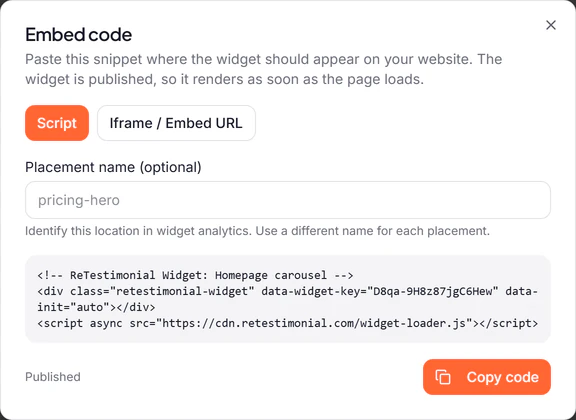
Copy your widget's code
When you sign up, your widget opens with its code ready. Click Publish and copy code. You can copy it again later from Get code in the widget builder.
Add a Code block
In Squarespace, open the page and click Edit. Hover over the section where the reviews belong, click Add Block and choose Code. On a 7.0 site, click + instead of Add Block.
Paste the code
Click the block, then its pencil icon. Check that Type is HTML and Display Source is off, then replace the placeholder with your code, all of it.
Save and check the page
Click Save. Squarespace sometimes hides a Code block's output while you're logged in, so if the block looks empty, choose Preview in Safe Mode or open the page in a private window.
Good to know on Squarespace
Check the phone layout
Resizing the block on the computer view doesn't change the phone layout. Click the Mobile View icon and check the block there too.
Change the design in ReTestimonial
Once the widget is published, changes you make in ReTestimonial reach your page with the same code. Switching to a floating style is the one exception: it gives you new code to paste.
Keep Script selected
If the code window offers Script and Iframe / Embed URL, keep Script, the default. Some styles only work with it.
Something not showing? Read the full Squarespace guide, with what to check when the widget stays empty.
Questions
- Which Squarespace plans can show the widget?
- The widget's code includes JavaScript, which Squarespace runs in Code blocks on its Core, Plus and Advanced plans, the older Business and Commerce plans, and free trials. On the Basic plan the code stays in the block but doesn't run.
- Is the Google reviews widget free?
- Yes. The free plan imports up to 25 Google reviews at a time from 1 location, and shows them with a small ReTestimonial badge. Paid plans import more and remove the badge.
- Do I have to connect my Google account?
- No. You search for your business by name and the widget shows its public reviews. There is nothing to authorise and no Google login.
- Will the widget clash with my Squarespace design?
- Your site's CSS rules can't reach inside the widget, and its styles never touch your page. You choose its layout, theme and colour in ReTestimonial to suit your site.
- Can I choose which reviews appear?
- Yes. After you sign up, every imported review sits in your inbox. You decide which ones the widget shows and in what order.
- Do new reviews show up on their own?
- On the free plan you bring in new reviews with one click. From Pro, reviews sync automatically every month for up to 3 locations.
Prefer another look? Browse every widget style.
After you sign up: How Google review import and sync work.
Not on Squarespace? The same widget works on any website: Google reviews widget.
Webflow, WordPress, Framer, Squarespace, Wix, and Shopify are trademarks of their owners. ReTestimonial is not affiliated with or endorsed by them.