Launch day ended. Your Product Hunt reviews can keep selling.
Connect your product's Product Hunt page and import its written reviews onto your own site. They wait in Pending until you approve them. Reviews without stars stay without stars, and the criticism stays in your dashboard.
The automatic import is on Business. Adding a Product Hunt review by hand or from a screenshot is free on every plan.
A Product Hunt widget on Ferrylog's home page
What product teams say on Product Hunt
The praise goes on your site. The rest stays with your team.
A Product Hunt review has several parts. Your site shows what the reviewer wrote under “What's great”, with their name, photo, stars and the date. Your team also sees what they'd improve and what they compared you with.
On your site
- The reviewer's name and photo
- Their stars, or none if they gave none
- What they wrote under “What's great”, and the date
- A link to the review on Product Hunt, when you switch on review links
In your dashboard
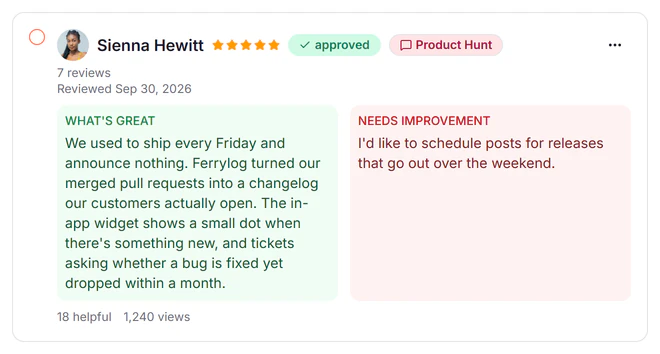
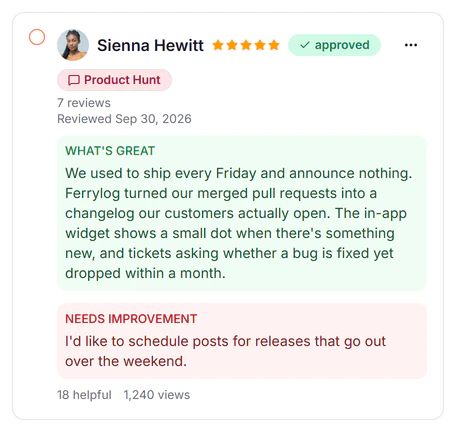
- “Needs improvement” and “vs Alternatives”
- How many people found it helpful, and how many viewed it
- How many reviews the reviewer has written
Every review passes one check on the way in.
A review needs at least 40 characters of praise to be imported. A rating with nothing written, or a review that is only criticism, stays on Product Hunt. Here is the check run on some of Ferrylog's reviews.
 Sienna HewittWe used to ship every Friday and announce nothing. Ferrylog turned our merged pull requests into a changelog our customers actually open. The in-app widget shows a small dot when there's something new, and tickets asking whether a bug is fixed yet dropped within a month.Imported
 Kyla ClayNo starsI don't do stars, but I'll say this: the email digest is the first product email our users reply to. People write back to thank us for fixes they asked for.Imported, without stars
 Zara Bush
 Harriet RojasNothing writtenSkipped: only a rating
 Jaya WillisNeeds improvement: Too expensive for a side project, and the free plan leaves out the email digest.Skipped: only criticism
 Noah PierreLove it, great launch!Skipped: under 40 characters
- Keyword tags a reviewer picked at the start of their review are taken off, so the quote starts with their own words.
- Photos are copied when a review is imported, so your widget doesn't depend on Product Hunt's image links.
- A review is never imported twice into a project, even if you disconnect the product and connect it again.
Set it up once.
Paste your product's Product Hunt address and choose how many reviews to bring in. No Product Hunt sign-in and nothing to install. Business
Connect your product
Paste your product's address on Product Hunt, or a link to one of your launches, and give it a name. Connect up to five products to a project.
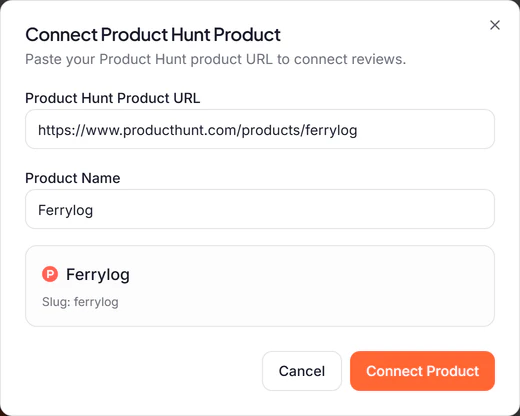
Connecting a product: its Product Hunt address and the name to show it under. Choose how many, and which first
Bring in up to 100 reviews at a time, and 1,000 a month per project, sorted by Most Helpful, Most Recent, Highest Rating or Lowest Rating (the dialog starts on Most Recent). An import runs as soon as you start it and can take a few minutes for a busy product.
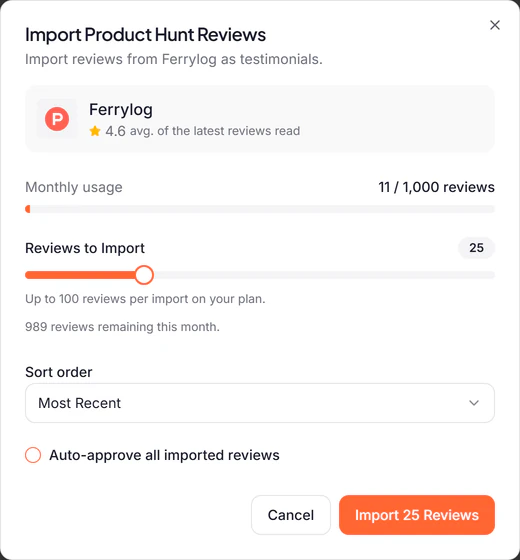
An import: how many reviews, the order to take them in, the month's usage, and whether to approve them all at once. Approve the ones to show
Imported reviews wait in Pending until you approve them, one at a time or all together. Or tick Auto-approve when you import and skip this step.
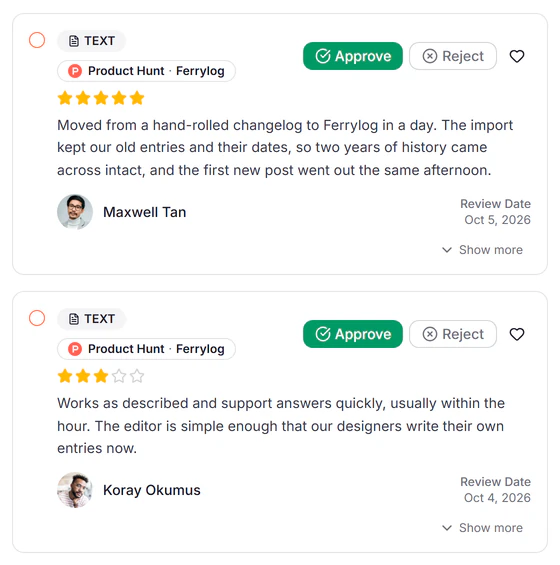
Product Hunt reviews waiting in Pending, each with Approve and Reject beside it. 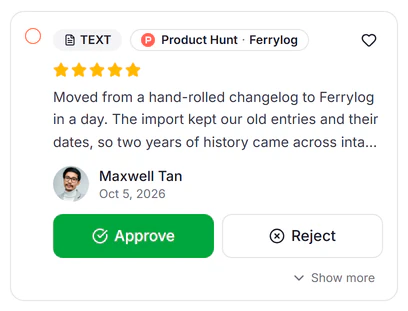
Product Hunt reviews waiting in Pending, each with Approve and Reject beside it.
Then pick a widget style and paste its code into Webflow, WordPress, Framer, Squarespace, Wix, Shopify or any HTML page. Try the styles
New reviews every month, once you switch it on.
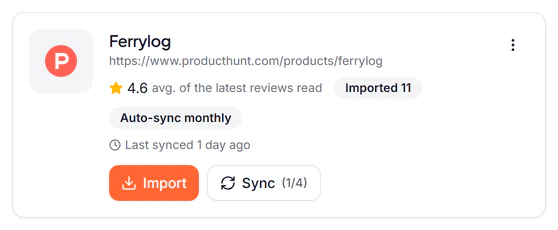
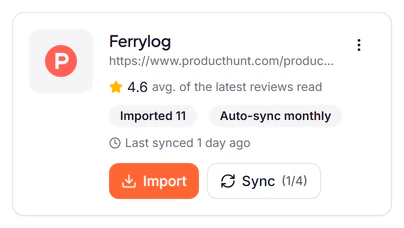
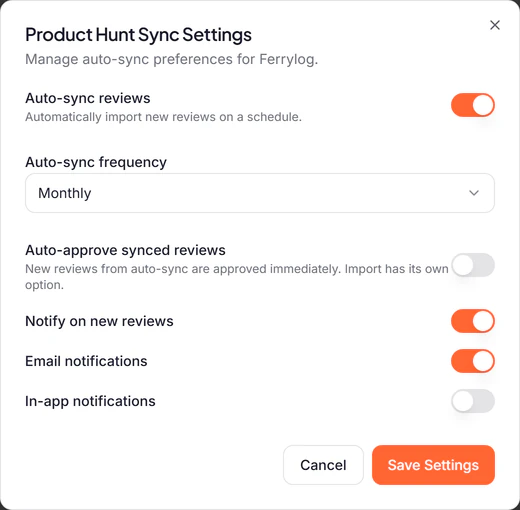
Switch on auto-sync and each connected product is checked every month for reviews newer than the ones you have. After a launch or a big release, press Sync.
- Where they land
- In Pending, or straight in Approved if you switch on auto-approve for synced reviews.
- Who hears about it
- The workspace owner gets an email when new reviews arrive. In-app notifications are one switch away.
- Sync now
- Check for the 50 newest reviews whenever you need, up to four times a month per project. A sync that fails doesn't count.
- A long history
- Import again to reach further back. An import can reach a product's newest 1,000 reviews.
- Every product
- Connect up to five products to one project, each with its own sync settings.
- Your own tools
- A webhook can send each new review to an address you choose once it's imported, with the endpoint's review sync events turned on.
Ask for the next review.
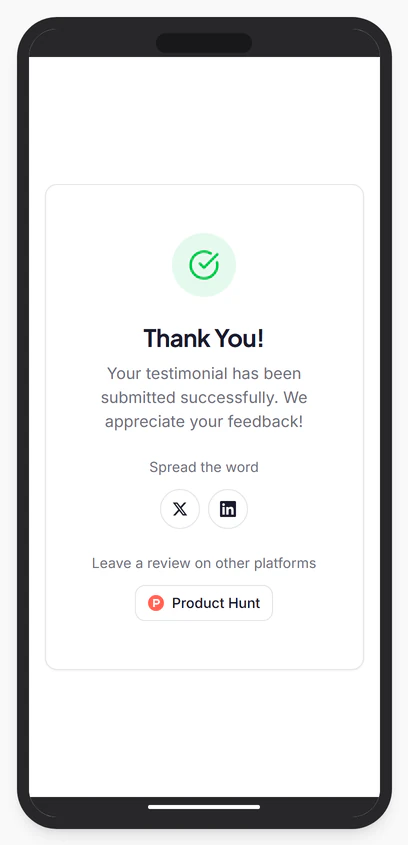
Product Hunt invites makers to ask their users for reviews. Ask while a customer is happy: when someone sends you a testimonial, your form's Thank You page can show a Product Hunt button that opens your product's page there. Pro and up
Everyone who finishes the form sees the same button, whatever they rated. Add your Google or G2 page beside it if you like.
Not on Business? Add reviews one at a time.
Add a Product Hunt review by hand, or paste a screenshot of it and let ReTestimonial fill in the reviewer, the stars and the words for you to check. Both are free on every plan.
Pick a look. It's the real widget.
Each style below is drawn by the same code that runs on your site, with Ferrylog's approved Product Hunt reviews. Choose from 64 styles and match your colours.
Masonry Grid
Free publishes 31 of the styles, the carousels, grids, badges and video layouts; all 64 come with Pro. These colours are free on every plan. Any other colour, and removing the ReTestimonial badge, come with Pro. See every widget style
Product Hunt is one place buyers read about you.
Your Product Hunt reviews share one inbox with your G2 and Capterra reviews, answers to your own forms and video testimonials, and one widget can show them together. G2 reviews come in on every plan, from Free. With Proof Match, a visitor who arrives from Product Hunt can see your Product Hunt reviews first. Premium and up
Start on any plan. Import automatically on Business.
Every plan
Free to start
- Add a Product Hunt review by hand, or from a screenshot of it
- Show reviews on a Wall of Love page and in 31 widget styles, all 64 from Pro
- Room for 10 testimonials on Free, and more on paid plans
Pro
$29 a month per active project
- A Product Hunt button on your form's Thank You page, so happy customers can review you there too
- All 64 widget styles
- Everything on every plan
Business
$79 a month per active project
- Five Product Hunt products per project
- Up to 100 reviews per import, 1,000 a month per project
- Auto-sync every month, plus Sync four times a month per project
- An email when new reviews arrive
Monthly prices. Limits are per project, and paid plans are priced per active project. Compare every plan
Questions
What do I need from Product Hunt?
Only your product's address on Product Hunt, such as producthunt.com/products/your-product, or just the your-product part of it. A link to one of your launches works too: ReTestimonial looks up its product when you connect. There's no Product Hunt account to connect and nothing to install.
Which reviews come in?
Reviews with at least 40 characters of written praise, each with the reviewer's name and photo, their stars if they gave any, and the date. A review with only a rating, or only criticism, is skipped, and a review is never imported twice into the same project, even if you disconnect and reconnect the product.
What happens to reviews without stars?
Product Hunt lets a reviewer leave no stars, and those reviews stay that way: their card shows no stars, and they don't count toward a widget's average. ReTestimonial never fills in a rating.
Is the criticism published?
No. What a reviewer wrote under “Needs improvement” and “vs Alternatives” is kept on the review in your dashboard, for your team. Widgets and walls show only the praise.
Do reviews go on my site straight away?
No. They wait in Pending until you approve them, unless you tick Auto-approve when you import, or switch on auto-approve for synced reviews.
How long does an import take?
It runs as soon as you start it and can take a few minutes for a large product. The reviews then wait in Pending for you.
How do new reviews get in?
Switch on auto-sync and each connected product is checked every month, or press Sync up to four times a month per project. Each sync brings in up to 50 of the newest reviews, and a sync that fails doesn't count.
Why is a review's date approximate?
Product Hunt shows a review's age, such as “3mo ago”, rather than a date. ReTestimonial turns that into a day, so an older review's date can be a few days out.
Will imported reviews show stars in Google search?
No. Google asks sites not to mark up reviews taken from other websites, so ReTestimonial leaves imported reviews out of review markup. Testimonials you collect yourself can carry it, from Business.
Whose reviews should I import?
Your own product's. The reviews are your customers' words about what you built: show them on your own site, credited to Product Hunt.
Is it on my plan?
The automatic import, with sync and auto-sync, is on Business. The Thank You page's button that sends customers to your Product Hunt page comes with Pro. On every plan you can add a Product Hunt review by hand or from a screenshot.
Is ReTestimonial affiliated with Product Hunt?
No. ReTestimonial is an independent product, not affiliated with or endorsed by Product Hunt.
Your launch got the reviews. Let them keep working.
The automatic import is on Business. Adding a Product Hunt review by hand or from a screenshot is free on every plan.
Product Hunt is a trademark of its owner. ReTestimonial is not affiliated with or endorsed by Product Hunt.