Ask like a person,not like a form
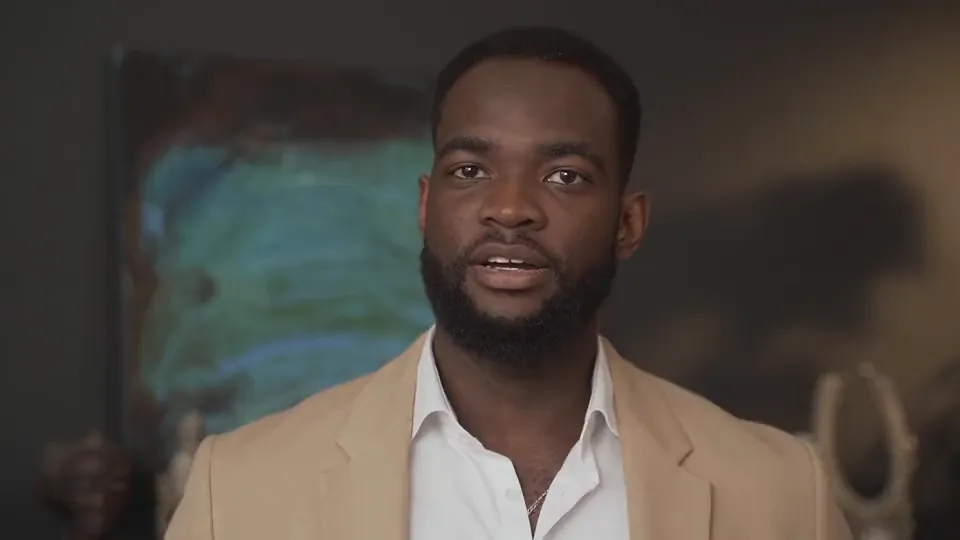
Put a short hello from you at the top of your testimonial form. Before the first question, customers see who is asking and who will read their answer. Then close the form with a thank you in your own voice.
- Start with a free account
- Welcome videos from Pro, $29/mo
- 14 day refund on your first payment

Driftlane
A quick hello from the Driftlane team
Before the questions, meet who reads your answers. Three short ones, in your own words.

This will take about 2 minutes
What others are saying
 Zaynab DonnellyBrand designer
It looks like we designed it in-house. Highest compliment I can give a tool.
 Nicolas WangEngineer at Layers
Fast, keyboard-first, no clutter. Approved by the whole team in a day.
 Dillan NguyenProduct Manager at Sisyphus
The dependency view caught a slip three weeks early. Paid for the year.
The public form's own Welcome page, in Driftlane's colours. Press play.
Pages Welcome
Simulated. Your file plays in this tab only: it is never uploaded or saved.
Every customer asks four things before your first question
Already on the Conversational template? Its Welcome page says “Leave us a testimonial” with the estimated time on. Drop your video under the message, then switch on Social Proof in the form's Settings.
Driftlane
A quick hello from the Driftlane team
Before the questions, meet who reads your answers. Three short ones, in your own words.
This will take about 2 minutes
What others are saying
- Zaynab DonnellyBrand designer
It looks like we designed it in-house. Highest compliment I can give a tool.
- Nicolas WangEngineer at Layers
Fast, keyboard-first, no clutter. Approved by the whole team in a day.
- Dillan NguyenProduct Manager at Sisyphus
The dependency view caught a slip three weeks early. Paid for the year.
The live Welcome page. Pick a question to see what answers it.
Already on the Conversational template? Its Welcome page says “Leave us a testimonial” with the estimated time on. Drop your video under the message, then switch on Social Proof in the form's Settings.
From your phone to every form, in three steps
- 01
Record a short hello
On your phone, held sideways at eye level. Twenty to forty seconds: who you are, why you're asking, how long it takes.
- 02
Drop it on your Welcome page
MP4, WebM, MOV, up to 100 MB and 5 minutes. It uploads in 5 MB pieces while you keep editing, and is ready in the editor once processed.
- 03
Every customer meets you first
The video is part of the form, so it goes wherever the form goes: the link, your site, a popup, a printed QR code.
Wherever the form goes, your hello goes
- Hosted linkOn your own domain from Pro
- Inline embedInside any page of your site
- ModalOpened by a button on your site
- PopupA tab at the edge of the page
- QR codeOn a printed card or a receipt
- Smart InvitesThe link in every invite email, from Premium
A form is a request from a company. Thirty seconds of you turns it into a request from a person.
Not sure what to say? Read this.
What you type stays on this page.
Six things that make a take feel like you
- 01Hold the phone sidewaysThe form plays your video at 16:9, so a landscape take fills the frame. Prop it at eye level.
- 02Face a windowDaylight from the front is kinder than any ceiling light, and costs nothing.
- 03Twenty to forty secondsThe limit is 5 minutes; the welcome is a hello, not a pitch. Cut anything that isn't who, why or how long.
- 04Lead with your nameThen say why you're asking. Save the thank you for the end, once you've earned it.
- 05Finish on the askSay how long it takes, and switch on Show Estimated Time so the page says it too.
- 06Record again next seasonReplace Video swaps it, and the old video stays until the new one is ready.
Thank you, truly
Your answer is with the Driftlane team
We read every one, and the next team deciding on Driftlane will too.
Spread the word
The form's own Thank You screen. Here its buttons open nothing.
Ask with your face. Say thank you with it too.
The Thank You page has its own Thank You Video (optional): the same uploader, the same limits, the same plans. It's there the moment their answer is sent, and plays when they press play.
- Plays under your thank you message, above the share buttons and links
- Share buttons for X (Twitter), LinkedIn, Facebook, WhatsApp, SMS
- A button to your Wall of Love, or a redirect to any page after a few seconds
- Review links for Google, G2, Capterra, Trustpilot, Facebook, Product Hunt, shown to every customer From Pro
- A reward: a coupon code, a link or a spin of a prize wheel From Pro
The details, before you hit record
- Formats
- MP4 · WebM · MOVDrop a file on the box, or click it to choose one
- Largest file
- 100 MBChecked before anything is sent
- Longest video
- 5 minutesChecked once it is processed; a longer one is refused
- Upload
- 5 MB at a timeWith progress, and Cancel upload while it runs
- Replacing it
- The old one waitsIt is removed only once the new video is ready
- Playback
- Press to playNever autoplays; quality follows their connection
- Controls
- Seek, mute, fullscreenAnd a duration badge before they press play
- Captions
- NoneWelcome and thank you videos get no transcript
- Your limits
- Not countedThey are part of the form, not testimonials
- After a downgrade
- Kept, not shownBack on your form when you return to Pro or above
Your hello can be on your form tonight.
Record it on your phone, drop it on the Welcome page, and every link you send greets people with you.
The rest of the Welcome page is free
| Feature | Free$0 | Pro$29/mo | Premium$49/mo | Business$79/mo |
|---|---|---|---|---|
| Welcome video | Not included | Included | Included | Included |
| Thank you video | Not included | Included | Included | Included |
| Welcome message, image and estimated time | Included | Included | Included | Included |
| “What others are saying” on the Welcome page | Included | Included | Included | Included |
| Review links on the Thank You page | Not included | Included | Included | Included |
| Your own domain for the form | Not included | Included | Included | Included |
Questions before you record
Which plans include welcome videos?
Pro, Premium and Business, from $29/mo on Pro. Every plan, Free included, has the rest of the Welcome page: the message, an image, the estimated time and the “What others are saying” list.
Can I add a thank you video at the end too?
Yes. The Thank You page has its own Thank You Video (optional), with the same uploader, the same limits and the same plans. It plays under your thank you message, above the share buttons.
Do I record it inside ReTestimonial?
No, you upload a file. Record on your phone or laptop with whatever you already use, then drop the file on the Welcome page. That way you can take it again until you like it.
What are the file limits?
MP4, WebM, MOV, up to 100 MB and 5 minutes. The length is checked once the video is processed, and a longer one is refused with a note to choose a shorter video.
Does it count against my testimonial limits?
No. Welcome and thank you videos are part of your form, not testimonials, so they never count toward your testimonials or your video testimonial allowance.
Does it play by itself?
Never. Customers see a still frame with a play button and the video's length, and it starts when they press play. Nobody is surprised by sound.
Are welcome videos captioned?
No. Welcome and thank you videos get no transcript, so keep the message on the page too: your title and welcome message say the same thing in writing.
What happens when I replace it?
Press Replace Video and choose a new file. The old video keeps playing on your form until the new one is ready, then it is removed. A cancelled or interrupted upload is cleaned up for you.
What if I move to the Free plan later?
Your form stops showing the video, but it stays saved on the page in the builder. Move back to Pro or above and it is on your form again.
Where does the video show up?
Wherever the form does: the hosted link, an inline embed, the modal, the popup, the QR code, and your own domain from Pro.
Ask like a person,not like a form
Record thirty seconds on your phone today. From then on, everyone who opens your form meets you before they answer.
Add your welcome video- Start with a free account
- Welcome videos from Pro, $29/mo
- 14 day refund on your first payment